
tweaK project is a config tool for editing KDE's various secret and hidden config options.. #Config tool #Options configuration #KDE options #TweaK #KDE #Secret
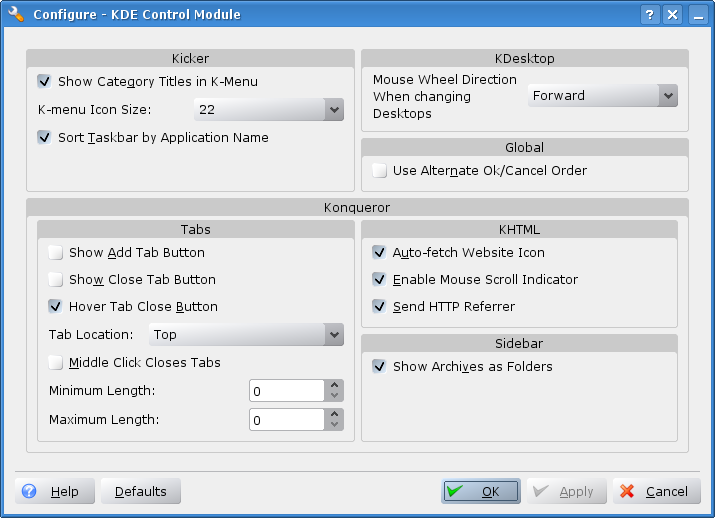
tweaK project is a config tool for editing KDE's various secret and hidden config options.
The simplest way to compile this package is:
1. `cd' to the directory containing the package's source code and type `./configure' to configure the package for your system. If you're using `csh' on an old version of System V, you might need to type `sh ./configure' instead to prevent `csh' from trying to execute `configure' itself.
Running `configure' takes a while. While running, it prints some messages telling which features it is checking for.
2. Type `make' to compile the package.
3. Type `make install' to install the programs and any data files and documentation.
4. You can remove the program binaries and object files from the source code directory by typing `make clean'.
What's New in This Release:
� Add option to disable kicker on KDE startup � Added Missing Icon sizes � Added option to disable Access Keys � Added option to disable shutdown/reboot in logout dialog � Reorganized the UI � Fixed bug where Disabling Archive expanding in the sidebar wasn't working
tweaK 0.2
add to watchlist add to download basket send us an update REPORT- runs on:
- Linux
- main category:
- Utilities
- developer:
- visit homepage
7-Zip 23.01 / 24.04 Beta

Zoom Client 6.0.3.37634

Bitdefender Antivirus Free 27.0.35.146

Windows Sandbox Launcher 1.0.0

4k Video Downloader 1.5.3.0080 Plus / 4.30.0.5655

ShareX 16.0.1

Microsoft Teams 24060.3102.2733.5911 Home / 1.7.00.7956 Work

calibre 7.9.0

Context Menu Manager 3.3.3.1

IrfanView 4.67

- calibre
- Context Menu Manager
- IrfanView
- 7-Zip
- Zoom Client
- Bitdefender Antivirus Free
- Windows Sandbox Launcher
- 4k Video Downloader
- ShareX
- Microsoft Teams