
lrceditor-amarok is a lrc editor against amarok, depends on pyqt3.It's version now is 0.2.0, but is the first release.. #Lrc editor #Amarok script #Amarok lcr editor #Lrceditor-amarok #Lcr #Editor
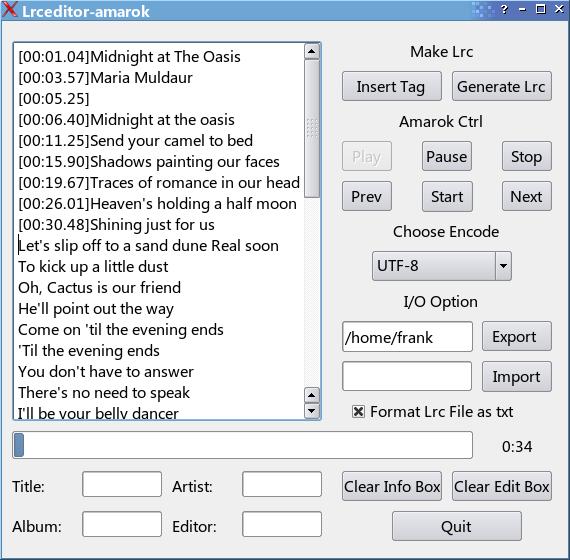
lrceditor-amarok is a lrc editor against Amarok, depends on pyqt3. It's version now is 0.2.0, but is the first release.
It is not amarok script, but need amarok provide the time tag of current song.
decompress the tallbar, just type "./lrceditor-amarok.py" in konsole or others. Important: it's not Amarok's script
1.you should open your Amarok first, whatever is play or stop status. 2.navigate to the track you want to edit the lrc of by Amarok or Lrceditor-amarok. 3.you can import .txt file to edit or .lrc file to modify, or just copy/paste the lyrics into textbox. 4.now press "start" button, the job is beginning, you can see something different: progressbar is moving,label of current time is changing. 5.press "insert tag" button or "F5" to insert the time-tag from Amarok to every line of lyrics. 6.when the track is over, progressbar never running, you now could fill the necessary information under the textbox, then generate and export the lrc file you just now made.Maybe you should choose export director and encoder first. 7.whatever you want.
F5: insert time-tag Alt-Q: quit Pause Key: pause (Amarok) P: play (Amarok) S: stop(Amarok) Alt-O: import .txt or .lrc file Alt-D: choose export director
System requirements
- PyQt
- PyKDE
What's new in lrceditor-amarok 0.3.1:
- fix a Amarok button status bug when Amarok stops by himself, Lrceditor-Amarok's interface would change button status, Amarok could not change him status without your action except stop. Note: you'd better use Lrceditor-Amarok's interface to control Amarok;
- add fast seek buttons, 5 seconds to seek backward or seek forward when you click them;
- fix a spell mistake;
- re-write the part of control button status;
lrceditor-amarok 0.3.1
add to watchlist add to download basket send us an update REPORT- runs on:
- Linux
- main category:
- Utilities
- developer:
- visit homepage
7-Zip 23.01 / 24.04 Beta

ShareX 16.0.1

Microsoft Teams 24060.2623.2790.8046 Home / 1.7.00.7956 Work

4k Video Downloader 1.5.3.0080 Plus / 4.30.0.5655

Bitdefender Antivirus Free 27.0.35.146

paint.net 5.0.13 (5.13.8830.42291)

Windows Sandbox Launcher 1.0.0

IrfanView 4.67

Zoom Client 6.0.0.37205

calibre 7.8.0

- IrfanView
- Zoom Client
- calibre
- 7-Zip
- ShareX
- Microsoft Teams
- 4k Video Downloader
- Bitdefender Antivirus Free
- paint.net
- Windows Sandbox Launcher