
An Open Source grep-like especially designed for programmers with large trees of heterogeneous source code. #Large tree #Grep tool #Source code #Programming #Grep #Tree
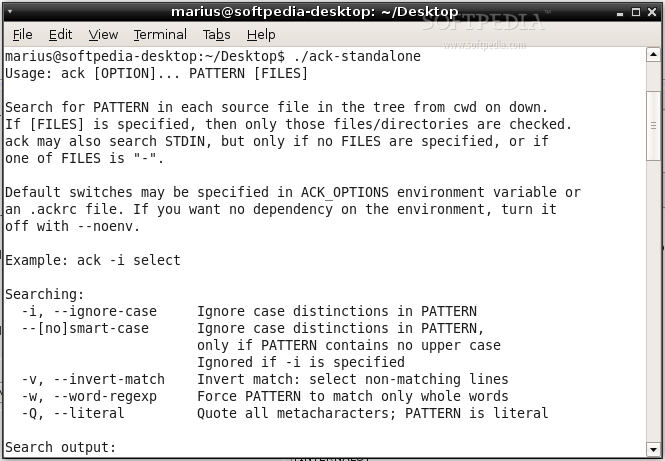
ack is an open source and freely distributed command-line software implemented in pure Perl and designed from the offset to act as a grep-like tool that takes advantage of the power of Perl's regular expressions. It’s also known as a grep-like tool optimized for programmers and developers.
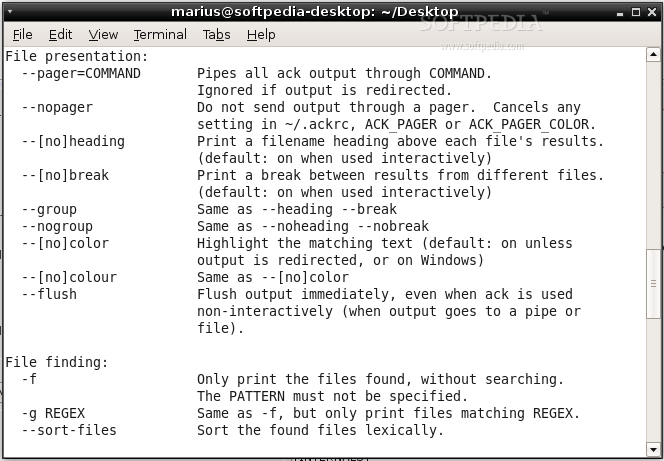
The software is blazing fast, as it only searches the stuff it makes sense to search; provides better search, as it searches entire trees by default while ignoring Git, Subversion and other VCS directories; it’s designed for code search, making it the programmer’s source code searching tool.
ack is also highly portable, to Perl 5, and it’s especially designed for developers with large heterogeneous trees of source code. It runs well on GNU/Linux, Microsoft Windows or Mac OS X operating systems, supporting both 32 and 64-bit instruction set architectures.
The program does not require installation and can be used directly from the source directory after making it executable, which will require you to open a terminal emulator app, move to the location of the extracted archive files (e.g. cd /home/softpedia/ack-2.14) and run the ‘chmod +x ack’ command.
Besides Perl, the software requires various Perl modules to work. Among these, we can mention File::Next and App::Ack. After installing these modules and making the binary file executable using the above instructions, it is time to view its command-line options by running the ‘./ack --help’ command.
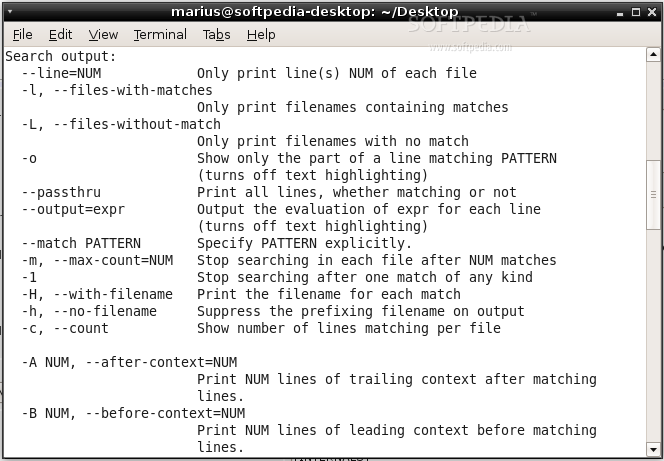
ack features a wide range of command-line options, among which we can mention the ability to ignore case distinctions in PATTERN, invert match, selecting non-matching lines, force PATTERN to match only whole words, quote all metacharacters, specify PATTERN explicitly, as well as to stop searching in each file after a given number of matches or after one match of any kind.
What's new in ack 2.14:
- FIXES:
- The -s flag would fail to suppress certain warnings. Thanks, Kassio Borges. (GitHub ticket #439)
- The -w flag would fail to work properly with regex features such as alternation. Thanks to Ed Avis for the report (GitHub ticket #443)
- The -g flag should now work faster on larger codebases. Thanks to Manuel Meurer for the report (GitHub ticket #458)
ack 2.14
add to watchlist add to download basket send us an update REPORT- runs on:
- Linux
- filename:
- ack-2.14.tar.gz
- main category:
- Utilities
- developer:
- visit homepage
IrfanView 4.67

4k Video Downloader 1.5.3.0080 Plus / 4.30.0.5655

Windows Sandbox Launcher 1.0.0

Zoom Client 6.0.3.37634

Bitdefender Antivirus Free 27.0.35.146

calibre 7.9.0

ShareX 16.0.1

Context Menu Manager 3.3.3.1

Microsoft Teams 24060.3102.2733.5911 Home / 1.7.00.7956 Work

7-Zip 23.01 / 24.04 Beta

- Context Menu Manager
- Microsoft Teams
- 7-Zip
- IrfanView
- 4k Video Downloader
- Windows Sandbox Launcher
- Zoom Client
- Bitdefender Antivirus Free
- calibre
- ShareX
