
DVD2DiVX3Pass is yet another DVD 2 DiVX rip program for Linux.. #DVD to DiVX rip #Flexible encoder #DiVX encoding #DVD2DiVX3Pass #Dvd #Divx
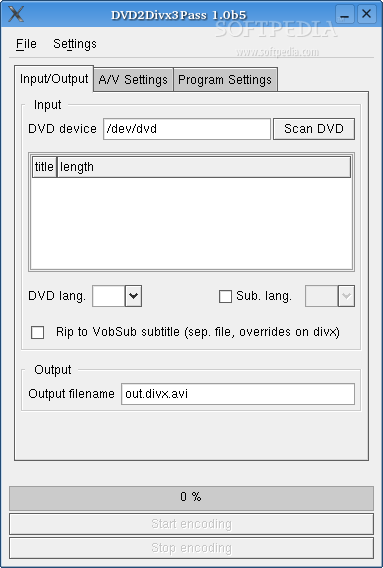
DVD2DiVX3Pass is yet another DVD 2 DiVX rip program for Linux. DVD2DiVX3Pass project aims to be a simple, yet flexible encoder with support for 3-pass DiVX encoding.
- save and load projects - save and load your favorite settings - choose between mplayer and transcode for scanning your DVD - rip subtitles to a separate file (vobsub format) - rip subtitles encoded on the DiVX - encode AC3 sound
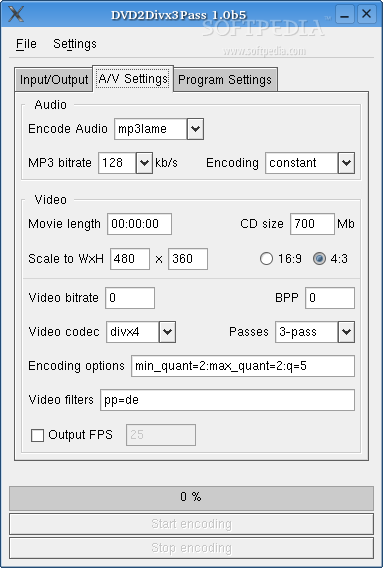
- an automatic video bitrate calculator - a bits per pixel calculator - command line options for automatic scanning and title selection
Requirements:
� perl � gtk-perl � mencoder compiled with lame and DVD support.
Optionally, you can use transcode for the scanning of the DVD.
- I could not help but notice that mplayer doesn't report the right DVD title lengths, so you could see a "neg. time" in your timer sometimes while encoding. That's not all, your videobitrate is completely wrong !
You can solve this by looking up the length of the movie (e.g. on the DVD cover or a search on google) and using that time in the "A/V Settings"-tab.
I strongly suggest you install tcprobe from the package transcode, so you will not have to fuss about with that.
- Subtitles can bz ripped in a separate file (vobsub format only)
- For surround sound use Encode Audio "copy" in the "A/V Settings"-tab
- Do you have a DVD (vob)copied to hard disk? Use it's full path instead of the DVD device
- Your settings are located in $HOME/.dvd2divx3pass, and are loaded at startup
What's New in This Release:
� changed mencoder option -dvd to dvd://
DVD2DiVX3Pass 1.0b5
 Softpedia Editor's Pick
add to watchlist
add to download basket
send us an update
REPORT
Softpedia Editor's Pick
add to watchlist
add to download basket
send us an update
REPORT
- runs on:
- Linux
- filename:
- dvd2divx3pass-1.0b5.tar.gz

- main category:
- Utilities
- developer:
- visit homepage
Context Menu Manager 3.3.3.1

IrfanView 4.67

Bitdefender Antivirus Free 27.0.35.146

calibre 7.9.0

7-Zip 23.01 / 24.04 Beta

Zoom Client 6.0.3.37634

Windows Sandbox Launcher 1.0.0

4k Video Downloader 1.5.3.0080 Plus / 4.30.0.5655

ShareX 16.0.1

Microsoft Teams 24060.3102.2733.5911 Home / 1.7.00.7956 Work

- 4k Video Downloader
- ShareX
- Microsoft Teams
- Context Menu Manager
- IrfanView
- Bitdefender Antivirus Free
- calibre
- 7-Zip
- Zoom Client
- Windows Sandbox Launcher