
Text-based tool for synchronizing subtitles in SubRip (.srt) format.. #Synchronize subtitles #SubRip synchronizer #Srt synchronizer #SubRip #Srt #Subtitle
SrtResync is a command-line tool for synchronizing subtitles in SubRip (.srt) format. With this tool you can shift the subtitles by adding/substracting a given amount of time to get the subtitles synchronized with the voices.
This script requires the installation of the object-oriented scripting language Ruby. On Debian-based distribution this is done by just typing : sudo apt-get install ruby
or being 'root' user :
apt-get install ruby
For other distribution, use your package manager to install Ruby.
Change to the directory where you installed the script and type :
./srt-resync --help
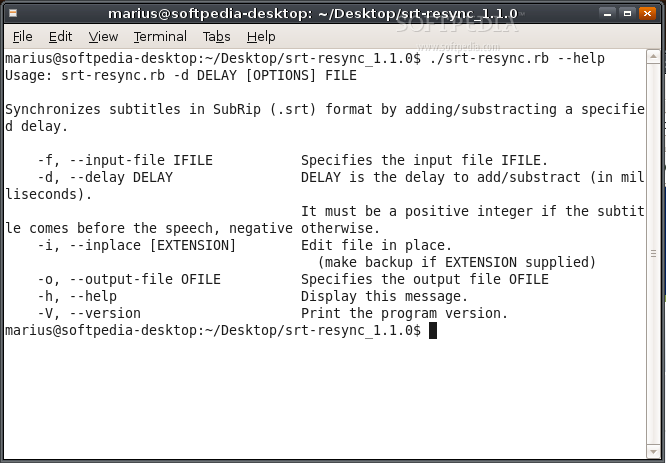
to display the following usage message :
Usage: srt-resync.rb -d DELAY [OPTIONS] FILE
Synchronizes subtitles in SubRip (.srt) format by adding/substracting a specified delay.
-f, --input-file IFILE Specifies the input file IFILE. -d, --delay DELAY DELAY is the delay to add/substract (in milliseconds). It must be a positive integer if the subtitle comes before the speech, negative otherwise. -i, --inplace [EXTENSION] Edit file in place. (make backup if EXTENSION supplied) -o, --output-file OFILE Specifies the output file OFILE -h, --help Display this message. -V, --version Print the program version.
System requirements
What's new in SrtResync 1.1.0:
- Handling of the options in a more GNU tools style way.
- Added some options (--version, --help, --inplace, --delay, --input-file --output-file)
- Code changes : added a SubRipField class for handling the SubRip fields (i.e. each dialogue) as an object.
SrtResync 1.1.0
add to watchlist add to download basket send us an update REPORT- runs on:
- Linux
- filename:
- srt-resync_1.1.0.tar.gz
- main category:
- Text Editing&Processing
- developer:
- visit homepage
Windows Sandbox Launcher 1.0.0

ShareX 16.0.1

7-Zip 23.01 / 24.04 Beta

calibre 7.9.0

IrfanView 4.67

Context Menu Manager 3.3.3.1

Microsoft Teams 24060.3102.2733.5911 Home / 1.7.00.7956 Work

Zoom Client 6.0.3.37634

Bitdefender Antivirus Free 27.0.35.146

4k Video Downloader 1.5.3.0080 Plus / 4.30.0.5655

- Zoom Client
- Bitdefender Antivirus Free
- 4k Video Downloader
- Windows Sandbox Launcher
- ShareX
- 7-Zip
- calibre
- IrfanView
- Context Menu Manager
- Microsoft Teams