
An open source utility for managing all types of LaTeX projects, small or large.. #LaTeX projects #LaTeX manager #Generate bibliographies #LaTeX #Management #Administration
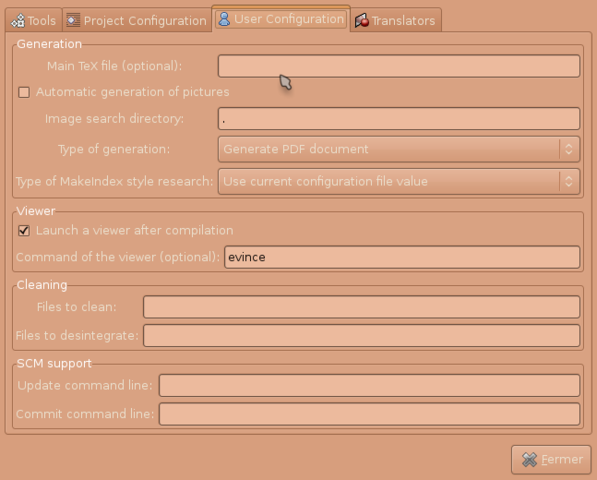
AutoLaTeX is an open source and free graphical software that has been designed from the ground up especially for those of you who want to automate LaTeX compilation on GNU/Linux operating systems.
The normal AutoLaTeX files is just a series of variable definitions inside a Makefile. With the AutoLaTeX software, users can now perform all necessary steps to take actions such as preview the document, or even produce a PD file.
The applications will keep track of the file that were modified and how o run various other programs. Among the supported tools, we can mention latex, xelatex, pdflatex, lualatex, biber, bibtex, makeindex, dvips.
AutoLaTeX also provides automatic file conversions from ASTA, DIA, DOT, FIG, GXL, ODG, PLOT, SVG, XMI to PS/PDF/PNG, from C/C++, Java, Matlab, ML, Perl, Python, Ruby, SQL, Beamer to TeX, from FIG, PLOT, DIA, SVG, Beamer to PSTeX and PdfTeX.
The application’s graphical user interface is easy to use and straightforward, allowing users to quickly set various options, such as the main TeX file, automatic generation of pictures, the default image search directory, the preferred type of generation, as well as MakeIndex style research.
You will be able to choose if you want to launch a viewer after compilation or not, set a specific program as the default document viewer, specify the files that need to be disintegrated or cleaned, and much more.
The software is written in the Perl programming language and uses the GTK+ GUI toolkit for its graphical user interface. For your convenience, it is distributed as a dual-arch DEB file for Ubuntu and Debian-based operating systems.
For those of you who want to optimize the software for a specific operating system and hardware architecture, you can always use the source tarball, which is compatible with both 32-bit and 64-bit hardware platforms.
What's new in AutoLaTeX 33.1:
- Fixing invalid guard for the LaTeX file.
AutoLaTeX 33.1
add to watchlist add to download basket send us an update REPORT- runs on:
- Linux
- filename:
- autolatex_33.1-0arakhne0.tar.gz
- main category:
- Text Editing&Processing
- developer:
- visit homepage
Zoom Client 6.0.3.37634

ShareX 16.0.1

7-Zip 23.01 / 24.04 Beta

calibre 7.9.0

IrfanView 4.67

4k Video Downloader 1.5.3.0080 Plus / 4.30.0.5655

Bitdefender Antivirus Free 27.0.35.146

Context Menu Manager 3.3.3.1

Windows Sandbox Launcher 1.0.0

Microsoft Teams 24060.3102.2733.5911 Home / 1.7.00.7956 Work

- Context Menu Manager
- Windows Sandbox Launcher
- Microsoft Teams
- Zoom Client
- ShareX
- 7-Zip
- calibre
- IrfanView
- 4k Video Downloader
- Bitdefender Antivirus Free
