
SDL Terminal is a library that allows to have a pseudo-ansi color terminal that can be used with any SDL application.. #SDL shell #SDL terminal #Ansi color terminal #SDL #Pseudo-ansi #OpenGL
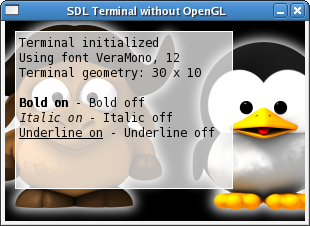
SDL Terminal is a library that allows to have a pseudo-ansi color terminal that can be used with any SDL application (without or with OpenGL). The internal terminal surface is an SDL surface that is mapped to a texture when OpenGL is used (and then it is quite simple to use the texture to map it on any GL surface, like in the glcube example from distribution). Any user input raises an SDL_TERMINALEVENT that can be catched like any other SDL event and the event structure holds the user actual input.
/* Terminal creation and settings */ SDL_Terminal *terminal = SDL_CreateTerminal (); SDL_TerminalSetFont (terminal, "./VeraMono.ttf", 12); SDL_TerminalSetSize (terminal, 80, 24); SDL_TerminalSetPosition (terminal, 10, 10); ...
/* Print a new line of text on terminal */ SDL_TerminalPrint (terminal, "Hello !"); ...
/* Blit terminal onto current video surface */ SDL_TerminalBlit (terminal); ...
/* Catch terminal event and get user input */ switch (event.type) { case SDL_TERMINALEVENT: printf ("User input: %sn", (char *) event.user.data2); ...
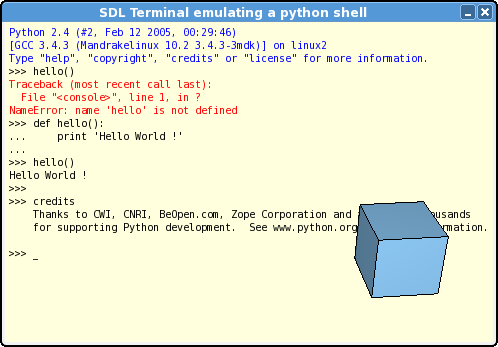
The SDL Terminal package comes with several examples showing how to use terminal either in 2D mode or 3D mode. Another example demonstrate the emulation of a python console using the SDL Terminal.
SDL Terminal 1.1.3
add to watchlist add to download basket send us an update REPORT- runs on:
- Linux
- filename:
- SDL_terminal-1.1.3.tar.gz
- main category:
- Terminals
- developer:
- visit homepage
4k Video Downloader 1.5.3.0080 Plus / 4.30.0.5655

calibre 7.8.0

7-Zip 23.01 / 24.04 Beta

Bitdefender Antivirus Free 27.0.35.146

Windows Sandbox Launcher 1.0.0

paint.net 5.0.13 (5.13.8830.42291)

IrfanView 4.67

ShareX 16.0.1

Microsoft Teams 24060.3102.2733.5911 Home / 1.7.00.7956 Work

Zoom Client 6.0.0.37205

- ShareX
- Microsoft Teams
- Zoom Client
- 4k Video Downloader
- calibre
- 7-Zip
- Bitdefender Antivirus Free
- Windows Sandbox Launcher
- paint.net
- IrfanView