
A Gtk2-Perl based GUI for xgamma.. #Xgamma GUI #Brightness control #Xgamma frontend #Xgamma #GUI #Frontend
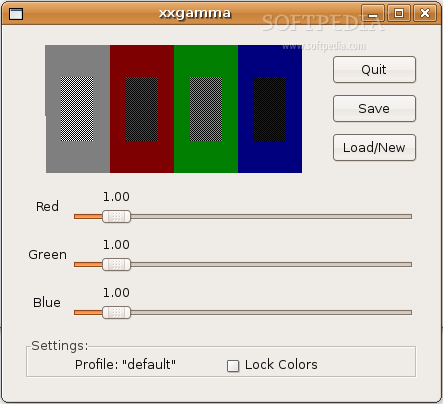
xxgamma is an Gtk2-Perl based GUI (Graphical User Interface) for xgamma which allows you to load, modify and store multiple gamma correction profiles for XFree86 and X.org.
I wrote it because I'm often using an external monitor with my laptop and want an easy way to switch between gamma correction for the internal and external monitor.
xxgamma [options] valid options are: --gui show GUI [default] --nogui don't show GUI --load load default profile at startup [default] --noload don't load default profile at startup --profile NAME use NAME; as default profile [default: default] --rcfile FILENAME use FILENAME to store the profiles [default: xxgammarc] --help show this text
Before you start, it's recommended to have your monitor's contrast set to the maximum allowed and its brightness set to a comfortable setting.
Change the values for red, green and blue until the four color blocks look solid. You can use your left and right keys to change the values by 0.1 or Control-Left and Control-Right to change it by 0.01.
"Lock Colors" locks all three colors to the same value.
Use "Save" to save your gamma profile. If you don't want to overwrite your current profile or want to load a profile use "Load/New". The current profile name is shown in the "Settings" area.
System requirements
- Gtk2-Perl
- xgamma (comes with XFree86 and X.org)
What's new in xxgamma 0.06:
- This release has some bugfixes for single value mode and fixes a bug when setting initial gamma values.
- An Undo menu item has been added.
xxgamma 0.06
add to watchlist add to download basket send us an update REPORT- runs on:
- Linux
- filename:
- xxgamma-0.06.tar.gz
- main category:
- System
- developer:
- visit homepage
Windows Sandbox Launcher 1.0.0

4k Video Downloader 1.5.3.0080 Plus / 4.30.0.5655

Zoom Client 6.0.3.37634

ShareX 16.0.1

Bitdefender Antivirus Free 27.0.35.146

calibre 7.9.0

Context Menu Manager 3.3.3.1

7-Zip 23.01 / 24.04 Beta

Microsoft Teams 24060.3102.2733.5911 Home / 1.7.00.7956 Work

IrfanView 4.67

- 7-Zip
- Microsoft Teams
- IrfanView
- Windows Sandbox Launcher
- 4k Video Downloader
- Zoom Client
- ShareX
- Bitdefender Antivirus Free
- calibre
- Context Menu Manager