LINUX CATEGORIES:


NEWS ARCHIVE >>
SOFTPEDIA REVIEWS >>

7-DAY TOP DOWNLOAD

#
Program
BackTrack 4 Final
9,178
TeamSpeak 2
2.0.32.60

3,920
Wine 1.0.1 / 1.1.38
3,273
VLC 1.0.5
3,185
Charles Web
Debugging Proxy
3.5.1

2,387
Yahoo Messenger
1.0.4

2,346
Adobe Flash Player
for Linux 10.0.42.34
/ 10.1 Beta

1,778
Ubuntu 9.10
1,698
Thunderbird PST
Import plugin 1.2

1,644
Corel Photo-Paint 9
1,492

WEEK'S BEST

  • Ubuntu 9.10
  • Ubuntu Netbook Rem...
  • Pidgin 2.6.5
  • Wine 1.0.1 / 1.1.38
  • Linux Kernel 2.6.3...
  • Mozilla Firefox 3.6
  • Fedora 12
  • OpenOffice.org 3.2.0
  • Firestarter 1.0.3
  • The Gimp 2.6.8 / 2...
  • FileZilla 3.3.1
  • Transmission 1.83
  • Super Grub Disk 0....
  • Gufw 9.10.4
  • Skype 2.0.072 / 2....
  • openSUSE Linux 11....
  • Opera 10.50 Build ...
  • Adobe Flash Player...
  • wine-doors 0.1.3
  • Google Gadgets 0.1...
  • Home / Linux / System / System Administration

    cpuid 2 20060917

    Download button

    Downloads: 5,190  Add to download basket  Tell us about an update
    User Rating:
    Rated by:
    NOT RATED
    0 user(s)
    Developer:

    License / Price:

    Last Updated:

    Category:
    Todd Allen | More programs
    BSD License / FREE
    September 18th, 2006, 16:35 GMT
    ROOT / System / System Administration

     Read user reviews (0)  Add a review  Refer to a friend  Subscribe


    cpuid description

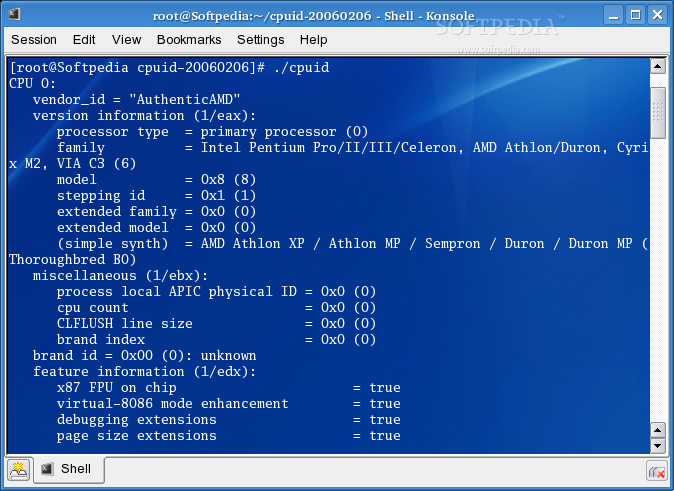
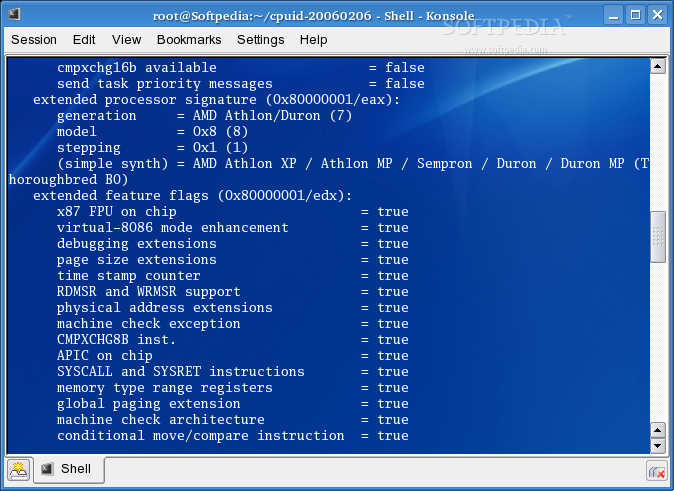
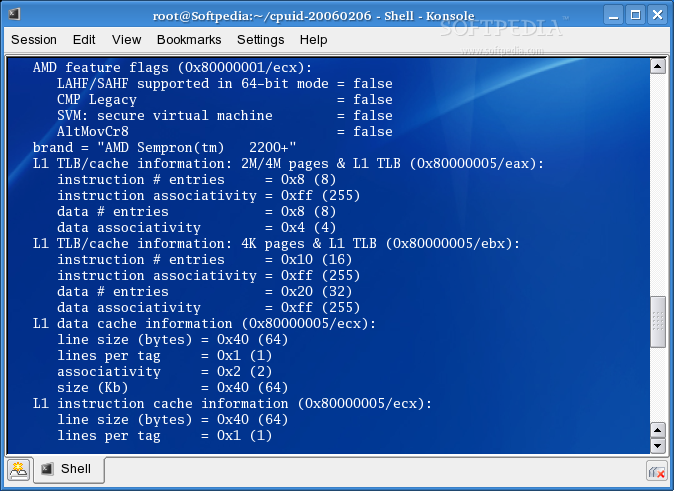
    cpuid dumps detailed information about the CPU gathered from the CPUID instruction.

    cpuid application dumps detailed information about the CPU(s) gathered from the CPUID instruction, and also determines the exact model of CPU(s).

    CPUID stands for Central Processing Unit Identifier.

    What is the CPUID instruction?

    In the earlier days of x86 computing (when the 486 was supreme), there was a vast amount of different hardware inside PCs, much as there is today, but back in those days "compatibility" was an unknown concept between manufacturers - all their hardware behaved differently, and the poor programmer had to write mountains of code merely to identify the hardware the program was running on, yet alone take full advantage of it's unique features.

    The CPU was one area where, despite continual advancements by Intel, AMD and others, programs were generally not using any optimisation based on the user's CPU, because it was difficult to know which CPU was being used!
    When Intel released MMX, however, it decided that it needed to make it easy for programs to recognise it's new CPUs, and utilise the instructions provided to increase the performance of the programs when running under a new CPU (which was good for Intel too - people saw how much faster it was, and they bought the new CPUs).

    So, they developed the CPUID instruction. This simple assembler instruction gave instant access for the programmer to a lot of information: who manufactured this CPU (e.g. Intel, AMD, Cyrix, etc), what "extra features" it supports (e.g. an FPU, MMX, 3DNow, etc), and other information (see Chapters #5 ,#6 & #7 for how to obtain this information).

    What processors support CPUID?

    Generally speaking, virtually all Pentium CPUs support the CPUID (opcode 0Fh-A2h) instruction. Also, genuine Intel 486-based CPUs and many 486 clones support it. The Pentium Pro, PentiumII, Pentium III and Pentium IV all support it. All AMD's CPUs support it, and the Cyrix MediaGX, 6x86, 6x86MX and mII (although not without troubles).

    Anything newer than the above will support it. A simple guideline is that all CPUs available today support CPUID, and Chapter #7 has a complete list of CPUs that support CPUID.

    Unfortunately, there is a small problem with just calling CPUID to find the CPU information, and that is: If the CPU you are running on does not support CPUID, it will crash (or, as the OS likes to call it, an "Invalid Instruction Exception"). There is a method of "checking" the CPU to see if it supports CPUID, but (of course) the check only works on 486+ class CPUs.

    Relax, though, because the process (and appropriate source code) to find out as much information as possible from any given CPU type is here, in flow-chart form (this assumes you are using at least a 386, which is a moot point as any compiler you'll find nowadays will require at least a 386 processor)

    What's New in This Release:

    · The -i option was made the default because of the unreliable CPUID kernel module.
    · The -k option was added to get the previous behavior.
    · A change was made to allow the i386 build to work on x86_64 systems.
    · Knowledge of Tulsa and pre-production Woodcrest was added.
    · Smithfield Pentium D and Pentium EE are now properly distinguished from each other.


    TAGS:

    CPUID instructions | CPU information | CPU identification | cpuid | CPU | CPUID


    HTML code for linking to this page:


    Go to top

    Windows tabGames tabDrivers tabMac tabLinux tabScripts tabMobile tabHandheld tabGadgets tabNews tab

    SUBMIT PROGRAM   |   ADVERTISE   |   GET HELP   |   SEND US FEEDBACK   |   RSS FEEDS   |   ENTER NEWS SITE   |   ENGLISH BOARD   |   ROMANIAN FORUM