
ncurses frontend to manage package updats on a large number of remote hosts using SSH. #Update hosts #Debian update #System administration #Debian #Hosts #Updater
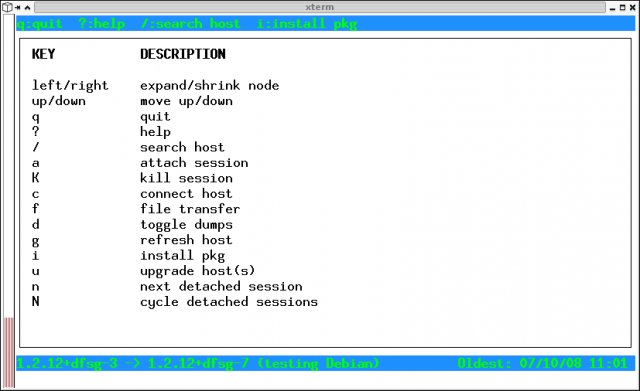
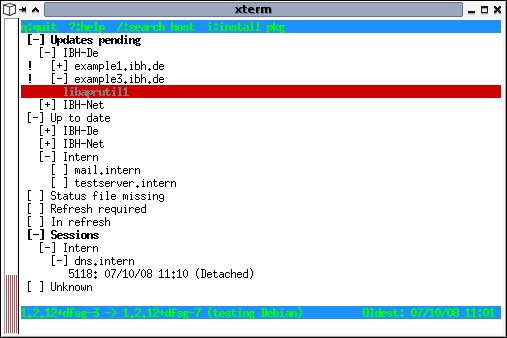
apt-dater provides a ncurses frontend to manage package updats on a large number of remote hosts using SSH. At the moment on the client site are only Debian based hosts running apt are supported.
Copy and modify the apt-dater.conf:
cp conf/apt-dater.conf.example $HOME/.config/apt-dater/apt-dater.conf
Copy and modify the hosts.conf:
cp conf/hosts.conf.example $HOME/.config/apt-dater/hosts.conf
Copy and modify the screenrc:
cp conf/screenrc.example $HOME/.config/apt-dater/screenrc
You need a SSH server and sudo installed. Create a user which will be used to install updates (using root is NOT recommended).
Modify the /etc/sudoers:
Defaults env_reset,env_keep=MAINTAINER the-user ALL=NOPASSWD: /usr/bin/apt-get, /usr/bin/aptitude
Create a user on your management server which perform updates on your Debian hosts.
Generate a SSH keypair:
ssh-keygen -t TYPE
Distribute the public key(s) e.g.: ssh-copy-id .ssh/your-public-key managed-host
What's new in apt-dater 0.9.0:
- This is a new feature release of apt-dater (including apt-dater-host) that also contains several minor bugfixes.
- It supports clustered hosts.
apt-dater 0.9.0
add to watchlist add to download basket send us an update REPORT- runs on:
- Linux
- main category:
- System
- developer:
- visit homepage
IrfanView 4.67

7-Zip 23.01 / 24.04 Beta

4k Video Downloader 1.5.3.0080 Plus / 4.30.0.5655

calibre 7.9.0

Bitdefender Antivirus Free 27.0.35.146

ShareX 16.0.1

Windows Sandbox Launcher 1.0.0

Microsoft Teams 24060.3102.2733.5911 Home / 1.7.00.7956 Work

Zoom Client 6.0.0.37205

paint.net 5.0.13 (5.13.8830.42291)

- Microsoft Teams
- Zoom Client
- paint.net
- IrfanView
- 7-Zip
- 4k Video Downloader
- calibre
- Bitdefender Antivirus Free
- ShareX
- Windows Sandbox Launcher