
URandR is a GUI (graphical user interface) to RandR 1.2 written in PyGTK.. #RandR GUI #RandR interface #Multihead configuration #RandR #GUI #Interface
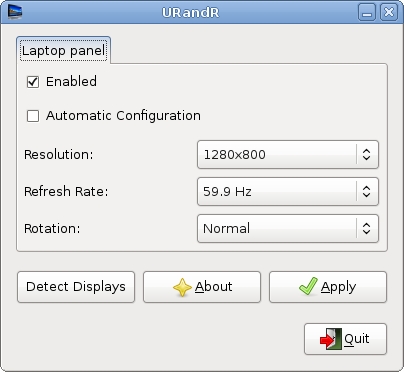
URandR is a GUI (graphical user interface) to RandR 1.2 written in PyGTK. IT covers RandR 1.2 basic functionalities and aims to make multihead configuration as easy as possible for unexperienced users.
� James wants to connect his laptop to a projector without messing with his xorg.conf � Jane has two displays and would like to work on her screens as if they were a unified desktop
� It doesn't set up more than 2 screens a time (e.g. 2 DVI monitors) [THIS WILL BE FIXED]
� If you allow URandR to set up a virtual resolution, you will have to enable your external monitor (with the enable checkbox) and click on the Apply button. Only then you will be able to set your external monitor to the left (or to the right, etc.) of your main screen � Sometimes setting the virtual resolution disables direct rendering (which you can restore by removing the virtual resolution from your xorg.conf or with URandR's Clear button. [Make sure you disable Compiz before you use a a method other than Clone mode]
Requirements:
� Python � PyGTK
� An Intel card with Intel's modesetting driver or an ATI card with the open source driver ("ati")[version 6.7.191 or higher] � xorg-server 1.3 or higher (on any GNU/Linux distribution)
URandR 0.1
add to watchlist add to download basket send us an update REPORT- runs on:
- Linux
- filename:
- urandr_0.1 0ubuntu12-3_all.deb
- main category:
- System
- developer:
- visit homepage
IrfanView 4.67

Windows Sandbox Launcher 1.0.0

Zoom Client 6.0.3.37634

7-Zip 23.01 / 24.04 Beta

ShareX 16.0.1

Bitdefender Antivirus Free 27.0.35.146

Context Menu Manager 3.3.3.1

4k Video Downloader 1.5.3.0080 Plus / 4.30.0.5655

calibre 7.9.0

Microsoft Teams 24060.3102.2733.5911 Home / 1.7.00.7956 Work

- 4k Video Downloader
- calibre
- Microsoft Teams
- IrfanView
- Windows Sandbox Launcher
- Zoom Client
- 7-Zip
- ShareX
- Bitdefender Antivirus Free
- Context Menu Manager