
An interactive shell for issuing HTTP commands to a web server or REST API #Interactive shell #HTTP commands #Web server #HTTP #Commands #Shell
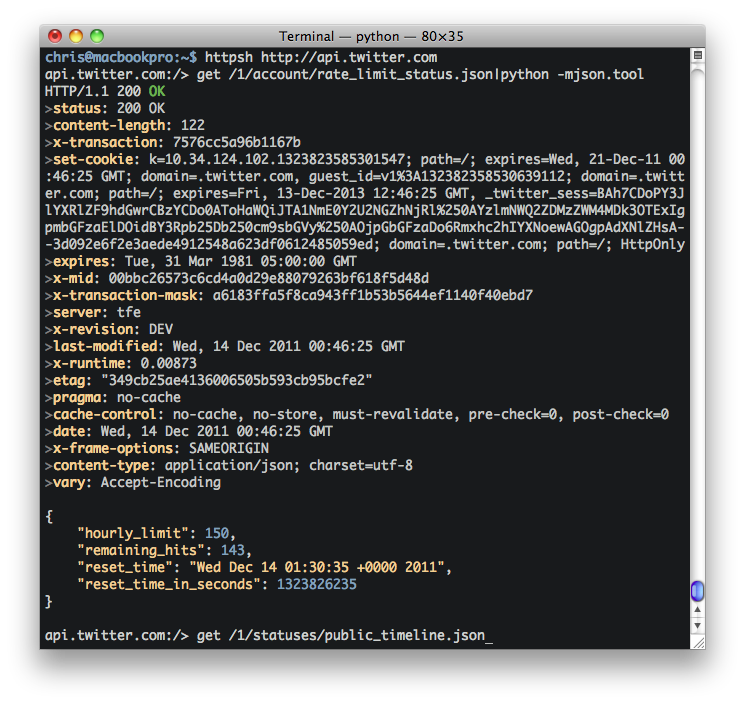
HttpShell is an interactive shell for issuing HTTP commands to a web server or REST API.
Issue HTTP commands (HEAD, GET, POST, PUT, DELETE) to a server with visual feedback. Makes debugging REST services much more interactive than cURL.
Treats the server like a filesystem:
$ httpsh http://api.twitter.com/a/statuses api.twitter.com:/1/statuses > get public_timeline.json
HTTP/1.1 200 OK >content-length: 40945 >vary: Accept-Encoding >x-transaction-mask: a6183ffa5f8ca943ff1b53b5644ef1140f40ebd7 ...
Use familiar shell commands:
api.twitter.com:/1/statuses > cd .. api.twitter.com:/1/ > cd / api.twitter.com:/ >
Pipe output to external commands for formatting, etc:
api.twitter.com:/1/statuses > get public_timeline.xml | xmllint -format - ... < ?xml version="1.0" encoding="UTF-8"? > < statuses type="array" > < status > < created_at >Wed Dec 14 00:57:12 +0000 2011< /created_at > ...
Post data to server: $ httpsh http://localhost:28017 localhost:28017:/ > post /foo/bar ... { "a" : 123456 } ... HTTP/1.0 201 >content-type: text/plain;charset=utf-8 >connection: close >x-ns: foo._defaultCollection >content-length: 15 >x-action: bar
{ "ok" : true }
Use JSON to post to web forms using special "@{}" notation!
somewebsite:/ > post /some/form/handler ... @{ ... "name": "Chris", ... "occupation": "Developer" ... }
Converts the JSON definition above to: name=Chris&occupation=Developer for form posting.
Set headers:
localhost:28017:/ > .headers Cookie:session=5cb9586618eea2374377bb1584f7de74 localhost:28017:/ > .headers User-Agent:AppleWebKit/535.13 localhost:28017:/ > .headers < Cookie: session=5cb9586618eea2374377bb1584f7de74 < User-Agent: AppleWebKit/535.13
Verbs head [< /path/to/resource >] [| < external command >] get [< /path/to/resource >] post [< /path/to/resource >] [data] put [< /path/to/resource >] [data] delete < /path/to/resource > Navigation cd < /path/to/resource > or .. Metacommands .headers [< name >]:[< value >] .quit
python setup.py install
Or if pip is installed:
pip install httpshell
May require sudo to install!
System requirements
HttpShell 0.8.0
add to watchlist add to download basket send us an update REPORT- runs on:
- Linux
- filename:
- httpshell-0.8.0.tar.gz
- main category:
- System
- developer:
- visit homepage
4k Video Downloader 1.6.0.0085 Plus / 4.30.0.5655

calibre 7.10.0

Bitdefender Antivirus Free 27.0.35.146

IrfanView 4.67

Microsoft Teams 24060.3102.2733.5911 Home / 1.7.00.10152 Work

ShareX 16.0.1

Context Menu Manager 3.3.3.1

Windows Sandbox Launcher 1.0.0

7-Zip 23.01 / 24.04 Beta

Zoom Client 6.0.4.38135

- Windows Sandbox Launcher
- 7-Zip
- Zoom Client
- 4k Video Downloader
- calibre
- Bitdefender Antivirus Free
- IrfanView
- Microsoft Teams
- ShareX
- Context Menu Manager