
A Live Linux operating system that features the dvd::rip-Cluster node, based on Ubuntu. #Dvd::rip cluster #Live CD #Linux distribution #Dvd::rip #Cluster #LiveCD
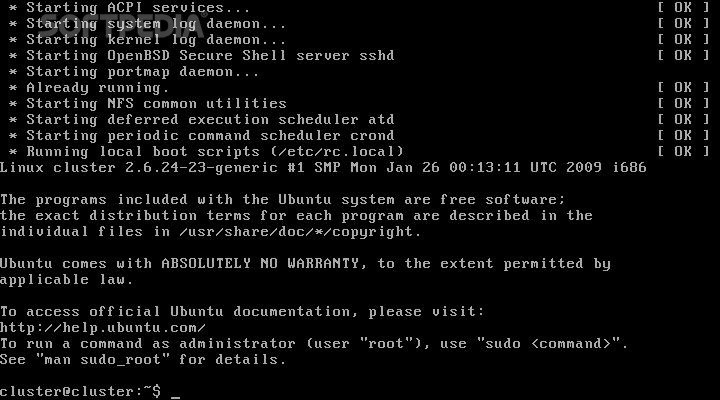
dvd::rip Cluster Live CD is an open source distribution of Linux that runs completely from a CD or USB media and delivers a dvd::rip-Cluster node on top of a stable and reliable Ubuntu Linux base. It doesn’t require any installation.
Users can download the latest version of dvd::rip Cluster Live CD from Softpedia. It is distributed as a dual-arch Live CD ISO image that supports 32-bit and 64-bit computers. It is a minimal distribution that has only 200MB in size.
The Live CD boot menu is minimal, but it provides users with the ability to check the CD disc for defects before running the live system, as well as to perform a system memory diagnostic test or boot from the local drive.
Just burn the downloaded ISO image onto a CD disc or write it to a USB storage device and boot the new cluster from this bootable medium. After a couple of minutes, the live system is up and running, allowing you to go to your master-computer and add this node.
To see the IP address of the computer where dvd::rip Cluster Live CD is running, type the "ifconfig" command, without quotes, at the boot prompt. The default username is "cluster" without a password.
Being designed from the ground up to be as minimal as possible, dvd::rip Cluster Live CD offers only a command-line environment. This means that you will be dropped to a shell prompt by default. Keep in mind though, that the SSH (Secure Shell) server accepts empty passwords, so you don't need to copy your public_id in order to connect remotely via SSH without a password.
dvd::rip Cluster Live CD 1.0
add to watchlist add to download basket send us an update REPORT- runs on:
- Linux
- filename:
- dvdripclusterlivecd_1.0.iso
- main category:
- Linux Distributions
- developer:
- visit homepage
Bitdefender Antivirus Free 27.0.35.146

Context Menu Manager 3.3.3.1

Microsoft Teams 24060.3102.2733.5911 Home / 1.7.00.7956 Work

Zoom Client 6.0.3.37634

ShareX 16.0.1

IrfanView 4.67

calibre 7.9.0

Windows Sandbox Launcher 1.0.0

4k Video Downloader 1.5.3.0080 Plus / 4.30.0.5655

7-Zip 23.01 / 24.04 Beta

- Windows Sandbox Launcher
- 4k Video Downloader
- 7-Zip
- Bitdefender Antivirus Free
- Context Menu Manager
- Microsoft Teams
- Zoom Client
- ShareX
- IrfanView
- calibre