
An Ubuntu-based operating system built around the Asterisk and VoiceOne software. #Asterisk OS #Ubuntu Linux #Linux distribution #VoiceBuntu #Ubunturisk #Asterisk
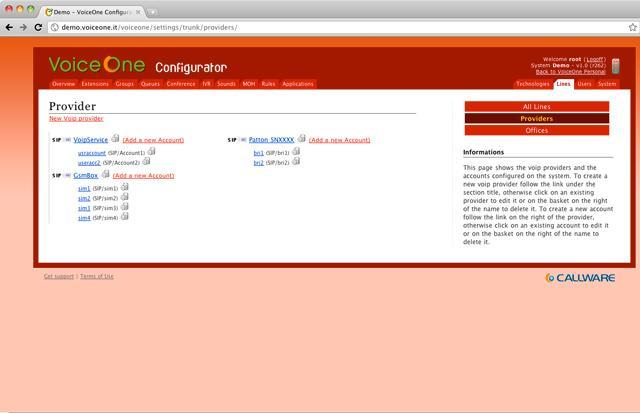
VoiceOne (formerly VoiceBuntu and Ubunterisk) is an open source operating system based on the world’s most popular distribution of Linux, Ubuntu, and built around the Asterisk PBX (Private Branch Exchange) server.
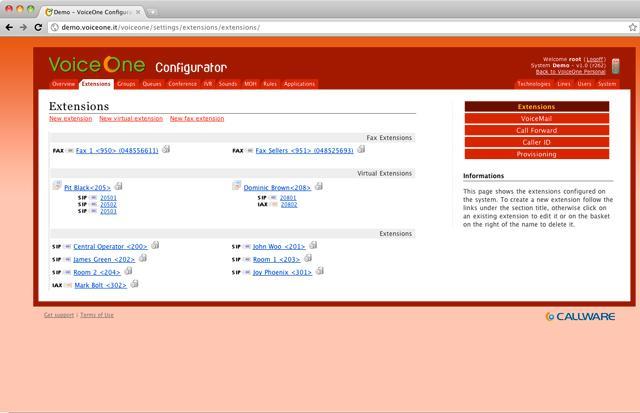
VoiceOne is backed by ARA (Asterisk Realtime Architecture), features SIP (Session Initiation Protocol) extensions management, supports traditional Telco and VoIP providers, queues system management, and comes with a policies system for the management of users and groups.
Among other interesting features, we can mention an easy to setup wizard, a state-of-the-art IVR (Interactive Voice Response) creation system, and offers a client/server architecture that relies on web services.
The VoiceOne distribution is available for download as an installable-only ISO image of approximately 1GB in size. While you will be able to install the OS on both 64-bit and 32-bit computers, it contains software packages optimized only for the 32-bit (i386) architecture.
Once the ISO image has been downloaded, burn it onto a DVD disc with any CD/DVD burning software or write it on a USB thumb drive of 2GB or higher capacity in order to transform it into a bootable medium.
When booting the ISO image from the BIOS of a computer using either a DVD disc or a USB stick, you will notice there is no boot menu and the system drops users to the VoiceOne Install CD menu that allows them to install the OS or reboot/shutdown the computer.
The installation script is text based and will require you to to choose between the English and Italian languages, select a device on which to install VoiceOne, select a device type, specify the amount of system memory (RAM) to use and partition the disk.
VoiceOne 1.8
add to watchlist add to download basket send us an update REPORT- runs on:
- Linux
- main category:
- Linux Distributions
- developer:
- visit homepage
Zoom Client 6.0.0.37205

7-Zip 23.01 / 24.04 Beta

paint.net 5.0.13 (5.13.8830.42291)

calibre 7.8.0

Windows Sandbox Launcher 1.0.0

Microsoft Teams 24060.3102.2733.5911 Home / 1.7.00.7956 Work

Bitdefender Antivirus Free 27.0.35.146

IrfanView 4.67

4k Video Downloader 1.5.3.0080 Plus / 4.30.0.5655

ShareX 16.0.1

- IrfanView
- 4k Video Downloader
- ShareX
- Zoom Client
- 7-Zip
- paint.net
- calibre
- Windows Sandbox Launcher
- Microsoft Teams
- Bitdefender Antivirus Free