
A fast, small and lightweight edition of the Slackware-based VectorLinux operating system. #Linux distribution #Operating system #Live CD #VectorLinux #Linux #Distribution
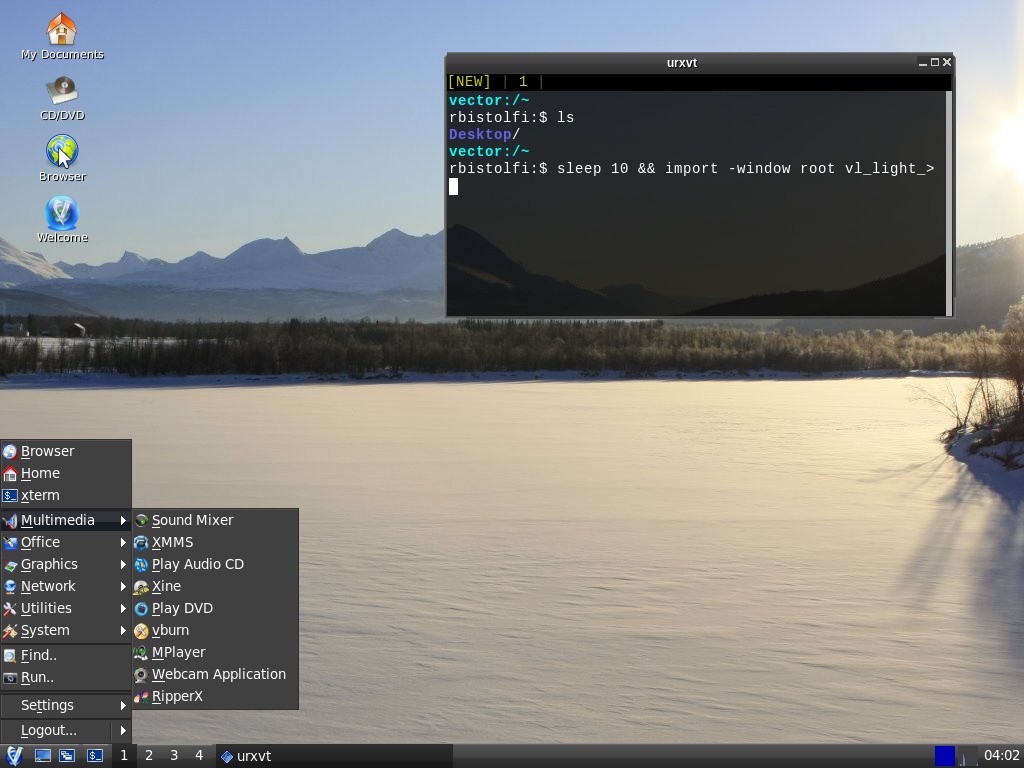
VectorLinux Light is an open-source and completely free operating system derived from the Slackware Linux distribution and designed from the ground up to be as lightweight as possible, suitable for low-end machines and computers with old and semi-old hardware components.
The Light edition of VectorLinux is distributed as an installable-only, dual-arch and hybrid ISO image, which can only be installed on a disk drive, supports both 32-bit (i386) and 64-bit (x86_64) hardware platforms and is deployable on CD discs or USB flash drives.
From the boot menu of the ISO image, the user can only start the text-mode installer by pressing the Enter key. You will be asked to select a keyboard layout and start the installation process by partitioning the disk, choosing an installation method, installing the bootloader, configure the timezone and network.
Once again, please note that the entire installation process takes place in text-mode and will take approximately 10 minutes to complete, depending on your computer’s specs.
During the installation, you will be able to choose between the IceWM window manager (Light) or the LXDE desktop environment (Full). However, there are two more installation modes you may want to use, so choose those if you don’t endorse either of the aforementioned graphical environments.
Summing up, VectorLinux Light is indeed a slim and lightweight distribution of Linux. It uses some of the fastest window managers/desktop environments available on top of a rock-solid Slackware base.
However, we strongly suggest to try it before installing it by downloading the VectorLinux Light Live edition from Softpedia. It comes with a plethora of lightweight applications and is the perfect solution for slow and old computers.
What's new in VectorLinux Light 7.2 Beta:
- The release features light a minimal desktop version using icewm and seamonkey as its base of operation. The standard version is xfce based with the lastest firefox version as the browser. Both versions can be installed with our semi automatic gui installer or thru a text based installer depending on your needs. We feature all the latest linux based software from kodi to libreoffice all easily installed with our gui or text based package manager. We are using the latest 4.4.14 lts kernel for the best hardware support and system speed. Please give this a try and submit any bugs you might find so that we can make our final releases as perfect as possible. Last note for the diehards we are systemd free.
VectorLinux Light 7.1 / 7.2 Beta
add to watchlist add to download basket send us an update REPORT- runs on:
- Linux
- filename:
- VL64-7.1-LIGHT.iso
- main category:
- Linux Distributions
- developer:
- visit homepage
ShareX 16.0.1

Zoom Client 6.0.0.37205

Microsoft Teams 24060.2623.2790.8046 Home / 1.7.00.7956 Work

calibre 7.8.0

4k Video Downloader 1.5.2.0077 Plus / 4.30.0.5655

Windows Sandbox Launcher 1.0.0

IrfanView 4.67

paint.net 5.0.13 (5.13.8830.42291)

Bitdefender Antivirus Free 27.0.35.146

7-Zip 23.01 / 24.04 Beta

- paint.net
- Bitdefender Antivirus Free
- 7-Zip
- ShareX
- Zoom Client
- Microsoft Teams
- calibre
- 4k Video Downloader
- Windows Sandbox Launcher
- IrfanView