
A free GNU/Linux operating system especially designed to be used by kids of all ages. #Linux for kids #Ubuntu Linux #Linux distribution #Qimo #Kids #Linux
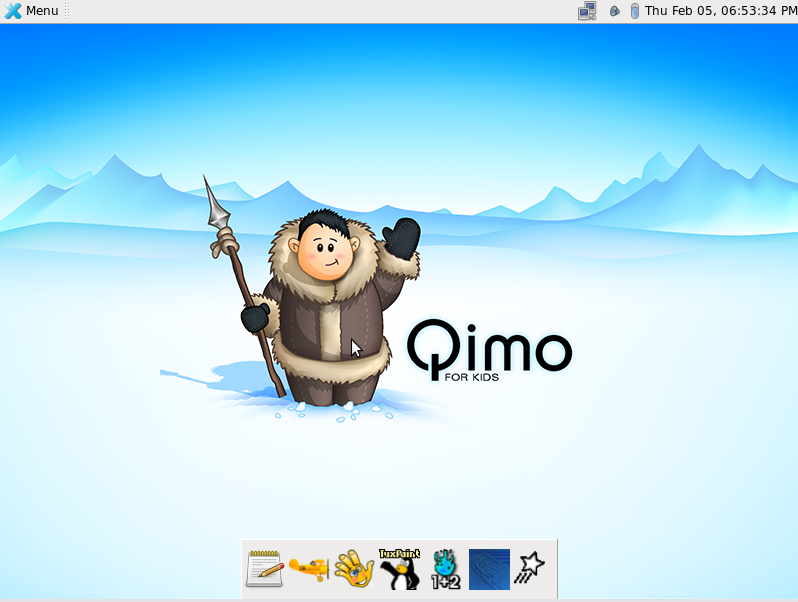
Qimo 4 Kids is an open source and freely distributed operating system based on the world's most popular free Linux distribution, Ubuntu, and designed from the ground up to be used by children aged 3 or over.
The distribution is available for download as a single Live CD ISO image that can be burned onto a blank CD disc using any CD/DVD burning software or written to a USB thumb drive using the Disks (GNOME) or UNetbootin applications.
It supports both 32-bit and 64-bit hardware platforms. From the boot prompt, users can try the operating system without installation anything on their computer, check the disc for defects (only if using a CD media), run a memory test, start an existing OS, and install the distro without testing it (not recommended).
The graphical session is powered by the lightweight Xfce desktop environment, which is designed in such a way to look beautiful and appealing for kids. It is comprised of a top panel for accessing the main menu, launching applications and interacting with running programs, as well as a dock (app launcher) located on the bottom edge of the screen.
Educational applications include the GCompris high quality educational software suite, Child's Play educational tool, Tux Paint painting program, Tux Math arcade game for practicing math facts, Tux Type for learning how to type, and Laby for learning how to program with ants and spider webs.
Among the default apps, we can mention the Exaile audio player, Totem movie player, Ristretto image viewer, Mozilla Firefox web browser, as well as Ubuntu Software Center and Synaptic Package Manager for installing additional apps.
Summing up, Qimo 4 Kids is a really great GNU/Linux operating system for kids, especially because it is based on the popular Ubuntu Linux distribution and because of the great selection of educational applications that it includes.
What's new in Qimo 4 Kids 2.0:
- We have introduced a new character to Qimo, her name is Illa, a cute and cuddly little polar bear. Illa (pronounced 'ee-la') is an Inuit word that means "friend", and we know she'll find her way into the hearts of your kids. She also has her own wallpaper featuring the artic landscape at dusk, filled with hues of pink and purple with the Auroa Borealis shining in the sky. Choose from a variety of Qimo and Illa wallpapers to find the one that is just right for your child.
- Have more than one child? With Qimo 2, they can each have their own user account! The Xubuntu session is still there too, so you can create an account for yourself as well.
Qimo 4 Kids 2.0
add to watchlist add to download basket send us an update REPORT- runs on:
- Linux
- filename:
- qimo-2.0-desktop.iso
- main category:
- Linux Distributions
- developer:
- visit homepage
Microsoft Teams 24060.3102.2733.5911 Home / 1.7.00.7956 Work

Zoom Client 6.0.3.37634

Bitdefender Antivirus Free 27.0.35.146

Context Menu Manager 3.3.3.1

4k Video Downloader 1.5.3.0080 Plus / 4.30.0.5655

calibre 7.9.0

ShareX 16.0.1

Windows Sandbox Launcher 1.0.0

7-Zip 23.01 / 24.04 Beta

IrfanView 4.67

- Windows Sandbox Launcher
- 7-Zip
- IrfanView
- Microsoft Teams
- Zoom Client
- Bitdefender Antivirus Free
- Context Menu Manager
- 4k Video Downloader
- calibre
- ShareX