
A Debian-based Live Linux operating system designed to provide a secure and encrypted distro. #Linux distribution #Live CD #Encrypted system #Encryption #Encrypted #Linux
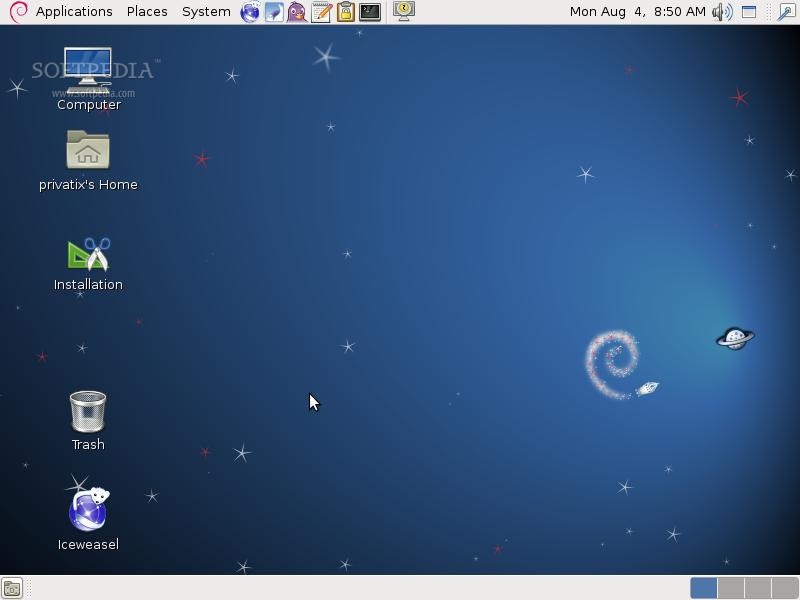
Privatix Live-System is an open source, secure and encrypted bootable operating system derived from the award winning Debian GNU/Linux distribution and built around the GNOME Classic graphical desktop environment.
The Privatix operating system is distributed in multiple editions, supporting English and German languages, as well as the GNOME and Xfce desktop environments. It is available for download as dual-arch Live CD/DVD ISO images, suitable for both old and modern computers.
The boot menu of the Live DVD includes the default artwork and boot entries of the Debian GNU/Linux. From here, the user can start the live system with default kernel or in failsafe mode, perform a system memory (RAM) diagnostic test or access a help screen.
As mentioned, GNOME is in charge of the graphical session inside this edition of Privatix Live-System. It uses a two-panel layout, where the top panel can be used for launching applications and accessing system tray functions, and the bottom panel for interacting with running programs and cycling between virtual workspaces.
Among the pre-installed applications, we can mention the GIMP image editor, OpenOffice.org office suite, Inkscape vector graphics editor, Ekiga softphone, Icedove email reader, Evolution email and calendar client, Empathy multi-protocol instant messenger and Iceweasel web browser.
The Transmission torrent downloader, Remmina remote desktop client, Brasero CD/DVD burning software, Cheese webcam viewer, Totem movie player, Rhythmbox music player and Gedit text editor are also included.
Summing up, we strongly suggest you to check out the Xfce edition of Privatix Live-System if you want to install or use the operating system on computers with old hardware components.
What's new in Privatix Live-System 11.04.11:
- This release was updated from Debian GNU/Linux 5.x (Lenny) to 6.0 (Squeeze).
Privatix Live-System 11.04.11
add to watchlist add to download basket send us an update REPORT- runs on:
- Linux
- filename:
- privatix_11.04.11_en.iso.torrent
- main category:
- Linux Distributions
- developer:
- visit homepage
IrfanView 4.67

Windows Sandbox Launcher 1.0.0

Zoom Client 6.0.3.37634

calibre 7.9.0

4k Video Downloader 1.5.3.0080 Plus / 4.30.0.5655

7-Zip 23.01 / 24.04 Beta

Microsoft Teams 24060.3102.2733.5911 Home / 1.7.00.7956 Work

ShareX 16.0.1

Bitdefender Antivirus Free 27.0.35.146

Context Menu Manager 3.3.3.1

- ShareX
- Bitdefender Antivirus Free
- Context Menu Manager
- IrfanView
- Windows Sandbox Launcher
- Zoom Client
- calibre
- 4k Video Downloader
- 7-Zip
- Microsoft Teams