LINUX CATEGORIES:


NEWS ARCHIVE >>
SOFTPEDIA REVIEWS >>

7-DAY TOP DOWNLOAD

#
Program
BackTrack 4 Final
9,178
TeamSpeak 2
2.0.32.60

3,920
Wine 1.0.1 / 1.1.38
3,273
VLC 1.0.5
3,185
Charles Web
Debugging Proxy
3.5.1

2,387
Yahoo Messenger
1.0.4

2,346
Adobe Flash Player
for Linux 10.0.42.34
/ 10.1 Beta

1,778
Ubuntu 9.10
1,698
Thunderbird PST
Import plugin 1.2

1,644
Corel Photo-Paint 9
1,492

WEEK'S BEST

  • Ubuntu 9.10
  • Ubuntu Netbook Rem...
  • Pidgin 2.6.5
  • Wine 1.0.1 / 1.1.38
  • Linux Kernel 2.6.3...
  • Mozilla Firefox 3.6
  • Fedora 12
  • OpenOffice.org 3.2.0
  • Firestarter 1.0.3
  • The Gimp 2.6.8 / 2...
  • FileZilla 3.3.1
  • Transmission 1.83
  • Super Grub Disk 0....
  • Gufw 9.10.4
  • Skype 2.0.072 / 2....
  • openSUSE Linux 11....
  • Opera 10.50 Build ...
  • Adobe Flash Player...
  • wine-doors 0.1.3
  • Google Gadgets 0.1...
  • Home / Linux / System / Operating Systems / Linux Distributions

    Foresight Linux 2.1.1

    Download button

    Downloads: 5,181  Add to download basket  Tell us about an update
    User Rating:
    Rated by:
    Good (3.0/5)
    40 user(s)
    Developer:

    License / Price:

    Last Updated:

    Category:
    The Foresight Linux Project | More programs
    GPL / FREE
    May 15th, 2009, 05:59 GMT [view history]
    ROOT / System / Operating Systems / Linux Distributions

     Read user reviews (0)  Add a review  Refer to a friend  Subscribe


    Foresight Linux description

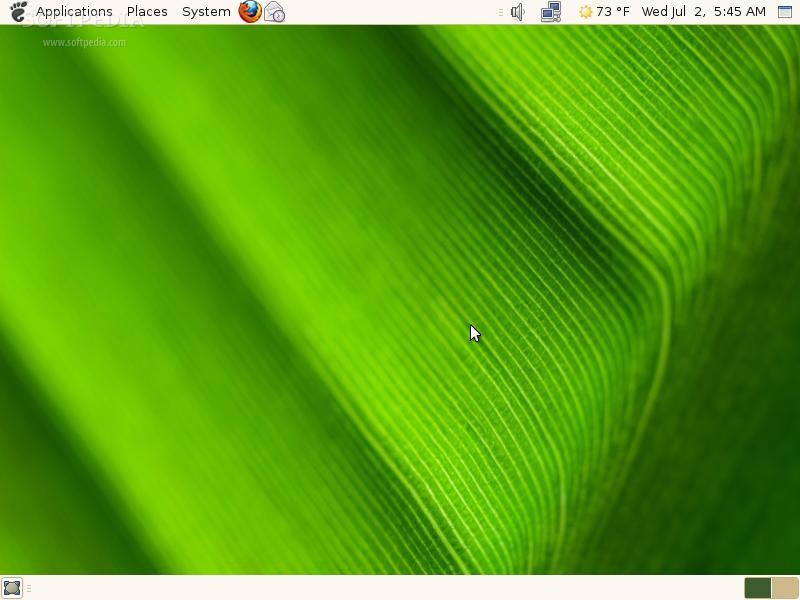
    Foresight Linux is a distribution based on Specifix Linux which showcases the latest and greatest from the GNOME project.

    Foresight Linux OS is a Distribution which showcases some of the latest and greatest from GNOME. Some of the things that may not be mature enough for some of the other distros.

    Some of the more innovative things are included, like beagle, f-spot, howl, and the latest hal. All of this plus some nice, clean default themes and artwork.

    Foresight Linux is built using the conary package management system. Conary is a way of managing software using a loosely knit group of network repositories. There are tools included to make it very simple to install and update packages.

    There are four basic operations involved in package management; querying, installing, upgrading, removing.

    Querying

    There are two type of searches you can do, local and remote. A local search queries localling installed software. A remote search queries network repositories for available software. Here are some examples:

    To see what version of firefox you have installed, you run the conary command with the "q" argument as well as the package name "firefox"

    foresight$ conary q firefox
    firefox 1.0-2-1


    This shows that firefox 1.0 build 3 is installed.

    To see what versions of firefox are available, you run the conary command with the "rq" argument as well as the package name "firefox"

    foresight$ conary rq firefox
    firefox 1.0-3-1


    This shows that firefox 1.0 build 3 is available. In this example, there is a newer version, so it can be upgraded

    Installing/Upgrading

    Installing and upgrading is basically the same operation, conary with the argument "update". To upgrade or install firefox:

    foresight$ conary update firefox
    foresight$

    Note: There will be no feedback on success, so if you just get returned to a prompt without an error it was successful. Some of these operations could take a while, so be assured if you don't see an error that things are working. Remember, these packages are being downloaded over the internet prior to installation.

    Removing

    To remove a package, conary with the argument "erase". To remove firefox:

    foresight$ conary erase firefox
    foresight$

    Note: As with update, there will be no feedback on success.

    For more information of how conary works, see the Conary Wiki. This is more of a developer reference, but has lots of good information.
    Checking for out of date packages

    There is a handy utility called "yuck" which compares your versions of packages to those available from the repository." Yuck can also update those packages (requires root), the default behavior is to simply display.

    foresight$ yuck

    This will display a list of available updates.

    foresight# yuck --update --except kernel

    This will update everything that is out of date with the exception of the kernel. You can specifiy a comma separated list of exceptions (no spaces). I would recommend always excluding the kernel and update that individually with "conary update --keep-existing kernel".

    This will also make it install a new kernel and leave the old one... so you system is still bootable if things aren't right. From time to time you can remove the unused kernel with "conary erase kernel=[version]".

    Here are some key features of "Foresight Linux":

    · Beagle :: Search tool that ransacks your personal information space to find whatever you're looking for.
    · f-spot :: Personal photo management.
    · Howl :: Cross-platform implementation of Zeroconf networking
    · Hal :: Hardware abstraction layer that makes hardware just work.
    · Conary :: A new way of looking at package management.
    · Oversite :: Web based systems management.
    · GNOME-Office :: Suite of Productivity Applications
    · Mono :: .NET implementation for Linux

    What's New in This Release: [ read full changelog ]

    · Foresight Linux 2.0.5 released. It features the latest GNOME 2.24 desktop environment, OpenOffice.org 3.0, and the latest X.Org server release, version 1.5.1.


    TAGS:

    operating system | linux distribution | UNIX distro | Foresight | linux | distribution


    HTML code for linking to this page:


    Go to top

    Windows tabGames tabDrivers tabMac tabLinux tabScripts tabMobile tabHandheld tabGadgets tabNews tab

    SUBMIT PROGRAM   |   ADVERTISE   |   GET HELP   |   SEND US FEEDBACK   |   RSS FEEDS   |   ENTER NEWS SITE   |   ENGLISH BOARD   |   ROMANIAN FORUM