
A bootable Live CD Linux operating system with built-in automatic hardware detection. #Berry OS #Linux distribution #Operating system #Berry #Linux #Distribution
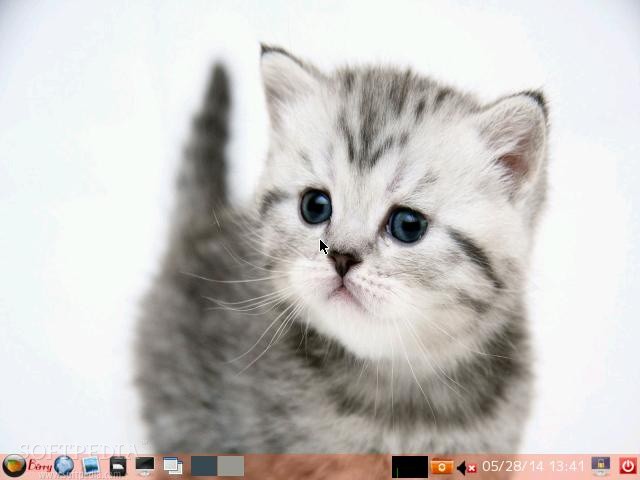
Berry Linux is an independent, freely distributed and open source Linux operating system that can be used as a rescue CD, a Linux demo, or an educational CD. Its strong points are automatic hardware detection, low on resources graphical desktop environment and support for a wide range of platforms.
The distribution can be easily downloaded from our website as a bootable Live CD ISO image that appears to run well on both 32-bit and 64-bit instruction set architectures. It is a ISO-hybrid image that can be written to either a CD disc or a USB flash drive of 512MB or higher capacity.
Default boot options include the ability to start the live environment with support for the English or Japanese languages, copy the contents of the CD image to RAM and run the live session from there ejecting the bootable medium, run the live system in safe mode, boot from a USB stick or the first disk, as well as to reboot or shutdown the machine.
Berry OS' desktop environment is minimal, familiar and cute, using a single taskbar located on the bottom edge of the screen from where the user can launch apps, cycle between virtual workspaces, as well as to interact with running programs and the system tray area.
Default applications include the Leafpad text editor, PCManFM file manager, GPicView image viewer, Mozilla Firefox web browser, Wicd network manager, LXTerminal terminal emulator, as well as various tools and utilities.
While some people build huge operating systems with hundreds of software packages and as many desktop environment as possible, others delight us with minimalistic and cute distributions of Linux that will always run well on any computer, such as Berry Linux (also known as Berry OS).
Berry Linux 1.31
add to watchlist add to download basket send us an update REPORT- runs on:
- Linux
- filename:
- berry-mini-1.31.zip
- main category:
- Linux Distributions
- developer:
- visit homepage
Zoom Client 6.0.3.37634

4k Video Downloader 1.5.3.0080 Plus / 4.30.0.5655

calibre 7.9.0

Windows Sandbox Launcher 1.0.0

Bitdefender Antivirus Free 27.0.35.146

7-Zip 23.01 / 24.04 Beta

ShareX 16.0.1

Context Menu Manager 3.3.3.1

Microsoft Teams 24060.3102.2733.5911 Home / 1.7.00.7956 Work

IrfanView 4.67

- Context Menu Manager
- Microsoft Teams
- IrfanView
- Zoom Client
- 4k Video Downloader
- calibre
- Windows Sandbox Launcher
- Bitdefender Antivirus Free
- 7-Zip
- ShareX
