
A sophisticated tool that allows you to install various Linux distributions from USB flash drives. #Install Ubuntu #Install Slackware #Install openSUSE #Linux Mint #Ubuntu #Slackware
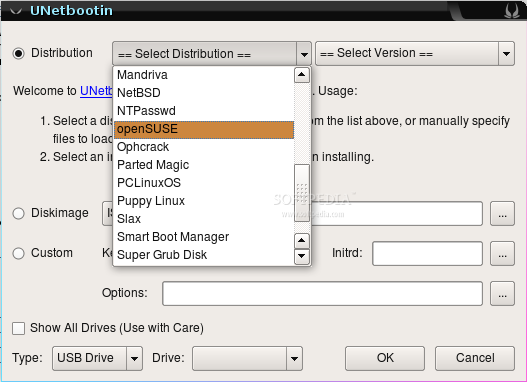
UNetbootin is an open source and multi-platform application that provides users with a straightforward way to create bootable Live USB flash drives with various Linux- and BSD-based operating systems that are distributed as hybrid ISO images.
It is a “Universal Netboot Installer” application runs on Linux, Microsoft Windows and Mac OS X operating systems, allowing people who want to install Linux on a computer that doesn't have a CD/DVD-ROM drive, such as ultra-portable laptops and netbooks.
First of all, we should mention that UNetbootin will always require elevated privileges for its operation, because of its built-in ability to write on hard disk drives, also known as a "frugal install." This means that every time you open the program it will ask for your password.
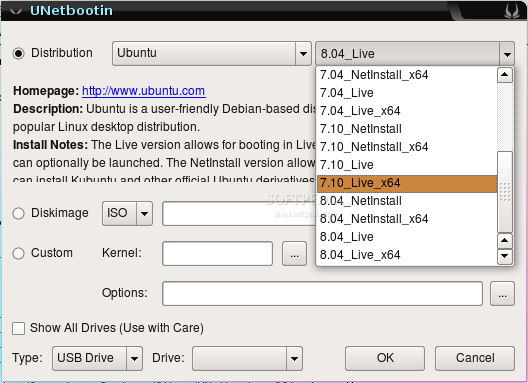
Second of all, the application presents users with two operation modes, Distribution and Diskimage. While the first one allows you to select a Linux or BSD flavor, as well as a version, the second one can be used if you already downloaded an ISO image.
Be aware that when using the first method, the application will downloaded the respective operating system from the Internet, which could take a while depending on your connection. Both methods require you to choose the installation type (USB Drive is recommended) and press the OK button to begin.
There are two installation types available, one that uses an attached USB flash drive and another one that can create a poor man's install (also known as frugal install) on your local disk drive, which means that it will just copy files of the selected distribution or ISO image allowing users to boot it using an existing bootloader. It can be removed by reopening the application.
Supported Linux distributions include Arch Linux, BackTrack, CentOS, CloneZilla, Damn Small Linux, Debian, Dreamlinux, Elive, Fedora, Frugalware, GeeXboX, gNewSense, Kubuntu, LinuxConsole, Linux Mint, Lubuntu, Mandriva, MEPIS, openSUSE, Puppy Linux, Sabayon, Salix, Slax, SliTaz, xPUD, Xubuntu, Zenwalk, and Ubuntu.
While it also supports the FreeBSD, FreeNAS and FreeDOS OSes, UNetbootin can be used to load some well known system rescue/recovery tools like SystemRescueCD, Dr.Web Antivirus, Parted Magic, Super Grub Disk, F-Secure Rescue CD, Kaspersky Rescue Disk, Ophcrack, NTPasswd, Gujin, and Smart Boot Manager.
UNetbootin 657
 Softpedia Editor's Pick
add to watchlist
add to download basket
send us an update
REPORT
Softpedia Editor's Pick
add to watchlist
add to download basket
send us an update
REPORT
- runs on:
- Linux
- filename:
- unetbootin-linux64-657.bin
- main category:
- System
- developer:
- visit homepage
Microsoft Teams 24060.3102.2733.5911 Home / 1.7.00.7956 Work

Bitdefender Antivirus Free 27.0.35.146

ShareX 16.0.1

Zoom Client 6.0.3.37634

4k Video Downloader 1.5.3.0080 Plus / 4.30.0.5655

Windows Sandbox Launcher 1.0.0

calibre 7.9.0

IrfanView 4.67

7-Zip 23.01 / 24.04 Beta

Context Menu Manager 3.3.3.1

- IrfanView
- 7-Zip
- Context Menu Manager
- Microsoft Teams
- Bitdefender Antivirus Free
- ShareX
- Zoom Client
- 4k Video Downloader
- Windows Sandbox Launcher
- calibre