
KBackup is a program that lets you back up any directories or files.. #Backup directories #Backup files #Archiving directories #KBackup #Backup #Archiving
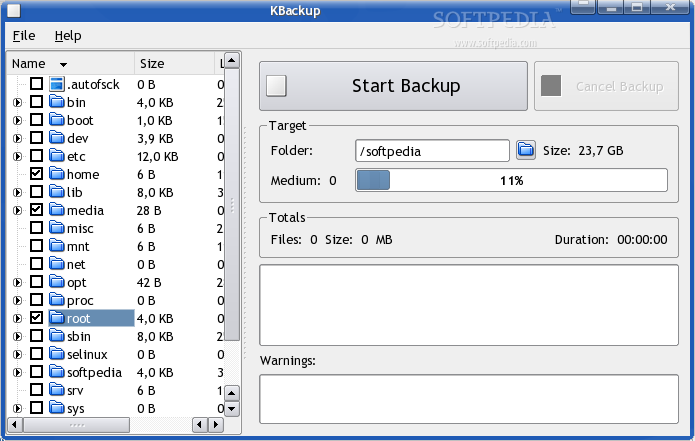
KBackup is a program that lets you back up any directories or files, whereby it uses an easy to use directory tree to select the things to back up.
The program was designed to be very simple in its use so that it can be used by non-computer experts.
The storage format is the well known TAR format, whereby the data is still stored in compressed format (bzip2 or gzip).
KBackup also includes a german translation for the user interface.
What's New in This Release:
� correctly limit slice size: � limited by the target directory (when we store directly into a local dir) � limited by the "tmp" dir when we create a tmp file for later upload via KIO � limited by Qt3 (4GB on 32bit) � limited by user defined maxSliceMBs � sort directories first in treeview � correctly sort by size and timestamp in treeview � check if a file that is archived into the backup is not the backup itself
What's new in KBackup 0.8:
- Add dirpath wildcard filters to skip complete directories
KBackup 0.8
add to watchlist add to download basket send us an update REPORT- runs on:
- Linux
- main category:
- System
- developer:
- visit homepage
Microsoft Teams 24060.3102.2733.5911 Home / 1.7.00.7956 Work

IrfanView 4.67

ShareX 16.0.1

Windows Sandbox Launcher 1.0.0

Zoom Client 6.0.3.37634

calibre 7.9.0

4k Video Downloader 1.5.3.0080 Plus / 4.30.0.5655

Context Menu Manager 3.3.3.1

Bitdefender Antivirus Free 27.0.35.146

7-Zip 23.01 / 24.04 Beta

- Context Menu Manager
- Bitdefender Antivirus Free
- 7-Zip
- Microsoft Teams
- IrfanView
- ShareX
- Windows Sandbox Launcher
- Zoom Client
- calibre
- 4k Video Downloader
