
Video Surveillance, Intuitive, Remote control, Flexible, Detectors, etc.. #Video surveillance #Remote control #Video #Surveillance #Remote #Control
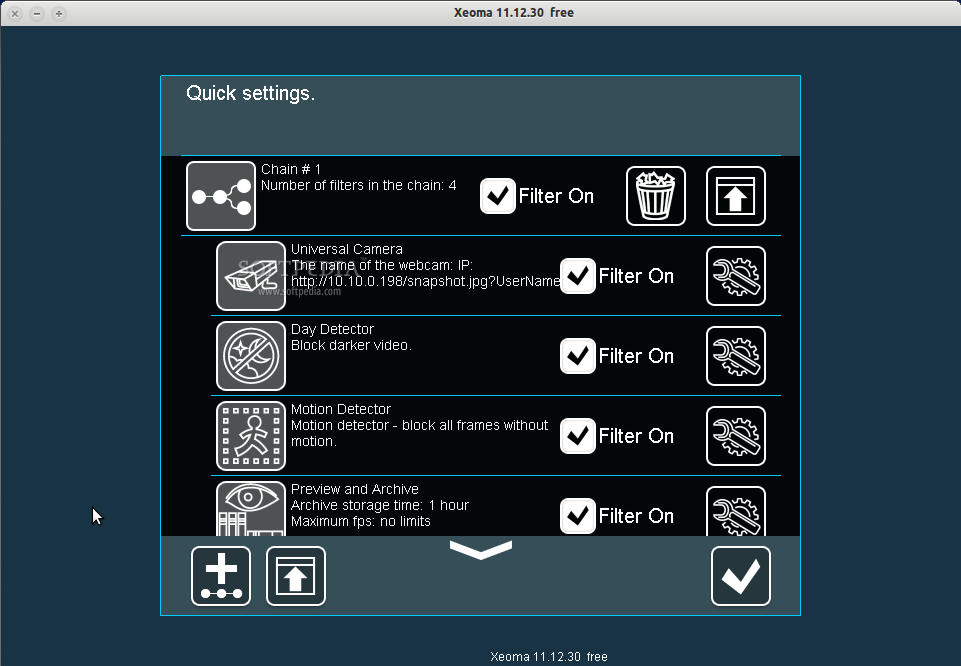
Xeoma is a video surveillance system with intuitive interface and flexible graph. It supports any IP and web cameras, Internet cameras. Handy archive works in a cycle mode (old recordings are gradually deleted). You can use built-in player to view the archived video with sound.
Remote access allows to control the system online. Built-in motion detector enables you to set up video security system to protect your home or office. If you want to monitor during daylight hours only, use the day detector. Xeoma is touchscreen compatible. Users can operate the program with just a finger. No mouse or keyboard is needed. Program doesn't require installation and admin rights. It can start working straightway after downloading.
The initial program settings take only several seconds. Typical applications include video monitoring of your home and business, keeping an eye on your child playing or sleeping, controlling your personnel activity, having an eye on your car and other valuables, using as a perimeter security system, watching your babysitter and more.
The program can work in three modes: free, trial and commercial.
1. Free mode allows to use any 4 filters including one source (video or audio) for an unlimited period of time and to control the program only from the computer where it is installed. 2. In trial mode you can use an unlimited number of filters in any combinations. Also, the remote access is available. Specified settings are active for 5 hours since they are defined. It will help you to feel the program flexibility and ease. 3. Choose commercial mode if 4 filters are not enough or you want to use full-featured version for an unlimited period of time.
It is available after buying any number of extra filters. This mode allows you to use any filters in any combinations. The only limit is the total number of used filters (4 free plus purchased filters). The program can be controlled online as well. You save money buying only needed functionality.
Xeoma 12.11.23
add to watchlist add to download basket send us an update REPORT- runs on:
- Linux
- main category:
- Security
- developer:
- visit homepage
IrfanView 4.67

Context Menu Manager 3.3.3.1

7-Zip 23.01 / 24.04 Beta

Zoom Client 6.0.3.37634

ShareX 16.0.1

calibre 7.9.0

4k Video Downloader 1.5.3.0080 Plus / 4.30.0.5655

Windows Sandbox Launcher 1.0.0

Bitdefender Antivirus Free 27.0.35.146

Microsoft Teams 24060.3102.2733.5911 Home / 1.7.00.7956 Work

- Windows Sandbox Launcher
- Bitdefender Antivirus Free
- Microsoft Teams
- IrfanView
- Context Menu Manager
- 7-Zip
- Zoom Client
- ShareX
- calibre
- 4k Video Downloader