
A Python accessibility explorer specifically designed for the GNOME desktop environment. #Python debugger #Accessibility explorer #GNOME debugger #Python #Accessibility #Explorer
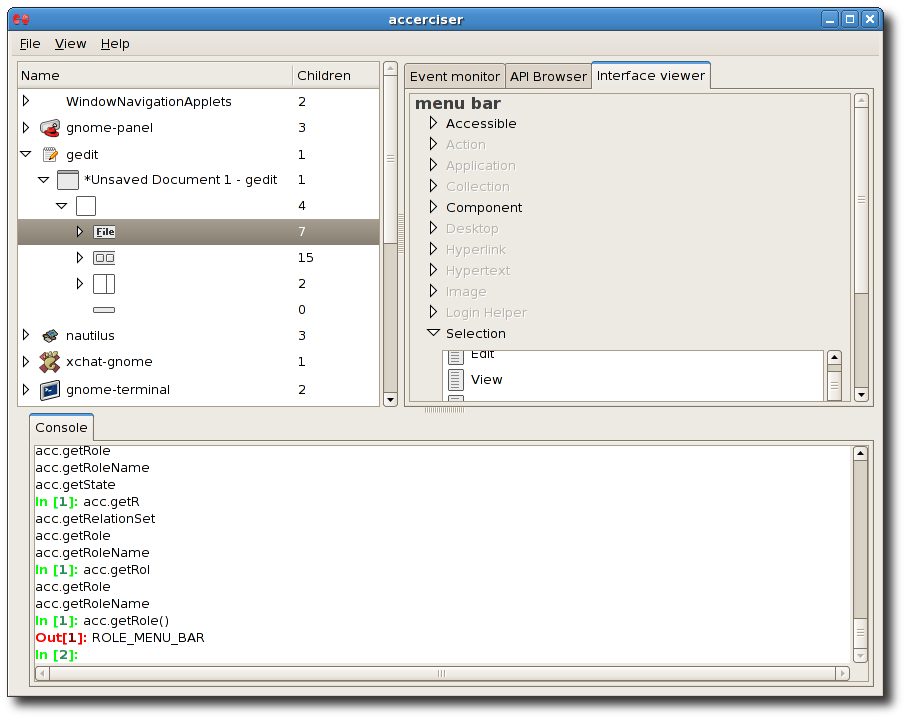
Accerciser is an open source interactive application that provides users with a modern accessibility explorer utility for the Python programming language. It is fully compatible with the GNOME desktop environment.
The application makes use of the Assistive Technology Service Provider Interface (AT-SPI) technology to control and inspect widgets. It enables users to verify if a Python project provides accurate information to automated test frameworks and assistive technologies.
It uses a straightforward plugin architecture that has been engineered to empower users to generate specific views of accessibility information. Accerciser is described by its developers as a next-gen at-poke tool, designed to inspection and test accessibility aware apps.
Similar to the Orca screen reader and magnifier application, this software uses the pyORBit Python binding for the ORBit2 CORBA 2.4-compliant ORB (Object Request Broker) to talk AT-SPI with other programs, while avoiding the old CSPI module.
Its sophisticated plugin framework allows Python developers to automatically load newly created Python modules as plugin panes. Other highlights include an interactive Python shell, an event monitor plugin, an API browser plugin, an interface browser plugin, global keyboard shortcuts, a customizable user interface layout, and Yelp documentation.
Besides Python and the usual GNOME libraries, the application requires the python-gtk2 2.8 or later, python-gnome2 2.14 or higher, python-pyatspi2, python-rsvg, python-wnck and gconf2 packages on a Debian-based distribution.
It will require the pygtk2 2.8 or later, gnome-python2 2.12 or higher, pyatspi, gnome-python2-rsvg, gnome-python2-libwnck 2.14 or later, and GConf2 modules on a Red Hat-based Linux operating system.
The Accerciser program proved to be a very good and full-featured interactive Python accessibility explorer for the GNOME desktop environment. However, it can also work on other open source desktop environments, such as Xfce, MATE, Cinnamon, LXDE, Openbox, Fluxbox, and even KDE.
What's new in Accerciser 3.34.3:
- New And Updated Translations:
- French
- Spanish
Accerciser 3.34.3
add to watchlist add to download basket send us an update REPORT- runs on:
- Linux
- main category:
- Programming
- developer:
- visit homepage
Bitdefender Antivirus Free 27.0.35.146

IrfanView 4.67

Zoom Client 6.0.0.37205

4k Video Downloader 1.5.3.0080 Plus / 4.30.0.5655

7-Zip 23.01 / 24.04 Beta

Microsoft Teams 24060.2623.2790.8046 Home / 1.7.00.7956 Work

calibre 7.8.0

paint.net 5.0.13 (5.13.8830.42291)

ShareX 16.0.1

Windows Sandbox Launcher 1.0.0

- paint.net
- ShareX
- Windows Sandbox Launcher
- Bitdefender Antivirus Free
- IrfanView
- Zoom Client
- 4k Video Downloader
- 7-Zip
- Microsoft Teams
- calibre