
JarBuilder is a useful tool for Java programmers which allows you to easily create jar files.. #Java programmers #Java compiler #Jar builder #Java #Jar #Builder
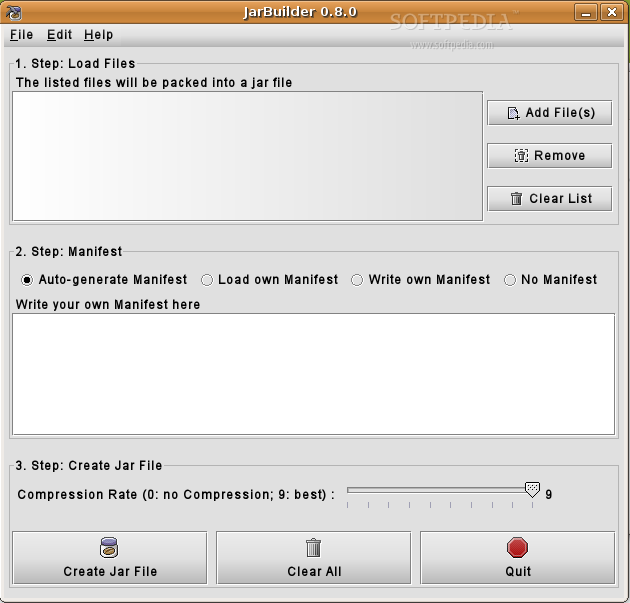
JarBuilder is a useful tool for Java programmers which allows you to easily create jar files. It is written in Java providing a nice Swing GUI.
Although JarBuilder isn't programmed as a classic wizard, java programmers are able to build their own jar files with JarBuilder in three steps: First you selected the files you want to include into the jar file, then you can load or write your manifest file. at least JarBuilder can do an automatic search for main classes for you and add the correct statement into the manifest file. finally you select the compression level of the jar file and then JarBuilder creates the file for you.
As a java developer you can build your jar files manually or with tools like ant. But if you have small projects JarBuilder can be much more faster than the other tools. For example, you don't have to write a manifest file just for the Main-Class statement.
Requirements:
� Java Runtime Environment (JRE) 1.5 or later
JarBuilder is written in Java and should run on every java supported platform. Just unzip your downloaded archive and start the JarBuilder.jar file either by double clicking on the symbol (on some platforms) or by entering the following command:
java -jar JarBuilder.jar
Note: for the kunststoff look & feel support, the kunststoff.jar file must be in the same directory as the JarBuilder.jar file.
What's New in This Release:
� new version numeration � new class VarUtils for some various methods and constants � new class JBMenu that creates the menu � new class JBCore for the main operations � replaced deprecated methods � new classes for the various JPanels � JSlider for exact compression rate setting � new interfaces for the menu and button event handling � new method for file path string resizing � the whole source is now in the package ch.fulgur.jarbuilder � ant build.xml file � some bugs removed
JarBuilder 0.8.0
add to watchlist add to download basket send us an update REPORT- runs on:
- Linux
- filename:
- JarBuilder-0.8.0.tar.gz
- main category:
- Programming
- developer:
- visit homepage
Zoom Client 6.0.3.37634

Windows Sandbox Launcher 1.0.0

7-Zip 23.01 / 24.04 Beta

4k Video Downloader 1.5.3.0080 Plus / 4.30.0.5655

Microsoft Teams 24060.3102.2733.5911 Home / 1.7.00.7956 Work

IrfanView 4.67

Bitdefender Antivirus Free 27.0.35.146

Context Menu Manager 3.3.3.1

ShareX 16.0.1

calibre 7.9.0

- Context Menu Manager
- ShareX
- calibre
- Zoom Client
- Windows Sandbox Launcher
- 7-Zip
- 4k Video Downloader
- Microsoft Teams
- IrfanView
- Bitdefender Antivirus Free
