
An open source and cross-platforms agenda manager software for Linux/UNIX operating systems. #Event manager #Task scheduler #To-do manager #Event #Task #Manager
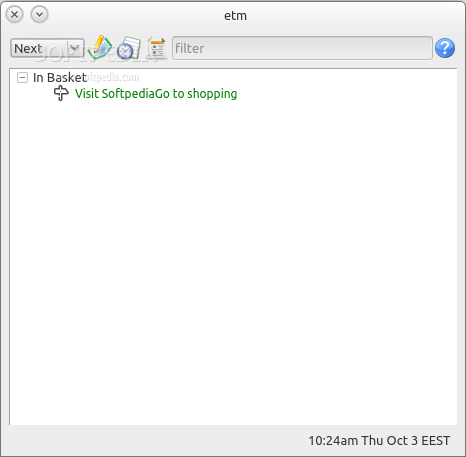
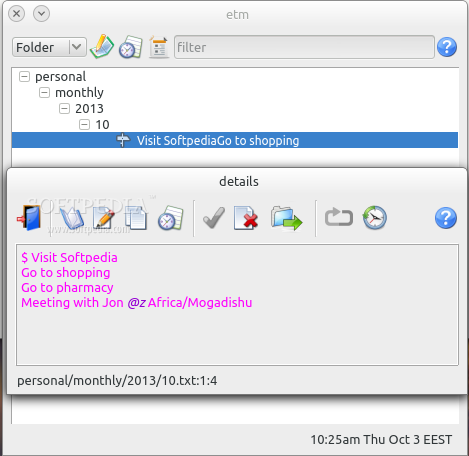
etm-tk (formerly etm-qt) is an open source application that allows users to manage events and to-do items in a simple and efficient way. It uses plain text files in order to store the tasks and events.
Key features include a powerful and flexible alarm repetition, a command-line interface for viewing the agenda, easily create, modify and view tasks, events or to-do items, as well as repetition of both events and tasks.
It supports fuzzy parsing for dates and times, quick completion of entry fields, tab completion, sorting of items, priorities, external commands at scheduled times, iCalendar exporting, CSV (Comma-Separated Values) exporting, time reports, alert queue, and much more.
Thanks to its easy to use and modern graphical user interface, the application provides users with an easy and flexible way to quickly and efficiently enter items.
It also comes with a plethora of built-in alarms via sound, display, voice, process, email, and text message. Supported operating systems include GNU/Linux, Mac OS X and Microsoft Windows.
The application is written entirely in the Python programming language, except for the graphical user interface, which is written in the Tk GUI toolkit. It will require a handful of Python packages, as well as the Tk libraries.
It is also important to mention here that the program is actually a remake of the old etm application, written by the same developer, but ported to the Tk platform-independent GUI framework. It can be easily installed from the default software repositories of many Linux distributions.
In conclusion, etm-tk is a decent piece of software for managing your daily tasks and events in a modern and straightforward manner. It will store all data items in plain text files and does not require filing of useless forms like other to-do/calendar apps do.
What's new in etm-tk 3.0.34:
- New version based on Tk instead of Qt.
etm-tk 3.0.34
add to watchlist add to download basket send us an update REPORT- runs on:
- Linux
- filename:
- etmtk-3.0.34.tar.gz
- main category:
- Office
- developer:
- visit homepage
ShareX 16.0.1

Context Menu Manager 3.3.3.1

Bitdefender Antivirus Free 27.0.35.146

Zoom Client 6.0.3.37634

7-Zip 23.01 / 24.04 Beta

calibre 7.9.0

4k Video Downloader 1.5.3.0080 Plus / 4.30.0.5655

Windows Sandbox Launcher 1.0.0

Microsoft Teams 24060.3102.2733.5911 Home / 1.7.00.7956 Work

IrfanView 4.67

- Windows Sandbox Launcher
- Microsoft Teams
- IrfanView
- ShareX
- Context Menu Manager
- Bitdefender Antivirus Free
- Zoom Client
- 7-Zip
- calibre
- 4k Video Downloader