
An application that allows anyone to easily create databases, inspired by MS Access. #Integrated environment #Microsoft Access replacement #Integrated environment #Kexi #MS Access #Access
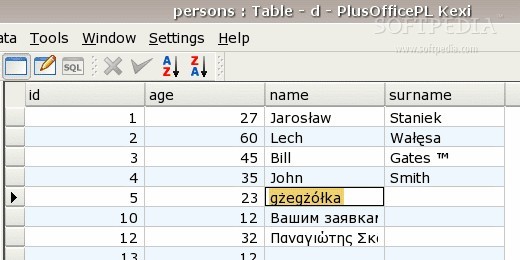
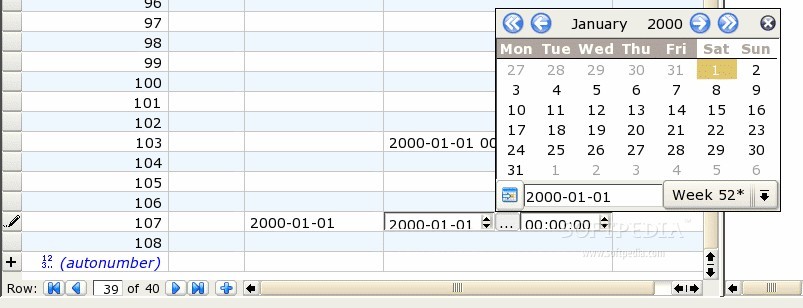
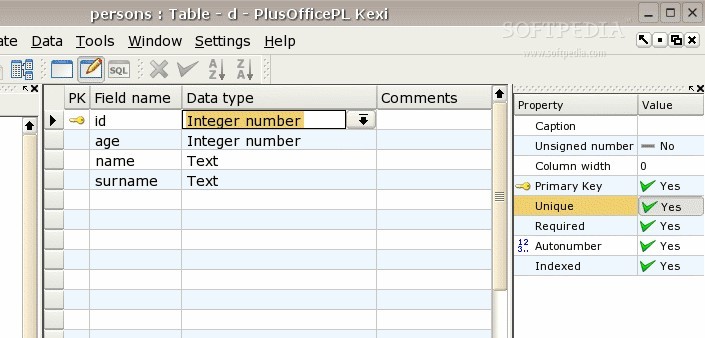
Kexi is an open source software project distributed as part of the popular Calligra office suite and designed to act as a visual database creator, allowing anyone to effortlessly create database schemas, as well as to process, query and insert data.
Key features include the ability to create forms that provide a custom interface to your data, store database objects, including forms, tables and queries in the database, support for parameterized queries, data sorting, support for "Object" data, use combo boxes for displaying and designing relational data, support for importing and exporting data to/in the CSV format, as well as a User Mode.
The application comes with built-in support for the SQLite, MySQL and PostgreSQL database servers, allowing the user to store and share all the design and data. No installation or maintenance is required.
Kexi is considered as the perfect replacement for the commercial Microsoft Office Access database management system from Microsoft, as well as for the Oracle Forms and FileMaker database creation software.
With Kexi, you will be able to migrate database tables from MySQL, PostgreSQL and Microsoft Access. It is also possible to export data to a PostgreSQL or MySQL server.
Kexi is a portable and cross-platform application that supports all GNU/Linux distributions. It was successfully tested on Ubuntu, Arch Linux, Debian, openSUSE, Fedora, Red Hat Enterprise Linux, CentOS, Mageia, Linux Mint, and other popular distros. The FreeBSD and Solaris operating systems are also supported.
Kexi is not a standalone application, which means that you can download it only as part of the Calligra office suite, which can be easily installed on any of the aforementioned Linux distributions. Both 32-bit and 64-bit architectures are supported at this time.
What's new in Kexi 3.2.0:
- Focus of the 3.2 release has been put on improving stability of KEXI and KEXI frameworks, KDb, KProperty, KReport. API of these frameworks is backward compatible with the 3.1.0 version. It is also is guaranteed to be stable until the 4.0.0 release.
- Since version 3.1.0 KEXI and the frameworks received about 80 improvements and bug fixes.
- Documentation of the frameworks has also improved and is available at api.kde.org, although tutorials and reference have to be added in coming releases. KEXI user's manual is outdated as it covers older versions 2.x. We're sorry for the inconvenience and invite volunteers to help out.
Kexi 3.2.0
add to watchlist add to download basket send us an update REPORT- runs on:
- Linux
- main category:
- Office
- developer:
- visit homepage
ShareX 16.0.1

Zoom Client 6.0.3.37634

Bitdefender Antivirus Free 27.0.35.146

Context Menu Manager 3.3.3.1

7-Zip 23.01 / 24.04 Beta

Microsoft Teams 24060.3102.2733.5911 Home / 1.7.00.7956 Work

IrfanView 4.67

Windows Sandbox Launcher 1.0.0

calibre 7.9.0

4k Video Downloader 1.5.3.0080 Plus / 4.30.0.5655

- Windows Sandbox Launcher
- calibre
- 4k Video Downloader
- ShareX
- Zoom Client
- Bitdefender Antivirus Free
- Context Menu Manager
- 7-Zip
- Microsoft Teams
- IrfanView