
GNU Image Manipulation Program, a complex and multi-platform image manipulation software. #Image processing #Image conversion #Image optimization #Conversion #Processing #Optimization
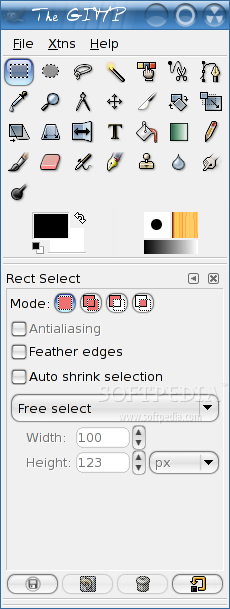
GIMP (GNU Image Manipulation Program) is an open source application that provides users with a free alternative to commercial image editing programs, such as Adobe Photoshop or Corel Painter.
It’s a sophisticated application, specifically designed for image retouching and editing or for creating stunning digital paintings using state-of-the-art functionality. The application can be used for photo montages, free-form drawing, image conversion, cropping, resizing, as well as more complex tasks.
Key features include support for layers, layer masks and channels, color management, automation, basic image editing, paths and selections, filters, scripts and plugins. Supported operating systems include Linux, Microsoft Windows and Mac OS X.
While the program can import and export JPEG, PNG, GIF, TIFF, BMP, SVG, and ICO image file formats, it can also read PDF and PostScript documents, as well as various other file formats from well known applications like Adobe Photoshop or Corel Paint Shop Pro.
A wide range of built-in filters will allow users to blur, enhance, distort, render and combine images, as well as to add shadows, borders, noise, maps, animation, and alpha to logo effects. The plugin architecture can be used to extend the default functionality of the application.
Two GUI modes are available, the default one comprised of the main window and two separate dockable dialogs that contain all the tools and layer controls, and a single-window mode.
The graphical user interface is written with the well known GTK+ GUI toolkit, allowing users to install the software on GTK-compatible desktop environments, such as GNOME, Xfce, Cinnamon or MATE.
In conclusion, GIMP is an amazing project that supports multiple operating systems, it’s translated into several languages, and can be used as a simple digital painting tool, a batch image processing system, an image renderer, as well as a complex photo retouching software.
GIMP 2.10.14
 Softpedia Editor's Pick
add to watchlist
add to download basket
send us an update
REPORT
Softpedia Editor's Pick
add to watchlist
add to download basket
send us an update
REPORT
- runs on:
- Linux
- main category:
- Multimedia
- developer:
- visit homepage
IrfanView 4.67

7-Zip 23.01 / 24.04 Beta

Windows Sandbox Launcher 1.0.0

Zoom Client 6.0.3.37634

Context Menu Manager 3.3.3.1

Microsoft Teams 24060.3102.2733.5911 Home / 1.7.00.7956 Work

ShareX 16.0.1

calibre 7.9.0

4k Video Downloader 1.5.3.0080 Plus / 4.30.0.5655

Bitdefender Antivirus Free 27.0.35.146

- calibre
- 4k Video Downloader
- Bitdefender Antivirus Free
- IrfanView
- 7-Zip
- Windows Sandbox Launcher
- Zoom Client
- Context Menu Manager
- Microsoft Teams
- ShareX