
Improve digital images with this powerful and open source utility for Linux operating systems. #Retouch photo #Image editor #Collection manager #Image #Photo #Retouch
Fotoxx is an all-in-one complex image editor and collection manage open source graphical software. It provides users with powerful tools for manipulating image files made with a digital camera.
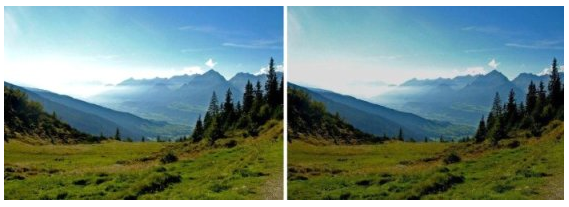
The application features brightness and contrast functionality, allowing users to change bright and dark image areas independently, the ability to reduce haze and intensify colors, as well as HDR support, so you can merge underexposed and overexposed images, while improving detail in both bright and dark areas.
It can also create panorama images, allowing users to stitch multiple images together, as well as the usual crop, rotate, flip, resize, red-eye removal, sharpen fuzzy edges, reduce noise in low-light photos, stretch, and distort functionality.
Another interesting feature is the ability to use 24 bits per color in internal edit calculations. It removes color castes, reduces sharpen and blur, expands or flattens brightness distribution, fixes brightness uniformity issues, and removes dark spots on scanned slides.
The program supports viewing of RAW camera images (NEF, CR2, etc.), as well as all other image formats, including JPG, PNG, DNG, GIF, TIFF, BMP, etc. in both 8 and 16 bits color. Users can also use the application to make calibrated color adjustments, repair dark or hot pixels in photos, removes chromatic aberration, edit individual pixels, convert between different color profiles, convert colors images to black & white, add watermark text to images, as well as to fix straighten curves, perspective or any other special effects.
Besides the HDR (High-Dynamic-Range) functionality, Fotoxx can create photos with a greater focus depth by combining close and far focus images, a function called HDF. Other functions include the ability to reduce the color depth of a photo, to convert images to drawings, add embossing effects, create tiles of any size, create Roy Lichtenstein effects, simulate paintings, convert photos to cartoon-like drawings or mosaic.
All in all, Fotoxx is a great photo editor for the enthusiast photographer. It can be used to do so many tasks that it may become overwhelming at some point. But it does a very good job!
Fotoxx 19.4
add to watchlist add to download basket send us an update REPORT- runs on:
- Linux
- filename:
- fotoxx-19.4.tar.gz
- main category:
- Multimedia
- developer:
- visit homepage
ShareX 16.0.1

4k Video Downloader 1.5.3.0080 Plus / 4.30.0.5655

Bitdefender Antivirus Free 27.0.35.146

7-Zip 23.01 / 24.04 Beta

calibre 7.9.0

Microsoft Teams 24060.3102.2733.5911 Home / 1.7.00.7956 Work

Context Menu Manager 3.3.3.1

Windows Sandbox Launcher 1.0.0

IrfanView 4.67

Zoom Client 6.0.3.37634

- Windows Sandbox Launcher
- IrfanView
- Zoom Client
- ShareX
- 4k Video Downloader
- Bitdefender Antivirus Free
- 7-Zip
- calibre
- Microsoft Teams
- Context Menu Manager