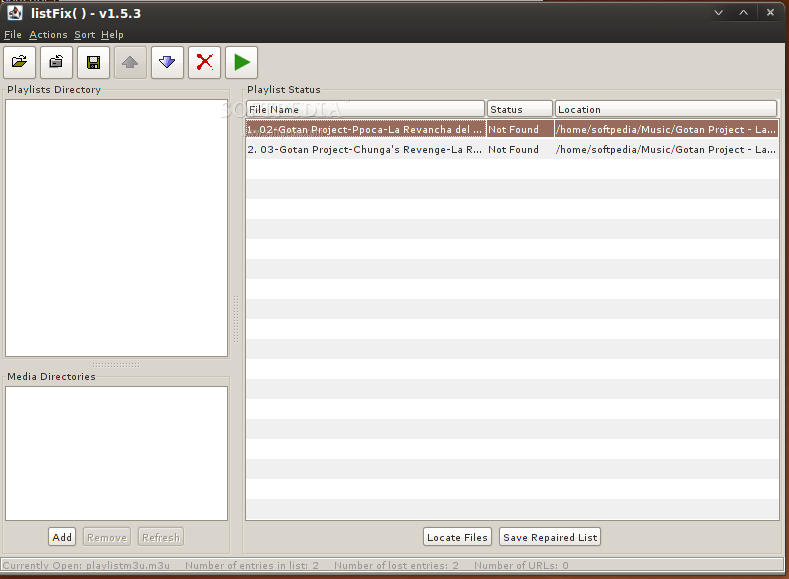
Have you ever spent some time making a playlist, only to have it break when you reorganize your files? listFix() is a Java application that solves this problem by finding the missing entries in your playlists automatically. Tell it where you keep your media files, load in the playlist you want to fix, and hit the locate button. The program will search your media library for the file and update the playlist accordingly when it finds a match.
If a few files are still missing, it's possible they were renamed. listFix() has a simple way of finding these files as well, by scanning your media library for files that have a similar name to the one in your playlist.
Product's homepage
Here are some key features of "listFix()":
· M3U/M3U8/PLS Support
· Find lost/missing playlist entries
· Insert/Move/Delete/Replace/Append entries
· Insert/Append Playlists
· Sort the playlist by filename, status, and location
· Randomize the list
· Remove duplicates and/or missing tracks from the playlist
· Copy all songs in a list to a specified directory
· Advanced search for renamed tracks
· Launch an entry or playlist in the system's default media program
· Support for URL & UNC path entries
· Save playlists with absolute or relative references
· Batch repairing of playlists
· Batch find closest matches (for renamed files)
· Batch repair Winamp Media Library playlists
Requirements:
· Java 2 Standard Edition Runtime Environment
· M3U/M3U8/PLS-formatted playlists
· UNC paths currently supported only on Windows (Linux users can smbmount a network drive and then use the mount point as a media directory)
What's New in This Release: [ read full changelog ]
Notes:
· Version 2.2.0 is dedicated to my late grandfather, Robert "Ruby" Caron. We love & miss you Pep.
· This version was a long time in coming, but it's chock-full of usability enhancements that makes it easier to work on multiple files at once, to manage multiple open playlists, and to interact with listFix() via dragging. Now it takes less time than ever to fix every broken playlist in your collection!
· This release marks the first time we are providing both a JAR file and an EXE file for download. The EXE file is basically a wrapper around the JAR for Windows users who aren't used to running Java programs. It will take you to Java's download page if you don't have the JRE installed, which isn't something we could do with a standard JAR. Some Windows systems fail to register double-click support for JAR files as well, and the EXE will run when double-clicked no matter what.
· Thanks to my wife Sarah, John Peterson for building out WPL support, and those generous souls who have donated.
· As always, please report any bugs you find.
New Features:
· Support for reading/writing WPL playlists (thanks to John Peterson).
· Can now run "Closest Matches Search" on multiple playlists at once.
· Drag-n-drop support for dragging files in from the operating system
· Playlists & Media Files can be dragged into an open playlist
· Playlists can be opened by dragging them into the "home screen" or the menu bar.
· Window position & size are now saved at exit & restored on startup.
Overhauled the config file structure:
· Broke out a new file for options.
· Added a new error log file for better debugging.
· Window size & position stored in its own file.
· Relocated all files to ~/.listFix() along with a new errorLog file, rather than at the root of the user's home directory.
· Config files from old versions are imported and removed when first running this new version.
· Running an old version again will re-create config files in the old location, and this version will leave those alone once new config files exist.
· Colored status circles in the playlist editor now contain icons so the color blind can easily distinguish between them (they've had tooltips since version 2.0.0).
· New red "skip" buttons in the playlist editor for jumping to the next/previous missing entry; handy when working on large lists with missing entries that have lots of fixed entries between them.
· Replaced the wrapping tabs layout with a flat one and introduced a new tabbed component that has a dropdown to select from all open tabs.
· Middle-clicking a tab now closes it.
New right-click menu on tab titles:
· Close All Tabs
· Close All Other Tabs
· Repair Open Tabs (runs a batch exact match search on all the open lists)
· A font chooser in the options screen for setting the program-wide font. This should help with internationalization issues, as users can choose a font that they know can support the characters used in their filenames.
· A new option for how many matches to find during find closest search, starting at 20. This is to allow for configurable memory usage, so we don't use too much memory on systems with huge media libraries, or very small amounts of RAM.
· Open selected playlists in the playlists panel with the "Enter" key.
· First command line argument support, for passing a list of playlists to open on startup.
· The escape key now triggers the cancel button in all cancellable dialogs.
· Tooltip on location column for full path so it's easy to see the whole location when the file name column is taking up most of the display.
· When "save playlists with relative file references" is enabled, there is now a check to see if a mapped network drive and a UNC path are really aliases for the same location, and if so, now saves with relative paths despite the apparent mismatch. (example: \\foo\bar\testDir\testFile.tst is the same location as Z:\testDir\testFile.tst if Z is mapped to
· \\foo\bar\, so when saving to either Z:\testDir or \\foo\bar\testDir, \\foo\bar\testDir\testFile.tst & Z:\testDir\testFile.tst would both be written out as .\testFile.tst)
· Added "Set", "Exact", & "Closest" buttons in the playlists panel, and "Open" & "Refresh" in that panel's right-click menu.
· The "Set" button launches the open screen where the directory to be shown in the "Playlist Directory" panel. This will hopefully help to clarify the usage of this panel.
· Now launching "Find Closest Matches" when double-clicking on a missing entry.
· The closest match search algorithm now breaks CamelCasedWords into separate tokens when comparing two filenames and calculating a score.
· "Batch Find Closest Matches" on a the right-click menu in the playlist editor has been removed. The "Fix Everything Button" runs this after an exact match search, and now "Find Closest Matches" will kick off batch mode if multiple entries are selected.
UI Tweaks & Bug Fixes:
· Removed the open icon in the top-right open the playlist editor.
· Items in the playlist directory list and the playlist editor are now de-selected when you click on nothing.
· Fixed a bug where saving a list with relative references would fail if the list contained an absolute reference that didn't exist on disk.
· Fixed a bug where opening a playlist with relative references and saving it as absolute, when "always use UNC" was enabled, would result in entries with "mapped drive" paths, even when the media directory was using UNC paths.
· Fixed a bug where opening a relative playlist and saving it relatively in a new location would result in entry paths that first led you to the playlist's original location, then back to the song.
· Now stripping invalid filename characters from winamp playlist names when extracting them so we don't fail to write any files during extraction.
· Fixed an issue with resolving relative entries in the same directory as the playlist itself, as the assumed path was '/' rather than '.'