
A simple audio file converter supporting many formats. #Audio converter #Mp3 converter #Wav converter #Mp3 #Wav #Ogg
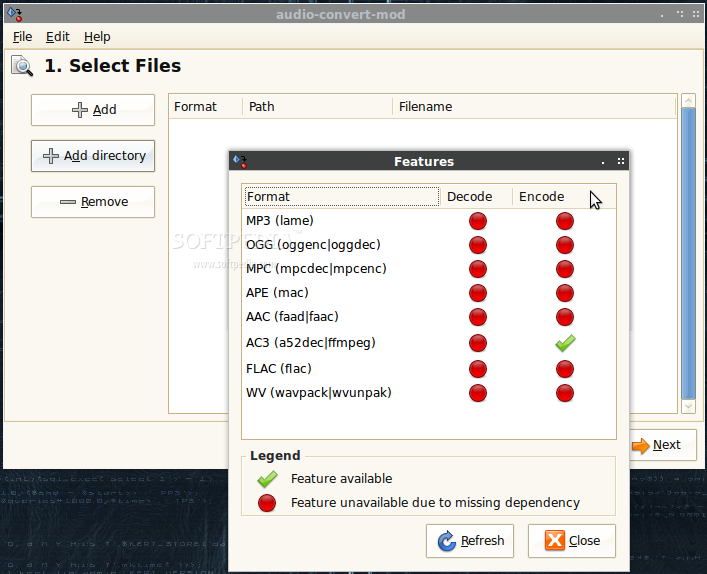
audio-convert-mod is a simple audio file converter that supporting many formats. At just a right-click, you can convert any amount of music files to MP3, WAV, AAC, Ogg and more. audio-convert-mod was designed with the same principles as fwbackups - keeping things simple. Using audio-convert-mod is simple but it offers many powerful features.
audio-convert-mod required these packages to function. Any additional encoders and decoders are optional and listed below. To find out what encoders and decoders are currently installed, select File > Show Format Capabilities from inside audio-convert-mod.
* gawk * file, at least version 4.16 * automake and intltool for building from source * python, at least version 2.4 * id3tag for MP3 metadata
Requirements: Decoders
* lame for MP3 * vorbis-tools for OGG * musepack-tools for Musepack (MPC) * flac for FLAC * mac for Monkey's Audio (APE) * faac AAC / M4A / MP4 * wavpack for Wavpack (WV) * a52dec for Dolby Digital (AC3)
Requirements: Encoders
* lame for MP3 * vorbis-tools for OGG * musepack-tools for Musepack (MPC) * flac for FLAC * mac for Monkey's Audio (APE) * faad for AAC / M4A / MP4 * wavpack for Wavpack (WV) * ffmpeg for Dolby Digital (AC3)
System requirements
audio-convert-mod 3.46.0
add to watchlist add to download basket send us an update REPORT- runs on:
- Linux
- main category:
- Multimedia
- developer:
- visit homepage
calibre 7.9.0

ShareX 16.0.1

4k Video Downloader 1.5.3.0080 Plus / 4.30.0.5655

paint.net 5.0.13 (5.13.8830.42291)

7-Zip 23.01 / 24.04 Beta

Microsoft Teams 24060.3102.2733.5911 Home / 1.7.00.7956 Work

Windows Sandbox Launcher 1.0.0

Zoom Client 6.0.0.37205

Bitdefender Antivirus Free 27.0.35.146

IrfanView 4.67

- Zoom Client
- Bitdefender Antivirus Free
- IrfanView
- calibre
- ShareX
- 4k Video Downloader
- paint.net
- 7-Zip
- Microsoft Teams
- Windows Sandbox Launcher