Search Perform an advanced search query SOFTPEDIA
 
SOFTPEDIA
Updated one minute ago
HomeSubmit a program for being reviewedAdvertise on our websiteGet help on surfing our websitesSend us your feedbackGet information about our XML/RSS backend and how to use itBrowse the news archiveVisit our discussion forumVizitati forumul in limba romana


Program Finder

XMMS 1.2.11

Download XMMS 1.2.11If you developed this product, click here to download your SoftPedia Pick Award
Add to download basket
Send update information
View more screenshots
Rating: Good
Rated by: 53 user(s)

Recent news
- The Core of Windows, Stretc...
- Latest Details on The Witch...
- Sony Ericsson W350 Goes Fre...
- SuperDocker (Leopard Custom...
- BlackBerry Bold Officially ...
- Judge Lifts Gag Order in MI...
- EnGarde Secure Linux Relased
- New Archos Internet Media T...
- Seed Notes Arrive for Mac O...
- Nvidia 177.67 Beta Linux Di...

Downloads: 18,984
Developer: Håvard Kvålen | More programs by this producer
License: GPL (GNU General Public License)
Price: FREE 
Last Updated: November 17th, 2007 09:40
Category: MAIN :: Multimedia :: Audio
 Read user reviews (0) Add a review Refer to friend Subscribe

XMMS description Download
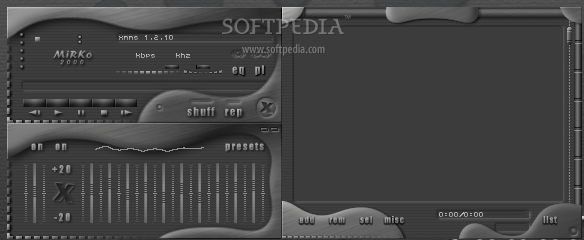
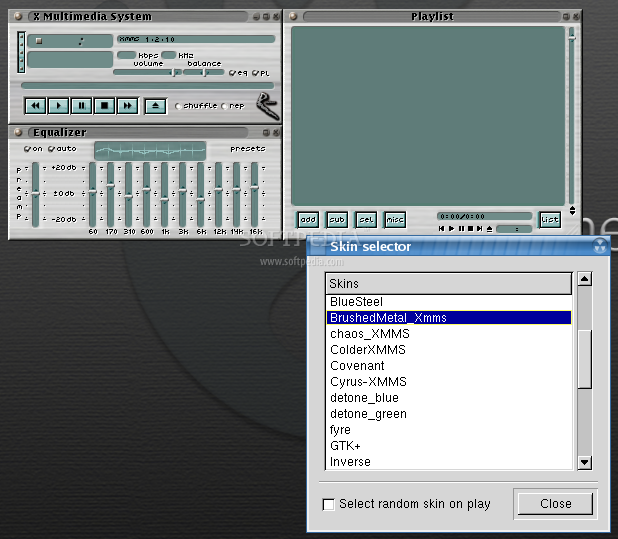
XMMS is a multimedia player for unix systems. XMMS stands for X MultiMedia System and can play media files such as MP3, MOD's, WAV and others with the use of Input plugins.

XMMS is mainly targeted at music playback, but through thirdparty plugins some rudimentary video capabilities exists, but there are much better systems other than XMMS for video support.

The XMMS player was modeled after Winamp from the Windows operating system. XMMS is not a port of Winamp but was written from scratch by Mikael and Peter Alm.

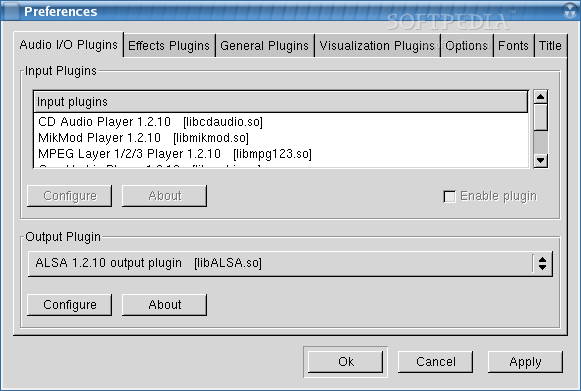
In the 'Audio I/O' tab you control the heart of XMMS, which would be the Input and Output plugins.

In the 'Input plugins' part you can disable/enable and configure the available plugins. The list box displays the name of the plugin, it's file name and '(disabled)' if you have disabled the plugin.

The 'Output Plugin' is where you tell XMMS how it should play the audio back. Today you can only have one 'Output Plugin' active at a time. So you can't both listen to the music through the 'OSS Driver' and save the music to disk with 'Disk Writer'.

Some Features of "XMMS":
'Read info on'
tells XMMS when to load the information from the files in your playlist.

'Demand'
will load the information when the files are visible in the playlist.

'Load'
will load the information when you add the file to the playlist. Having 'Load' turned on when loading a 6000 song playlist might not be a good idea. If both options are turned off XMMS will only load the information when the song is currently playing.

'Convert %20 to space'
This will convert "%20" to " " when the filename is displayed in the playlist. (%20 is what browsers use instead of space)

'Convert underscore to space'
This will display " " instead of "_" in the playlist.

'Dim titlebar when inactive'
Will tell XMMS to use the dimmed titlebar from the current skin when the window is inactive.

'Sort "jump to file" alphabetical'
Will sort the 'Jump to file' dialog (available by pressing "j") in alphabetical order instead of the order it's in the playlist.

'Use realtime priority when available'
This works only if XMMS is run as root or is setuid as root. It will allow XMMS to get all the CPU power it needs, and can greatly improve the playback on slower systems. NOTE: The 'Disk Writer' plugin will NOT work with this option enabled, also you need to restart XMMS in order for this to make a change.

'Pause between song for [ ] seconds'
Will make a defined pause between each song.

'Show windowmanager decorations'
Enables the windowmanager borders around XMMS.

'Mouse Wheel adjust Volume by (%)'
If you have a mouse with a wheel, you can change how much of the volume to be changed when you move it up or down.

'Allow multiple instances'
This will allow you to start more than one XMMS. You have to quit XMMS before this change takes effect.

'Always show clutterbar'
Will make the OAIDV part of the main window to be displayed all the time.

'Save window positions'
Will save the main window's position on the screen instead of letting the windowmanager choose location.

'Show numbers in playlist'
Enables the display of the internal track number in the playlist.

'Equalizer doublesize linked'
Will display the Equalizer in doublesize if you make XMMS doublesize.

'Smooth title scroll'
Makes the title scroll go smoother.

'Snap window at [ ] pixels'
Tells XMMS how close you can position the three windows until they dock / snap together with each other.

'Use "" as a directory delimiter'
This will come in handy if you are using playlist files from a windows player, so XMMS will treat as /.

'Use meta data in playlists'
When enabled, all playlists will be saved with the configured 'Title' string for quick loading of information when you load a playlist.

Requirements:

· ALSA output: ALSA 0.9.0 or better.
· Esound output: esound 0.2.8 or better.
· Mikmod input: libmikmod 3.1.10
· Ogg Vorbis input: libvorbis
· OpenGL Visual plugin: Mesa 3.0 or better.


XMMS Download
XMMS Screenshots
Find Related Downloads


MOST POPULAR PROGRAMS IN THIS CATEGORY ( Audio )  

amaroK 1.4.10 / 2.0 Alpha 2
amaroK is a music player for Linux and Unix with an intuitive interface.
screenshot
pick | update
Audio Convert 0.3.1.1
audio convert is a script to convert Wav, Ogg, MP3, MPC, FLAC, APE, or WMA files into Wav, Ogg, MP3, MPC, FLAC, or APE files.
screenshot
update
Beep Media Player 0.9.7.1
BMP Is a versatile and handy multi platform media player.
screenshot
pick | update
XMMS 1.2.11
XMMS is input: libmikmo System.
screenshot
pick | update
Linux MultiMedia Studio 0.3.2 / 0.4.0 Beta 1
LMMS aims to be a free alternative to popular (but commercial and closed-source) programs like FruityLoops, Cubase and Logic.
screenshot
pick | update
AcetoneISO 6.7 Advance
AcetoneISO script was made to simplify the mount of file *.iso .
screenshot
update
GeeXboX 1.1
GeeXboX is a GNU/Linux standalone media player system.
screenshot
pick | update

go to top  


Welcome!
Hello, Guest

Login if you have a Softpedia.com account.

Otherwise, register for one.

Main categories:
  • Adaptive Technologies
  • Adobe AIR Apps
  • Artistic Software
  • Communications
  • Database
  • Desktop Environment
  • Documentation
  • Education
  • Games
  • Home Automation
  • Information Management
  • Internet
  • Multimedia
  • Office
  • Printing
  • Programming
  • Religion
  • Science
  • Science and Engineering
  • Security
  • System
  • Text Editing&Processing
  • Utilities

  • Week's best:
  • Softpedia Linux RSS ...
  • Ubuntu 8.04.1 (Hardy...
  • Pidgin 2.5.0
  • Adobe Flash Player f...
  • The Gimp 2.4.6 / 2.5...
  • openSUSE Linux 11.0 ...
  • Linux Kernel 2.6.26....
  • Super Grub Disk 0.97...
  • Skype 2.0.0.68
  • OpenOffice.org 2.4.1...
  • Mozilla Firefox 3.0....
  • Transmission 1.32
  • DeVeDe 3.10
  • Wine 1.1.2
  • wine-doors 0.1.2
  • Shoreline Firewall 4...
  • Linux Mint 5.0 (Elys...
  • Google Gadgets 0.10....
  • Fedora 9 / 10 Alpha
  • Opera 9.52
  • Latest Distributions
  • EnGarde Community Ed...
  • Weasel GNU/Linux 2.0...
  • Elive 1.8.3 Developm...
  • Polippix 1.1 / 2.0 B...
  • MythBuntu Ubuntu 8.1...
  • Clonezilla LiveCD 1....
  • SYS 0.23 RC5
  • paldo 1.15
  • Scientific Linux 5.2...
  • Ubuntu 8.10 (Intrepi...
  • Kubuntu 8.10 (Intrep...
  • Edubuntu 8.10 (Intre...
  • Xubuntu 8.10 (Intrep...
  • OpenGEU 7.10 / 8.04 ...
  • Zenwalk 5.2 Beta (GN...
  • ClarkConnect 4.3
  • Astaro Security Linu...
  • KaufKauf Slim Linux ...
  • Frugalware Linux 0.8...
  • m0n0wall 1.234 / 1.3...
  • Latest Ubuntu Packages
  • Nemo 0.2.3
  • Opera 9.52
  • Crypt::Eksblowfish::...
  • Pidgin 2.5.0
  • Klavaro 1.1.4
  • aMule 2.2.2
  • Unofficial Evolution...
  • Jajuk 1.6.3
  • XPS Led Changer 0.5....
  • BitPim 1.0.6
  • PHP FastCGI Per-User...
  • Zero Install Injecto...
  • BashStyle-NG 7.0
  • soundgonverter 0.0.1
  • Usermin For Webmail ...
  • SMPlayer 0.6.2
  • Task Coach 0.70.3
  • OpenFracas 0.6
  • © 2001 - 2008 Softpedia. All rights reserved.
    Softpedia™ and Softpedia™ logo are registered trademarks of SoftNews NET SRL.
    Copyright Information | Privacy Policy | Terms of Use | Contact Softpedia | Update your software | Archive