
Spotify For Linux
Listen to your favorite songs, artists, albums, and playlists, as well as enjoy podcasts and videos, all with the help of Spotify, world's most popular audio and media streaming services. #Stream Music #Audio Player #Music Player #Music #Streaming #Player

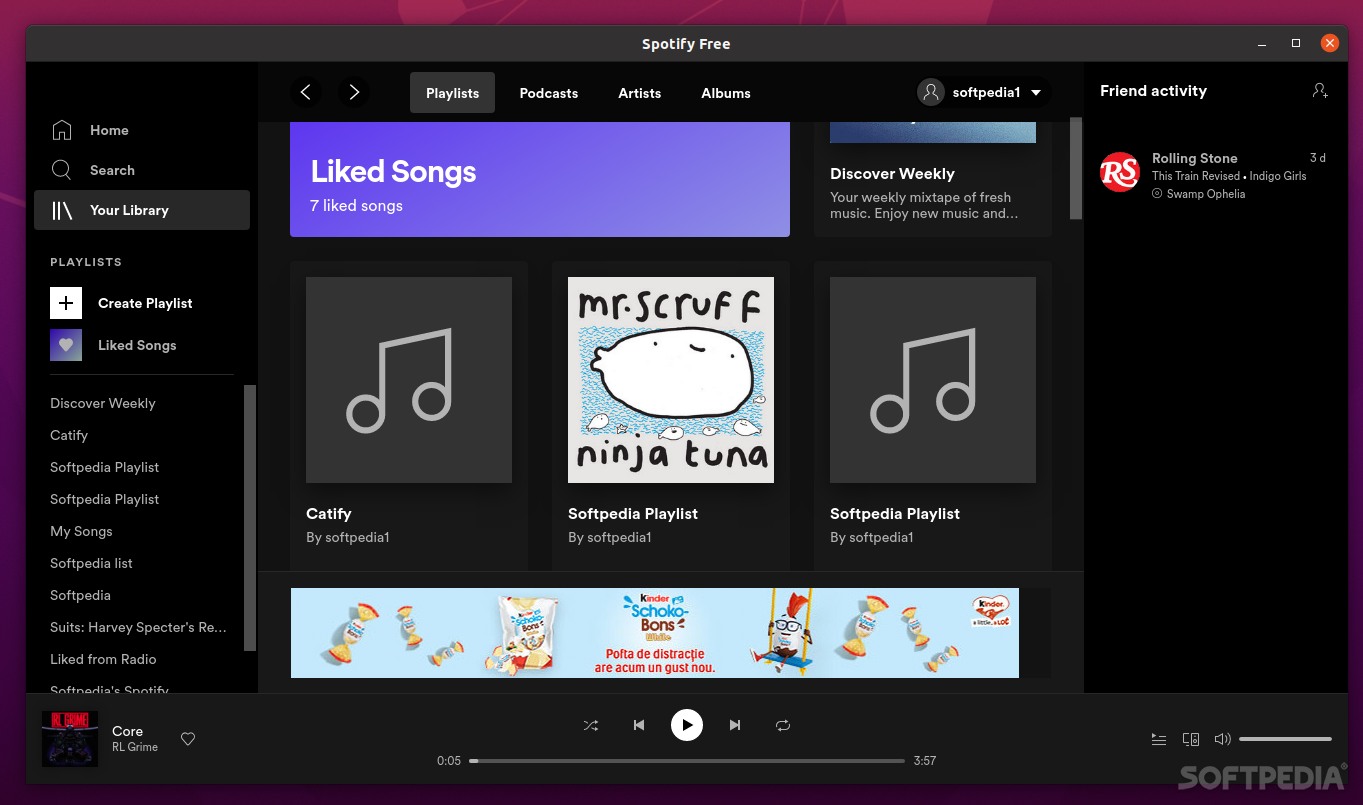
With a whopping 365 million active users and an impressive library of more than 70 million tracks, and well above a million podcasts, it's no surprise that Spotify is still the kind of the hill in the ever-expanding music streaming industry.
Part of Spotify's rise to success is its accessibility. You can launch the streaming service on pretty much any device starting with the smooth, modern, and sublime mobile apps for iOS and Android, a web player (accessible with almost all modern browsers), and finishing with the desktop apps for Chromebook, Windows, macOS, and even Linux (designed to round up the experience as a whole).
While Windows and macOS are privileged with officially supported clients boasting all the latest features, Linux users are, somewhat understandably (considering Linux's market share), not that lucky.
For starters, let's quite the official Spotify website regarding this matter: "Spotify for Linux is a labor of love from our engineers that wanted to listen to Spotify on their Linux development machines. They work on it in their spare time, and it is currently not a platform that we actively support. The experience may differ from our other Spotify Desktop clients, such as Windows and Mac."
Nevertheless, the Linux Spotify client is not too shabby after all. It looks just like the latest clients of other platforms, and it works great without noticeable hiccups. The only real-world difference is the rate at which the client receives its updates.
Currently, there are two main ways to install the Spotify app on Linux distros. The first and easiest one, is to go to Ubuntu Software, search for Spotify and install it from there with one click.
If your Linux computer is Snap-enabled, run the following command in the Terminal: "snap install spotify." For other Linux distros (apart from Ubuntu), you can use the Debian package.
First, configure the debian repository by running the following commands: "curl -sS https://download.spotify.com/debian/pubkey_0D811D58.gpg | sudo apt-key add -" and "echo "deb http://repository.spotify.com stable non-free" | sudo tee /etc/apt/sources.list.d/spotify.list"
To complete the installation, type: "sudo apt-get update && sudo apt-get install spotify-client"
Another reason why Spotify is so popular is that it still has a free tier/plan, even though it's borderline tolerable. The free subscription offers you access to pretty much all the content found on Spotify. Sound quality is limited to 160kbps, and listening is limited to somewhere around 750 tracks across 15 playlists each month.
The most annoying aspect of the Free tier (yep, you've guessed it) is the constant bombardment of ads. Audio ads cannot be skipped, but more annoyingly, there are a lot of GUI ads as well. Not only are they present in a big portion of the GUI, but they also pop up covering the entire GUI from time to time.
Nevertheless, a quick Premium subscription will get rid of this annoyance. By opting for a Premium plan, you get 320kbps streams, offline listening, the ability to skip unlimited tracks, and no more ads.
The Premium plans are as follows: Individual ($9.99,) Duo($12.99,) Family($15.99,) and Student($4.99.). The premium plans are billed monthly and each have their own particularities.
For instance, the Duo plan is designed for friends and couples and provides a playlist for two that can be updated by both users. The Family plan provides access to up to 6 members, access to Spotify Kids, as well as the ability to block explicit music.
There are a plethora of reasons why one might want to choose Spotify over its competition.
It has the biggest and most impressive library of music and podcast content, the music discovery features (AI-powered + machine learning algorithms) are peachy, the clients on all platforms are top-notch (with a slight exception for Linux, sadly), as well as some cool, collaborative features and playlists.
Oh, and the Premium plan makes it possible for you to listen to various albums before they're released. Overall, Spotify still holds the crown when it comes to all-around availability and music curation.
Of course, picking a music streaming service is only partly an objective process. Some other platforms might offer a few other features that will appeal better to your personality and needs.
However, Spotify does have a series of drawbacks. For example, it's not available in all countries.
Despite its popularity, top-tier music quality was actually Spotify's biggest problem, especially when compared to services like Tidal that offers its users non-compressed 1411kbps FLAC audio. Alas, Spotify announced that it will be adding Hi-Res lossless streaming somewhere at the end of 2021.
Whichever way you look at it, Spotify is an excellent music streaming service. As a package, Spotify offers the day-to-day audiophile (almost) everything he or she needs: a massive music library, podcasts, exclusive content, hand-picked playlists, awesome apps for both desktop and mobile, and enough AI-powered features to make some departments in NASA look lame.
Spotify 1.2.31.1205.g4d59ad7c
add to watchlist add to download basket send us an update REPORT- runs on:
- Linux
- main category:
- Multimedia
- developer:
- visit homepage
Windows Sandbox Launcher 1.0.0

Context Menu Manager 3.3.3.1

4k Video Downloader 1.5.3.0080 Plus / 4.30.0.5655

Bitdefender Antivirus Free 27.0.35.146

Zoom Client 6.0.3.37634

ShareX 16.0.1

Microsoft Teams 24060.3102.2733.5911 Home / 1.7.00.7956 Work

calibre 7.9.0

IrfanView 4.67

7-Zip 23.01 / 24.04 Beta

- calibre
- IrfanView
- 7-Zip
- Windows Sandbox Launcher
- Context Menu Manager
- 4k Video Downloader
- Bitdefender Antivirus Free
- Zoom Client
- ShareX
- Microsoft Teams