
JavaAmp is a clone of the well known multimedia player WinAmp.. #Audio player #Music player #Media player #JavaAmp #Media #Player
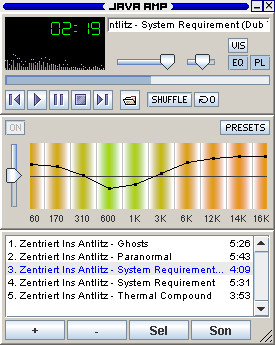
JavaAmp is a clone of the well known multimedia player WinAmp.
JavaAmp player uses the Lightweight Java Game Library (LWJGL) and FMOD for playing music and visualizing it.
Requirements:
� Java 5.0 or later
1. Download and install Java Runtime Environment 5.0 2. Download latest version of LWJGL (0.99) and extract it to any directory: https://sourceforge.net/project/showfiles.php?group_id=58488 2.1. Copy libraries from native-directory into the bin-directory of your JRE. 2.2. Copy JARs from the jar-directory into the lib/ext-directory of your JRE. 3. Download FMOD 3.75 and extract it to any directory: http://www.fmod.org/ifmoddownload.html
What's New in This Release:
� This release adds translation support (English and German are already included). � A preferences dialog has been added. � The settings are saved when JavaAmp closes, and loaded on startup. � In the file information dialog, general information (file size, etc.) is shown now. � For users with slower computers, a splash screen has been added to show that JavaAmp is loading. � Some bugfixes have been made.
JavaAmp 0.0.5
add to watchlist add to download basket send us an update REPORT- runs on:
- Linux
- filename:
- JavaAmp005.zip
- main category:
- Multimedia
- developer:
- visit homepage
IrfanView 4.67

4k Video Downloader 1.5.3.0080 Plus / 4.30.0.5655

Microsoft Teams 24060.3102.2733.5911 Home / 1.7.00.7956 Work

Windows Sandbox Launcher 1.0.0

ShareX 16.0.1

calibre 7.9.0

Bitdefender Antivirus Free 27.0.35.146

Context Menu Manager 3.3.3.1

7-Zip 23.01 / 24.04 Beta

Zoom Client 6.0.3.37634

- Context Menu Manager
- 7-Zip
- Zoom Client
- IrfanView
- 4k Video Downloader
- Microsoft Teams
- Windows Sandbox Launcher
- ShareX
- calibre
- Bitdefender Antivirus Free
