
A cross-platform and multi-track audio editor application for Linux and UNIX systems. #Audio Editor #Track Editor #Sound Editor #Sound #Editor #Audio
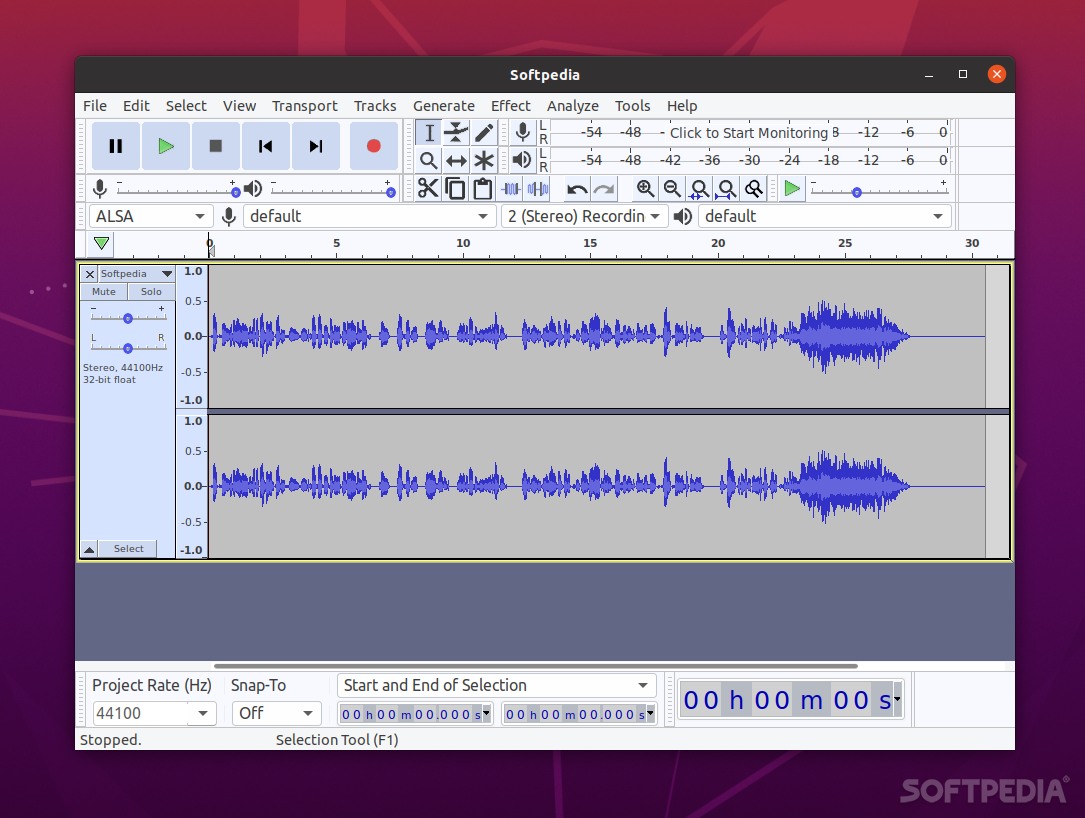
Audacity is an open source, freely distributed, cross-platform and easy-to-use software project designed from the offset to act as an audio editor and recorder for personal computers running any GNU/Linux distribution or the Microsoft Windows and Mac OS X operating systems. Audacity is a very powerful software, it is used by many professional musicians who want a free software alternative for analyzing, editing and recording audio tracks.
With Audacity, users can record live audio, convert tapes and records into digital recordings or CDs, edit Ogg Vorbis, MP3, and WAV sound files, cut, copy, splice, and mix sounds together, as well as to change the speed or pitch of a recording. The software contains many plugins and effects, among which we can mention Echo, Paulstretch (extreme stretch), Phaser, Reverb, Reverse, Truncate Silence and Wahwah.
Audacity comes by default with a vast amount of features, but the most important one is the powerful plugin architecture, which allows users to extend its default functionality through add-ons that can be written by users.
The application is written entirely in the C++ programming language and uses the GTK+ GUI toolkit for its graphical user interface under GNU/Linux and BSD systems, where it is available for download only as a sources archive, requiring users to configure and compile the app prior to installation, but it can be easily installed from the default software repositories of many Linux distributions.
The software has been successfully tested under several GNU/Linux distributions, such as Ubuntu, Arch Linux, Debian, Linux Mint, Fedora, Red Hat Enterprise Linux, CentOS, openSUSE or Mageia, various BSD flavors like FreeBSD, as well as on the commercial Microsoft Windows and Mac OS X operating systems. At the moment, it runs perfect on both 32-bit and 64-bit instruction set architectures.
What's new in Audacity 3.5.0 Beta 3:
- Audio previews for the projects are generated only on demand
- Bug fixes
Audacity 3.4.2 / 3.5.0 Beta 3
 Softpedia Editor's Pick
add to watchlist
add to download basket
send us an update
REPORT
Softpedia Editor's Pick
add to watchlist
add to download basket
send us an update
REPORT
- runs on:
- Linux
- filename:
- Audacity-3.4.2.tar.gz
- main category:
- Multimedia
- developer:
- visit homepage
Windows Sandbox Launcher 1.0.0

ShareX 16.0.1

Bitdefender Antivirus Free 27.0.35.146

4k Video Downloader 1.5.2.0077 Plus / 4.30.0.5655

calibre 7.8.0

Zoom Client 6.0.0.37205

7-Zip 23.01 / 24.04 Beta

IrfanView 4.67

Microsoft Teams 24060.2623.2790.8046 Home / 1.7.00.7956 Work

paint.net 5.0.13 (5.13.8830.42291)

- IrfanView
- Microsoft Teams
- paint.net
- Windows Sandbox Launcher
- ShareX
- Bitdefender Antivirus Free
- 4k Video Downloader
- calibre
- Zoom Client
- 7-Zip