
The OpenGTA project tries to reimplement Grand Theft Auto and make it better.. #Grand Theft Auto #GTA clone #Action game #GTA #Action #Simulation
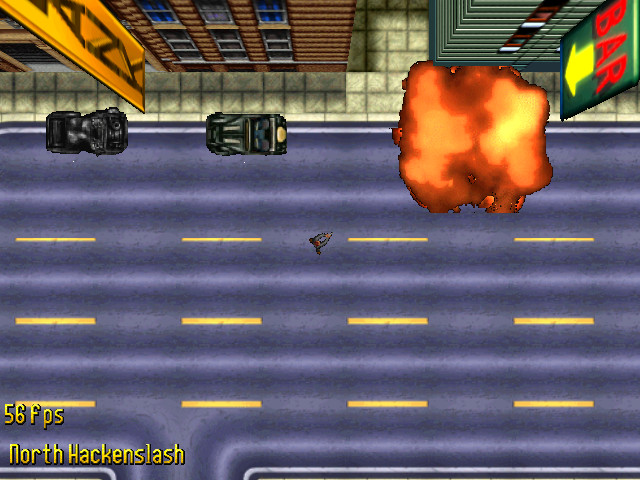
The OpenGTA project tries to re-implement Grand Theft Auto and make it better.
OpenGTA is an open source clone of the Grand Theft Auto engine that can be used with the original game files to play the game and ultimately enhance it.
The project is still in early development, so you can only walk around the town.
Requirements:
· Original game files. · OpenGL · SDL · SDL_mixer · SDL_sound · PhysicsFS · Loki · g++ · GNU Make · Lua (optional)
Only tested on GNU Linux using gcc & make; I assume that GL, SDL and PhysicsFS are installed, Loki is downloaded and compiled automatically.
Just run 'make' or specifically 'make viewer'.
The other programs are/were used for development or debugging.
The distributed win32 binaries are created with a cross-compiler.
The file doc/compiling.txt in the source code release contains more information about the build process.
You can download the game from http://www.rockstargames.com/classics/ .
These programs expect to find the data in the current directory, either directly in the file-system or in a ZIP file (named 'gtadata.zip'). You want the content of the original game directory GTADATA, but not the directory itself. See doc/using_mods.txt for a slightly longer description.
Needed: *.FXT, *.FON, *.CMP
STYLE*.GRY (for 8-bit graphics) STYLE*.G24 (for 24-bit graphics)
Will be needed (in the future): MISSION.INI *.RAT ( 8 bit menu graphics) *.RAW (24 bit menu graphics) AUDIO/*.RAW AUDIO/*.SDT (sound effects) AUDIO/*.WAV (cutscene text; in legacy format)
You may also want to keep the music (even though it isn't used yet). It is safe to assume that Ogg Vorbis [ http://vorbis.com/ ] will be supported, so you can encode the music files.
Note: Binary releases only contain the 'viewer' application; the other programs should only be intersting for developers (read: compile them yourself).
Export/Display textures and sprites; run ./gfxextract -h (or without any parameters) for usage info.
Sprite graphics browser; shows internal indices, can display animations (ped walking, car delta anims).
run ./spriteplayer -h for usage information.
Brain-dead immediate-mode renderer of the city (now with objects); with plenty of bugs...
start as:
./viewer [flags] [0-2]
The optional param loads the respective city; default is 0:
0 - NYC.CMP 1 - SANB.CMP 2 - MIAMI.CMP
There are several flags; see the compiled-in usage information.
-V show version and compile time switches -h show usage
Using "-l 1" will make it easier to see actual error messages; sometimes there is a lot of noise on 'info' level (0).
ESC, cursor-keys, + and - do what you might except them to do; furthermore:
x : pseudo-3d view z : top-down view . : decrease visible range , : increase visible range t : display entire city (at a crawl) f : toggle fullscreen/windowed [only works on Linux] PRINT : save 'screenshot.bmp' in current directory p : dump coords (in lua syntax) to stdout F2 : toggle drawing of sprite bounding-boxes F3 : toggle marking of sprite tex-border-boxes F4 : toggle free-move vs. follow-player F5 : toggle drawing of road heading arrows (& normals) F6 : city map mode (ESC to exit, +, -, cursor keys) F9 : toggle city blocks drawn textured F10 : toggle blocks wireframe lines F12 : show/hide screen-gamma scrollbar
in 3d view:
w : forward s : backward space : stop r : toggle rotate cam (when not moving) g : toggle ~gravity~ affect on 3d-cam
You can move the view with the mouse; when you switch to 3d and the screen is black: move the mouse down.
in follow-player mode:
i,j,k,l : move player-char l-shift : toggle walking/running l-ctrl : shoot 0 : unselect weapon / unarmed 1,2,3,4 : select weapon (only switches graphic) F7 : draw explosion at player pos (graphical effect) F8 : create random-walker ped at player-pos
You can still use + and - to zoom; but the view will try to return to the old position quickly.
OpenGTA 2007-06-14
add to watchlist add to download basket send us an update REPORT- runs on:
- Linux
- main category:
- Games
- developer:
- visit homepage
4k Video Downloader 1.5.2.0077 Plus / 4.30.0.5655

IrfanView 4.67

Windows Sandbox Launcher 1.0.0

Bitdefender Antivirus Free 27.0.35.146

paint.net 5.0.13 (5.13.8830.42291)

7-Zip 23.01 / 24.04 Beta

calibre 7.8.0

ShareX 16.0.1

Microsoft Teams 24060.2623.2790.8046 Home / 1.7.00.7956 Work

Zoom Client 6.0.0.37205

- ShareX
- Microsoft Teams
- Zoom Client
- 4k Video Downloader
- IrfanView
- Windows Sandbox Launcher
- Bitdefender Antivirus Free
- paint.net
- 7-Zip
- calibre