
A complete educational software suite with numerous activities for children aged 2 to 10 #Educational suite #Computer discovery #Kids educational suite #Educational #Math #Paint
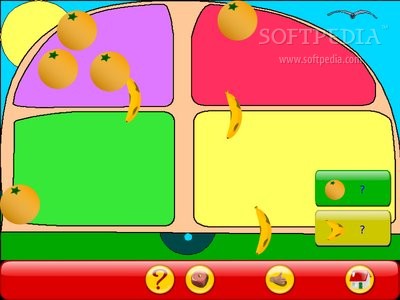
GCompris, also known as I Got IT, is an open source and award winning educational project designed from the ground up to offer a wide range of activities suited for children aged 2 to 10. It is part of the GNU project and uses a full-screen user interface, specifically designed to help children concentrate only on the activities and not on what the operating system does in the background, though it should need a little bit of polishing here and there.
Key features include numerous activities for your kids, including computer discovery, learn to tell time, arithmetic functions, vector drawing, science and geography tasks, puzzle of famous paintings, cartoon making, and reading topics, as well as some game-oriented ones, but still educational.
With this software, kids can discover what is a computer and how to use it, starting with the mouse and keyboard, and continuing with different mouse gestures and how to use software applications.
Children will be able to learn various facts about farm animals and what sounds they make, learn about various music instruments and music notes, discover the Braille system, understand colors, and much more.
At the moment, the application offers over 100 activities for young children, with more of them coming in future versions. It is available for download from the default software channels of your Linux distribution.
Under the hood, we can report that the software is written entirely in the C and Python programming languages and supports GNU/Linux, BSD, Microsoft Windows and Mac OS X operating systems. It runs well on both 32-bit and 64-bit hardware platforms.
GCompris is an unique software suite that gathers together several open source educational applications for small children, helping them to easily and quickly learn many new things. It is distributed by default in many educational operating systems, such as Edubuntu.
What's new in GCompris 0.70:
- This new version contains 8 new activities, half of them being created by last Google Summer of Code students:
- an activity where the child has to move elements to build a given model (crane by Stefan Toncu)
- an activity to draw the numbers from 0 to 9 (drawnumbers by Nitish Chauhan)
- an activity to draw the letters (drawletters by Nitish Chauhan)
GCompris 0.70
 Softpedia Editor's Pick
add to watchlist
add to download basket
send us an update
REPORT
Softpedia Editor's Pick
add to watchlist
add to download basket
send us an update
REPORT
- runs on:
- Linux

- main category:
- Games
- developer:
- visit homepage
Zoom Client 6.0.4.38135

7-Zip 23.01 / 24.04 Beta

ShareX 16.0.1

Bitdefender Antivirus Free 27.0.35.146

IrfanView 4.67

4k Video Downloader 1.5.3.0080 Plus / 4.30.0.5655

Windows Sandbox Launcher 1.0.0

Microsoft Teams 24060.3102.2733.5911 Home / 1.7.00.7956 Work

calibre 7.9.0

Context Menu Manager 3.3.3.1

- Microsoft Teams
- calibre
- Context Menu Manager
- Zoom Client
- 7-Zip
- ShareX
- Bitdefender Antivirus Free
- IrfanView
- 4k Video Downloader
- Windows Sandbox Launcher