LINUX CATEGORIES:


NEWS ARCHIVE >>
SOFTPEDIA REVIEWS >>

7-DAY TOP DOWNLOAD

#
Program
Mandriva Linux
2008.1 / 2009 RC1

256,150
Fedora 9 / 10 Alpha
216,522
KNOPPIX Live DVD
5.3.1

209,884
Kororaa AIGLXgl Live
CD 0.3

180,509
Beryl 0.2.1
178,619
BackTrack 3.0
171,720
aircrack 2.41
158,233
MPlayer 1.0 RC2
158,135
VLC 0.9.0
113,121
Cedega 6.0
108,001

WEEK'S BEST

  • Softpedia Linux RS...
  • Ubuntu 8.04.1
  • Pidgin 2.5.1
  • Adobe Flash Player...
  • The Gimp 2.4.7 / 2...
  • openSUSE Linux 11....
  • Linux Kernel 2.6.2...
  • Super Grub Disk 0....
  • Skype 2.0.068
  • OpenOffice.org 2.4...
  • Mozilla Firefox 3....
  • Transmission 1.33
  • DeVeDe 3.11b
  • Wine 1.1.3
  • wine-doors 0.1.2
  • Shoreline Firewall...
  • Linux Mint 5.0
  • Google Gadgets 0.1...
  • Fedora 9 / 10 Alpha
  • Opera 9.52
  • Home / Linux / Desktop Environment / Window Managers

    Xfce 4.4.2

    Softpedia Pick Award


    Downloads: 2,542  Add to download basket  Tell us about an update
    User Rating:
    Rated by:
    Very Good (4.2/5)
    35 user(s)
    Developer:

    License / Price:

    Last Updated:

    Category:
    Olivier Fourdan | More programs
    GPL / FREE
    December 3rd, 2007, 14:12 GMT
    ROOT / Desktop Environment / Window Managers

     Read user reviews (0)  Add a review  Refer to a friend  Subscribe


    Xfce description


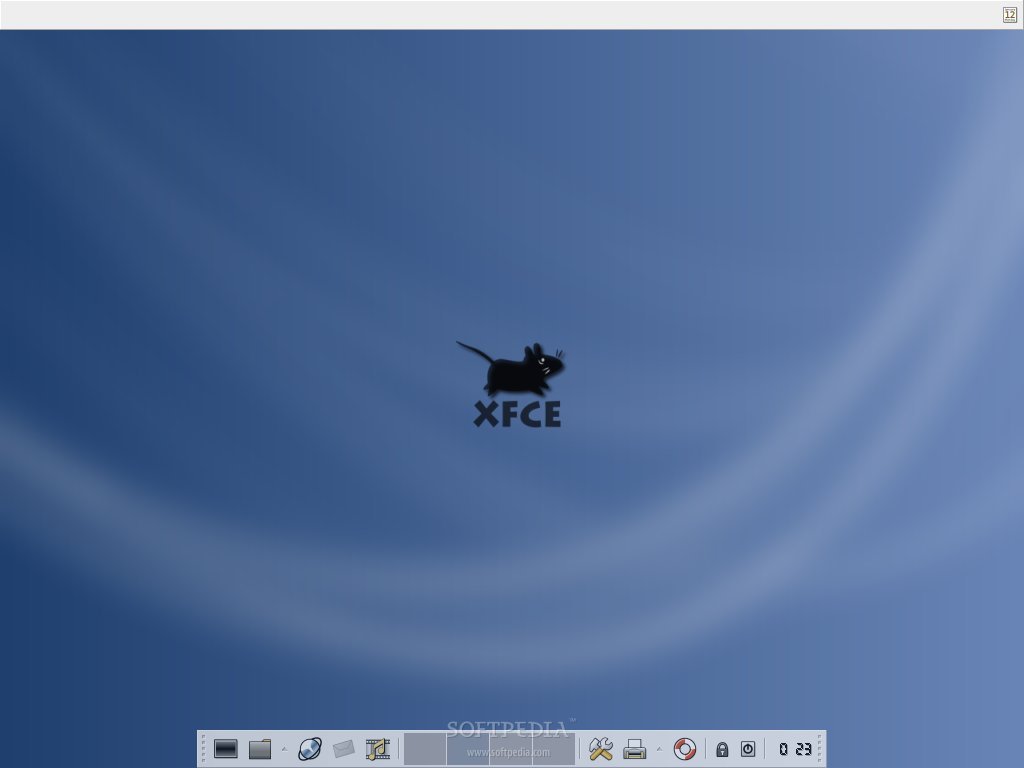
    Xfce is a lightweight desktop environment for various *NIX systems.

    Xfce is a lightweight desktop environment for unix-like operating systems. Xfce aims to be fast and lightweight, while still being visually appealing and easy to use.

    Xfce 4.2 embodies the traditional UNIX philosophy of modularity and re-usability. It consists of a number of components that together provide the full functionality of the desktop environment. They are packaged separately and you can pick and choose from the available packages to create the best personal working environment.

    Another priority of Xfce 4 is adhereance to standards, specifically those defined at freedesktop.org.

    Xfce 4 can be installed on several UNIX platforms. It is known to compile on Linux, NetBSD, FreeBSD, Solaris, Cygwin and MacOS X, on x86, PPC, Sparc, Alpha...

    Here are some key features of "Xfce":

    General

    · Freedesktop specifications compliance for Window Manager hints, menus, icons themes, XDG Basedir Specification, Xsettings protocol, drag and drop...
    · Real multiscreen and Xinerama support.
    · Support for "kiosk mode" in which the allowed user actions can be restricted in xfce4-session, xfce4-panel, and xfdesktop.
    · Development framework for applications.
    · Xft fonts anti-aliasing support.
    · You can install/launch each Xfce module separately. Very useful if you do not need them all or if you have very limited system resources.
    · More than 40 languages translations...

    Libraries (libxfce4util, libxfcegui4, libxfce4mcs)

    · libxfce4util : library with non-graphical helper functions.
    · libxfcegui4 : widgets and convenience functions to create graphical user interfaces.
    · libxfce4mcs : settings management library used by most Xfce 4 components.

    Settings manager (xfce-mcs-manager and xfce-mcs-plugins

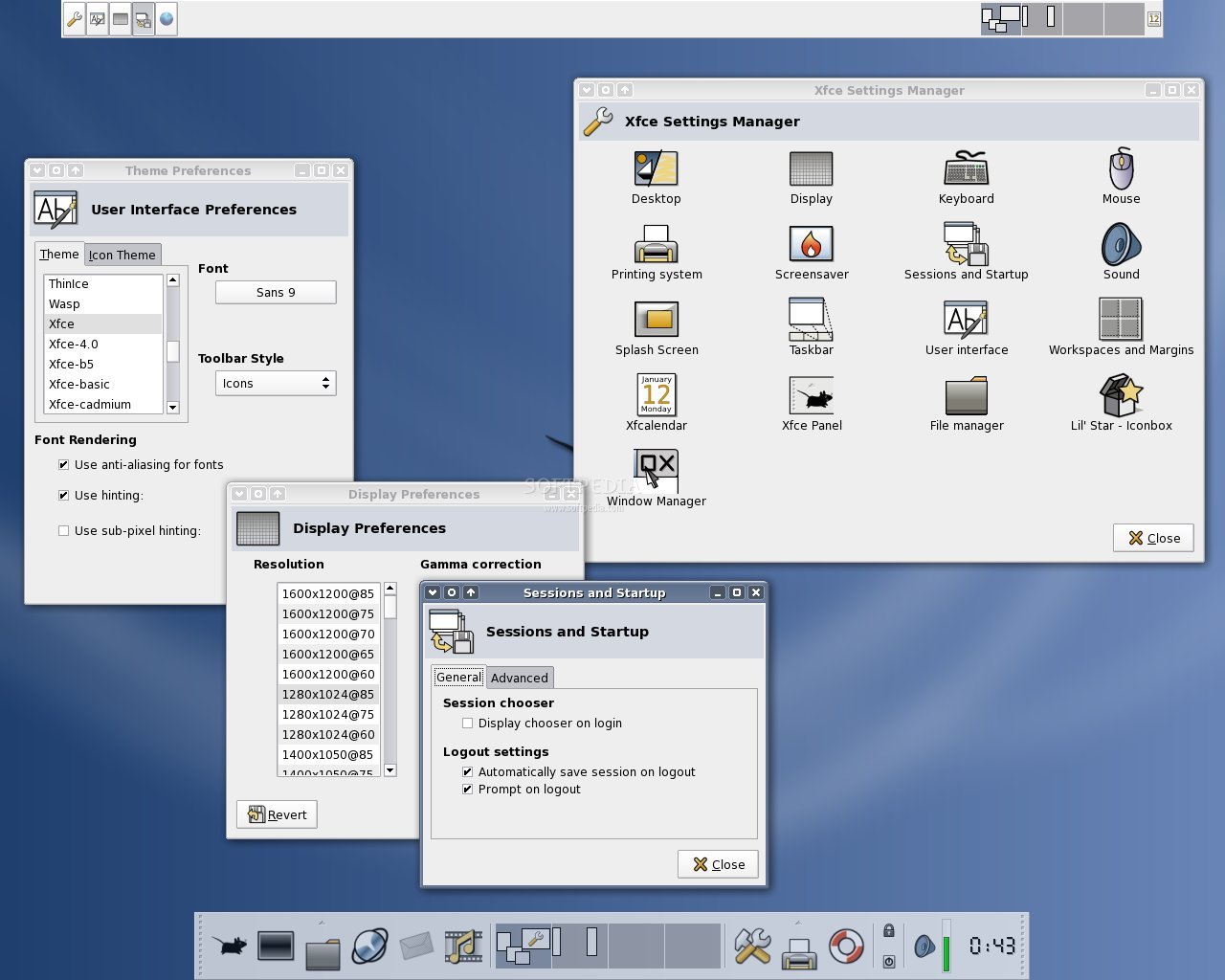
    · Provides the Multi-Channel Settings, a modular, host independent, network transparent and centralized configuration system. It runs in the background and provides global settings information to other Xfce components. There is a main control panel to access the configuration dialogs of Xfce components. Its icons are customizable. The MCS plugins provide settings dialogs for general items that are not part of a package, e.g. GTK, mouse, fonts, keyboard and display settings.

    Window manager (xfwm4)

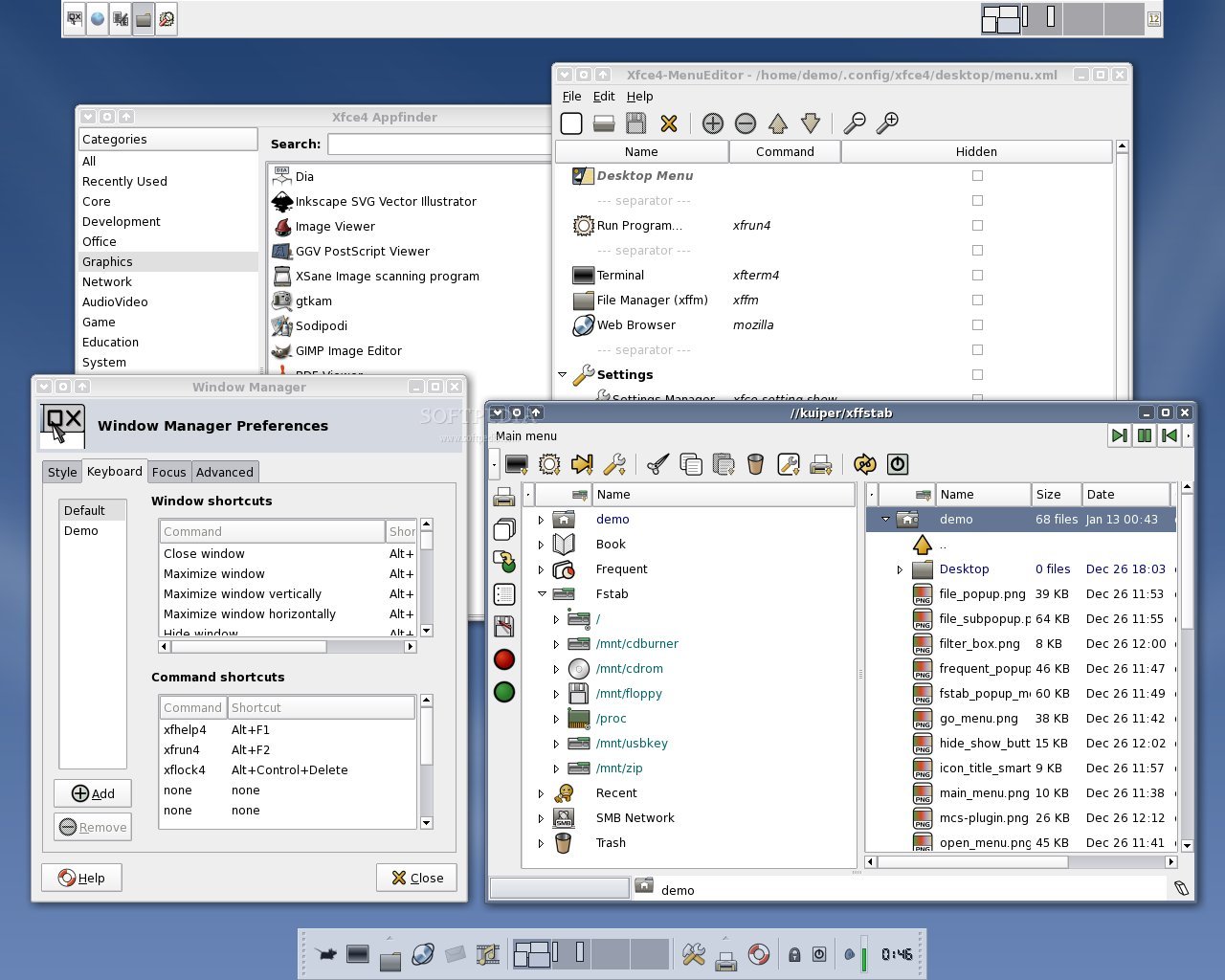
    · The Xfce 4 window manager. It manages the placement of application windows on the screen, provides window decorations and manages workspaces or virtual desktops. Xfwm4 natively supports multihead mode. It provides its own compositing manager (a manager for the Xorg Composite extension, which brings true transparency to the Xfce desktop). The themes support image composition with PNG images as layers, which means that one can do gradients or anything else, and that applies to any pixmap that make the window frame. Xfwm4 includes a keyboard shorcuts editor. Moreover, users can shade windows and switch desktops using the mouse wheel.

    Panel (xfce4-panel)

    · The Xfce 4 panel. It provides both vertical and horizontal modes, a workspace switcher, a clock, an auto-hide feature, easy-to-setup detachable menus and application launchers, and a mail checker with mbox, Maildir and POP3 support. The panel supports transparency when the X Composite extension is enabled. It offers an easy way to add a plugin, using a dialog and mouse double-click. It's compatible with the numerous plugins available from the Xfce Goodies Project page.

    Desktop manager (xfdesktop)

    · The desktop background manager. This program sets the background image and provides a root window menu. It includes gradient support for background color, saturation support for background image, real multiscreen and xinerama support, a desktop menu editor with DND support from xfce4-appfinder and .desktop files from Rox, Konqueror, Nautilus, Xffm... The desktop menu and the window list have optional support for icons, so you can use icons only if you want, and if your computer has enough resources to handle them. Moreover, Xfdesktop4 provides a desktop menu plugin for the panel: you can get standard menu from either the panel or the desktop.

    Utilities (xfce-utils)

    · Essential utilities and scripts. Provides a taskbar, an "about" dialog, a run dialog and several important scripts that are used by other packages including the panel (startxfce4, xfhelp4, xflock4, xfmountdev4, and xfterm4). Also contains the user guide. The taskbar includes an "always group tasks" option, a selectable left/center/right alignment and variable width, and a right-click action menu.

    File manager (xffm)

    · A fast file manager, with two independent panes, integrated samba network browser and mount/umount capabilities using fstab data. It includes an icon theme editor.

    Printing Helper (xfprint)

    · Print dialog. Provides a graphical frontend for printing. It includes xfprint4 and xfprint-manager. Xfprint can use either CUPS, BSD-LPR or a file as destination, and printers are retrieved from the printing system you choosed.

    Application finder (xfce4-appfinder)

    · An application finder, which allows you to search, launch and find information about applications installed on your system.

    Session manager (xfce4-session)

    · The session manager. The session manager controls the startup and shutdown of the Xfce Desktop Environment. On logout it can save the running application and start them again the next time you log in. It's compatible with Gnome/KDE, supports multihead modes (Xinerama and multiscreen), doesn't rely on smproxy (or any rewrite like gnome-smproxy), but provides (partial) session management even for non-sm or X11R5-sm aware apps. Moreover, it supports nice themes.

    Sound Mixer (xfce4-mixer)

    · A volume control for the panel. It includes a mixer dialog wich supports ALSA, OSS and Sun audio.

    Notification area (xfce4-systray)

    · Notification area (or "system tray") for the panel.

    Toys (xfce4-toys)

    · Less serious utilities and additions for the panel. Contains a tips/fortunes dialog and an xeyes implementation for the panel.

    Calendar and Appointments (xfcalendar)

    · A simple calendar application with reminders.

    Toggle Button plugin (xfce4-trigger-launcher)

    · Provides a toggle button for the panel, showing on or off state. May be used for starting or ending network connections for example.

    Icon Box (xfce4-iconbox)

    · An icon box that can be used as an alternative for the taskbar provided in the xfce-utils package. Its transparency level is configurable when using the X Composite extension.

    Themes for the Window Manager (xfwm4-themes)

    · More than 60 window decoration themes for xfwm4.

    Icon Theme (xfce4-icon-theme)

    · Default icon theme for Xfce 4. It includes both PNG and SVG icons

    GTK Theme Engine (gtk-xfce-theme-engine)

    · A theme engine for GTK2. Not required for the desktop, but it's a nice theme engine so you might just as well give it a try.

    What's New in This Release:

    Utilities Library (libxfce4util):
    · Fix applications sometimes starting on the wrong screen in multihead setups (Bug #3667).
    · Fix possible buffer overflow (reported by Vegard Nosum on the ml).
    · Remove trailing parens on AC_INIT version info to work around bug in intltool 0.35.x and 0.36.x.
    · Updated translations: Maximilian Schleiss (nl), Dimitri Gogelia (ka), Pablo Vieira and Jose Vitor Lopes e Silva (pt_BR).
    · New translations: Terje Uriansrud (nb_NO), Nuno Miguel (pt_PT), Manatsawin (th), Tegegne Tefera (am), RPrieditis (lv).

    Widget Library (libxfcegui4):
    · Fix application windows sometimes opening on the wrong screen in multihead setups (Bug #3667).
    · Free list returned by gtk_container_get_children().
    · Remove trailing parens on AC_INIT version info to work around bug in intltool 0.35.x and 0.36.x.
    · Allocate copy of passed cliend id, program name and working directory in session management, in case the application frees the data.
    · Properly deal with %-starting 'field codes' in commands from .desktop files.
    · Updated translations: Maximilian Schleiss (nl), Dimitri Gogelia (ka), Pablo Vieira and Jose Vitor Lopes e Silva (pt_BR).
    · New translations: Terje Uriansrud (nb_NO), Nuno Miguel (pt_PT), Tegegne Tefera (am), Manatsawin (th), RPrieditis (lv).

    Application extension library (libexo):
    · Please see the Thunar website for a list of changes.

    Window Manager (xfwm4):
    · Be more relax with transients, allow transients to be sticky independently of their parent window (Bug #3296).
    · Fix xfwm4 hanging with gtk -2.11.x (Bug #3346).
    · Plug a leak in mouse button grab when changing theme.
    · Fix dialogs and modals without parents not being automatically centered like before (Bug #3278).
    · Fix modifier mask not working with all keymaps (Bug #3194).
    · Fix wrong count of key shortcuts causing switch to last workspace on modifier key press if no window is focused (Bug #3191).
    · Fix spec file missing from the tar ball causing 'make dist' to fail.
    · Fix strict bound checking causing wrong window to be focused in focus follow mouse (Bug #2781).
    · Transients for group shouldn't apply to other transients, or it breaks stacking for some apps, noticeably mozilla "save as" dialog...
    · Fix typo breaking compilation on systems without XShape 1.1 support.

    Desktop Manager (xfdesktop):
    · Fixed the Italian xfdesktop menu causing a crash.
    · Fix missing xfce_rc_close() causing memleak and too many open file descriptors (Bug #3065).
    · Always use button 0 in gtk_menu_popup() as GTK 2.11 expects the same button to be pressed or it doesn't activate the entry (Bug #3359).
    · Fix menu sometimes not popping up when using the keyboard shortcut, again. Timeout waiting for grab is now 0.25s (Bug #441).
    · Fix desktop settings only getting applied to the first screen in non-Xinerama dualhead setups (Bug #3467).
    · Fix spurious drag when double-clicking a volume icon that fails to mount (Bug #3426).
    · Clean out stale entries in icon position file (Bug #3267).
    · Some minor memory leak fixes (some still remain, likely).
    · Fix --disable-menu-editor configure option.

    Panel (xfce4-panel):
    · Fix window manager hints reporting width 1 pixel too wide (Bug #3402).
    · Improve MCS plugin code.
    · Fix expansion of items a non-full-width panel.
    · Make sure tooltips are set for more than 1 clock instance (Bug #3109).
    · Fix area that is off-limits to other windows (_NET_WM_STRUT hints) for a Xinerama setup with differently sized monitors (Bug #3097).
    · Fix loading internal plugins if a similar file exists in the start directory (Bug #3279).
    · Only update the clock once a minute when seconds are disabled. The digital clock is also set in the default layout to minimize the amount of screen updates.
    · Fix possible buffer overflow in launcher tooltips (Bug #3324).
    · Use exo-open --launch TerminalEmulator in the default configuration (Bug #3384).
    · Fix crash when removing a panel in Gtk 2.11.x (Bug #3496).
    · Remove trailing parens on AC_INIT version info to work around bug in intltool 0.35.x and 0.36.x.
    · Updated translations: Pau Rul-lan Ferragut (ca), Fabio Riga (it), Terje Uriansrud (nb_NO), Nuno Miguel (pt_PT), Vincent Tunru (nl), Dimitri Gogelia (ka), Ivan Masár (sk), Fábio Nogueira (pt_BR).
    · New translations: Tegegne Tefera (am), RPrieditis (lv).

    Settings Manager (xfce-mcs-manager):
    · Remove the half-second signal-check timeout in favor of a signal-check pipe that's watched by the glib main loop. Helps reduce CPU wakeups that hurt laptop battery performance.
    · Updated translations: Terje Uriansrud (nb_NO), European Portuguese (pt_PT), Vincent Tunru (nl), Dimitri Gogelia (ka), Ivan Masar (sk), Vladimir Melo (pt_BR), Terje Uriansrud (nb_NO), Nuno Miguel (pt_PT).
    · New translations: Tegegne Tefera (am), RPrieditis (lv).

    Settings Manager Plugins (xfce-mcs-plugins):
    · Make the theme list expand for more natural resize (Bug #3659).
    · Font DPI is now configurable in the User Interface Settings (Bug #3164).
    · Fix modifier mask not working with all keymaps (Bug #3194)
    · Add support for xinput devices when setting left/right handed mouse.
    · Updated translations: Fabio Riga (it), Nuno Miguel (pt_PT), Tegegne Tefera (am), Vincent Tunru (nl), Dimitri Gogelia (ka), Vladimir Melo (ka), Alexander Nyakhaychyk (be), Jari Rahkonen (fi), Nico Schümann (de), Mike Massonnet (fr), Jeff Bailes (en_GB), Terje Uriansrud (nb_NO), Stavros Giannouris (el), Fabio Riga (it), Luiz Armesto (pt_BR), Stephan Arts (nl).
    · New translations: Terje Uriansrud (nb_NO), RPrieditis (lv).

    Text Editor (mousepad):
    · Test for support of -Wall, -Werror and -errwarn=%all (Bug #2921).
    · Remove trailing parens on AC_INIT version info to work around bug in intltool 0.35.x and 0.36.x.
    · Updated translations: Maximilian Schleiss (fr), Szymon Kałasz (pl), Pau Rul-lan Ferragut (ca), Stavros Giannouris (el), ByungHyun Choi (ko), Piarres Beobide (eu), Maxim Dziumanenko (uk), Stephan Arts (nl), Nico Schümann (de), Jeff Bailes (en_GB), Daichi Kawahata (ja), Fabio Riga (it), Dimitri Gogelia (ka), Pablo Vieira (pt_BR), Og Maciel (pt_BR).
    · New translations: Besnik Bleta (sq), Terje Uriansrud (nb_NO), Nuno Miguel (pt_PT), Tegegne Tefera (am), Manatsawin (th), RPrieditis (lv).

    Session Manager (xfce4-session):
    · Updated translations: Pau Rul-lan Ferragut (ca), Fabio Riga (it), Terje Uriansrud (nb_NO), Nuno Miguel (pt_PT), Tegegne Tefera (am), Vincent Tunru (nl), Ivan Masár (sk), Luiz Armesto (pt_BR).
    · New translations: RPrieditis (lv).

    Printing Helper (xfprint):
    · Updated translations: Stephan Arts (nl), Fabio Riga (it), Terje Uriansrud (nb_NO), Nuno Miguel (pt_PT), Tegegne Tefera (am), Ivan Masár (sk), Fábio Nogueira (pt_BR).
    · New translations: Denizo Priskorn (eo), RPrieditis (lv).

    Development Tools (xfce4-dev-tools):
    · Add script (xdt-commit) for generating commit messages from ChangeLogs on the fly.
    · Remove trailing parens on AC_INIT version info to work around bug in intltool 0.35.x and 0.36.x.

    Utilities (xfce-utils):
    · Put back a default DPI value for Xorg (Bug #3164, Bug #3158).
    · Use gnome-screensaver if xscreensaver is not available (Bug #3131).
    · Fix typo on XDG_DATA_DIRS path definition (Bug #2967).
    · Updated credits in the about dialog.
    · Updated translations: Fabio Riga (it), Nuno Miguel (pt_PT), Dimitri Gogelia (ka), Ivan Masar (sk), Vladimir Melo (pt_BR).

    New translations: Terje Uriansrud (nb_NO), Tegegne Tefera (am), RPrieditis (lv).

    Volume Control (xfce4-mixer):
    · Fix parallel build of xfce4-mixer (Bug #2892).

    Updated translations: Stephan Arts (nl), Fabio Riga (it), Terje Uriansrud (nb_NO), Nuno Miguel (pt_PT), Dimitri Gogelia (ka), Luiz Armesto (pt_BR).

    New translations: Tegegne Tefera (am), RPrieditis (lv).
    · Calendar and Appointments (xfcalendar):
    · Recurrence not recurring at the limit date. Missing fix: convert time back to UTC when reading. Caused day to be incremented for -GMT timezones (Bug #2937).
    · Added missing last update time (Bug #3431).
    · Orage clock now wakes up only when needed. This fix sacrifies a little of accuracy to save wakeups. If seconds are not visible clock wakes up only once per minute (Bug #3363).
    · Updated translations: Fabio Riga (it), Pau Rul-lan Ferragut (ca), Daichi Kawahata (ja), Terje Uriansrud (nb_NO), Nuno Miguel (pt_PT), Tegegne Tefera (am), Dimitri Gogelia (ka), Vincent Tunru (nl), Pablo Vieira (pt_PT), Fábio Nogueira (pt_PT).
    · New translations: RPrieditis (lv).

    File manager (Thunar):
    · Please see the Thunar website for a list of changes.

    GTK theme engine (gtk-xfce-engine-2):
    · Don't include the iconrc file in gtkrc.

    Application Finder (xfce4-appfinder):
    · Remove trailing parens on AC_INIT version info to work around bug in intltool 0.35.x and 0.36.x.
    · Updated translations: Nuno Miguel (pt_PT), Dimitri Gogelia (ka), Pablo Vieira (pt_PT), Vladimir Melo (pt_BR).
    · New translations: Terje Uriansrud (nb_NO), Tegegne Tefera (am), RPrieditis (lv).


    TAGS:

    lightweight window manager | desktop environment | linux window manager | Xfce | wm | window

    Related downloads IT News Popular downloads New additions   Latest reviews  
    echinus 0.3.1
    echinus is a lightweight window manager for X based on dwm's source code.
    XFast 0.9
    XFast's goal is to have a slim and fast graphical environment that contains both within the same project.
    AntiWM 0.0.3
    AntiWM is a simple and small window manager with a focus on productivity and utility.
    dwemo 0.0.2
    dwemo is a minimal window manager for X focusing on necessity and functionality.
    ajaxWM 0.2.5-r1
    ajaxWM is a window manager in a web browser, a terminal emulator and an SSH proxy.


    HTML code for linking to this page:


    Go to top


    SUBMIT PROGRAM   |   ADVERTISE   |   GET HELP   |   SEND US FEEDBACK   |   RSS FEEDS   |   ENTER NEWS SITE   |   ENGLISH BOARD   |   ROMANIAN FORUM