
An Open Source, lightweight task manager designed for the LXDE desktop environment. #Task manager #System monitor #Services administration #Task #Service #Monitoring
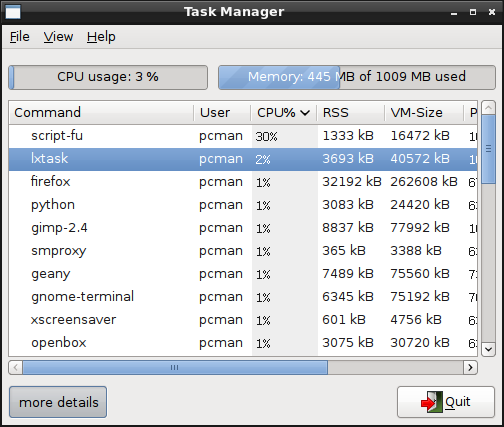
LXTask is an open source, desktop-independent, lightweight and free graphical software written in GTK+ as a task manager for the LXDE (Lightweight X11 Desktop Environment) window manager for Linux-based operating systems.
Being based on the task manager used in the lightweight Xfce desktop environment, LXTask does not require all the Xfce4 dependencies, uses an improved user interface and fixes some bugs that were present in the upstream application.
As a matter of fact, the LXTask application only requires the GTK+ GUI toolkit, which should be installed on your system prior to attempting to install LXTask manually. It can also be used on any other Linux desktop environment, even it it’s part of the LXDE desktop environment.
Its graphical user interface has a simple designed, allowing the user to view all the running processes at a glance, as well as the total CPU and memory (RAM) usage. More details about each process are provided to uses through a “more details” button when a process is highlighted.
To provide fastness, the application is written in the C programming language. To install it on your GNU/Linux system you must first download the latest version from Softpedia, save the tar archive on a location of your choice, extract its contents and open a terminal emulator.
In the terminal window, use the ‘cd’ command to go to the location of the extracted archive files, run the ‘./configure && make’ command to optimize and compile the source code, and execute the ‘make install’ command as root or with sudo to install the program system wide.
However, the above instruction are completely redundant if your Linux distribution comes with the LXDE desktop environment, or you install the entire Lightweight X11 Desktop Environment on your operating system via the official channels.
LXTask 0.1.6
add to watchlist add to download basket send us an update REPORT- runs on:
- Linux
- main category:
- Desktop Environment
- developer:
- visit homepage
paint.net 5.0.13 (5.13.8830.42291)

7-Zip 23.01 / 24.04 Beta

4k Video Downloader 1.5.3.0080 Plus / 4.30.0.5655

Microsoft Teams 24060.2623.2790.8046 Home / 1.7.00.7956 Work

IrfanView 4.67

calibre 7.8.0

Windows Sandbox Launcher 1.0.0

Bitdefender Antivirus Free 27.0.35.146

ShareX 16.0.1

Zoom Client 6.0.0.37205

- Bitdefender Antivirus Free
- ShareX
- Zoom Client
- paint.net
- 7-Zip
- 4k Video Downloader
- Microsoft Teams
- IrfanView
- calibre
- Windows Sandbox Launcher