
Vector icon theme for GTK. #Icon theme #GNOME icons #GNOME #Icons #Theme #GTK
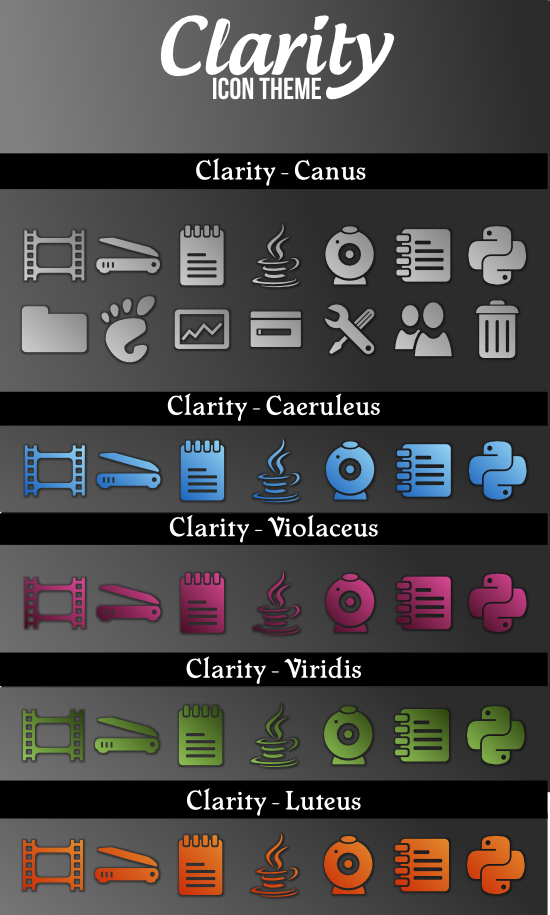
Clarity contains four predefined color themes.
caeruleus - blue gradient canus - grey gradient(default) luteus - orange gradient violaceus - violet/pink gradient viridis - green
Every icon is build from single path and a template (in svg format). You can easy create your own template see how default templates are defined. You can use all power of SVG to create your theme.
To change a color theme of icons just type
make name_of_a_theme
If you type
make
it will display all available color themes. If you change a theme (svg file with template_ prefix in src directory) or create your own (in file src/template_your_name.svg) type: ./configure
make your_name
And the script will build icons based o a your template.
The template is svg file which must have two template marks {{TITLE}} and {{PATH}} (icons are created by replacing {{PATH}} by value of d attribute of first path from svg file in src directory).
You can also change the source of icons which are svg files with single path.
System requirements
What's new in Clarity 0.4.0:
- Nikon NEF, Wordpress, Freemind, pithos
- Preferences, XFce panel menu, Application Engineering
- Ufraw, new embeds, Themable System Upgrade
- Gnome Panel, notification area, window list, window menu, Gnumeric
Clarity 0.4.0
add to watchlist add to download basket send us an update REPORT- runs on:
- Linux
- main category:
- Desktop Environment
- developer:
- visit homepage
Microsoft Teams 24060.3102.2733.5911 Home / 1.7.00.7956 Work

IrfanView 4.67

Context Menu Manager 3.3.3.1

ShareX 16.0.1

calibre 7.9.0

Bitdefender Antivirus Free 27.0.35.146

7-Zip 23.01 / 24.04 Beta

Zoom Client 6.0.3.37634

4k Video Downloader 1.5.3.0080 Plus / 4.30.0.5655

Windows Sandbox Launcher 1.0.0

- Zoom Client
- 4k Video Downloader
- Windows Sandbox Launcher
- Microsoft Teams
- IrfanView
- Context Menu Manager
- ShareX
- calibre
- Bitdefender Antivirus Free
- 7-Zip