
A port of the Mac icon theme for Linux. #Mac icons #OSX icons #Icon theme #Mac #OSX #Iconset
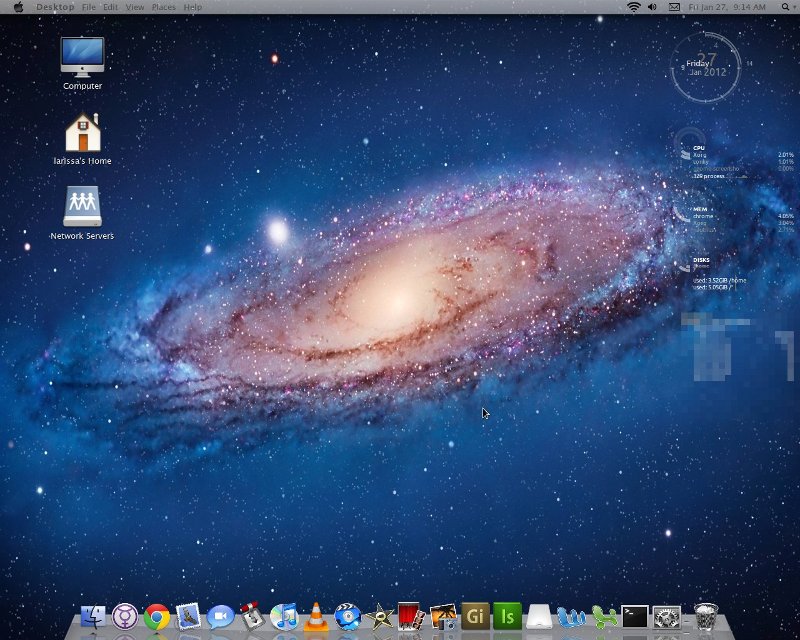
OSX icon theme port is an attempt to give Linux/GNOME/Ubuntu users the beautiful default icons of the Mac OS X operating system.
Below we've listed a few applications that are similar to the ones in Mac OS X, and which gained their icons:
Text Edit - Gedit Quicksilver - Gnome Do Finder - Nautilus App Store - Ubuntu Software Center Epiphany - Safari Apple Mail - Evolution iChat - Empathy Adium - Pidgin iTunes - Banshee Garage Band - Jokosher Front Row - Moovida Roxio - Nero Linux Photo Booth - Cheese iPhoto - Shotwell/F-spot OpenShot - iMovie HD iDVD - DeVeDe Preference Panel - Gnome Control Center
For detailed installation instructions please see the following tutorial created by Softpedia: http://news.softpedia.com/news/How-to-Install-GNOME-Themes-in-Ubuntu-11-10-231213.shtml
System requirements
What's new in OSX icon theme port 0.1:
- Fixed some scaling issues with some of the monochromatic indicators and a few missing applications.
- The Docky theme is actually a custom build of Docky (note the indicators) from launchpad based on the Docky 2.2.0 which I modded and have available for download as .deb for both 32 bit and 64 bit.
OSX icon theme port 0.1
add to watchlist add to download basket send us an update REPORT- runs on:
- Linux
- filename:
- osx_icon_theme_for_gnome_by_n00b_un_2-d4ma1gm.zip
- main category:
- Desktop Environment
- developer:
- visit homepage
Zoom Client 6.0.0.37205

Bitdefender Antivirus Free 27.0.35.146

IrfanView 4.67

ShareX 16.0.1

7-Zip 23.01 / 24.04 Beta

paint.net 5.0.13 (5.13.8830.42291)

4k Video Downloader 1.5.3.0080 Plus / 4.30.0.5655

calibre 7.9.0

Windows Sandbox Launcher 1.0.0

Microsoft Teams 24060.3102.2733.5911 Home / 1.7.00.7956 Work

- calibre
- Windows Sandbox Launcher
- Microsoft Teams
- Zoom Client
- Bitdefender Antivirus Free
- IrfanView
- ShareX
- 7-Zip
- paint.net
- 4k Video Downloader