
A console (text mode) file manager for UNIX/Linux. #File manager #Console manager #Text mode #VFU #File #Manager
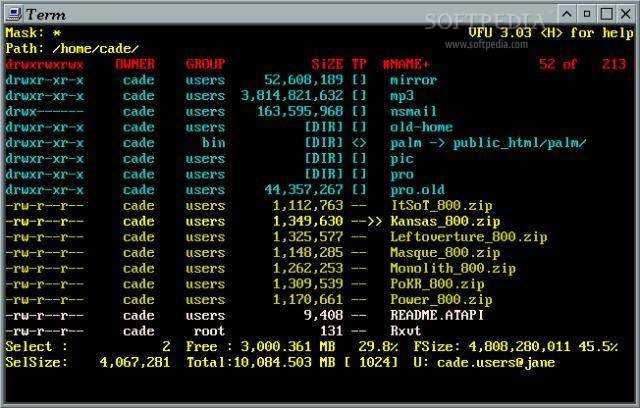
VFU File Manager is console (text mode) file manager for UNIX/Linux.
During the years I tried to make short attractive list of features which VFU has. 'Attractive' as 'Advertising' above :) and it does not seem to work... at least it didn't for me and I never liked it.
I made all possible to make VFU cover all file managing needs and offer large set of behaviour options. If I succeeded or not, you can decide for yourself but without trying I believe noone can say for sure.
1. how to compile vfu
run `make' from vfu base directory
this should compile everything
to compile each part of vfu manually do this:
-- go to `vslib' directory -- run `make' -- go to `vfu' directory -- run `make'
if something goes wrong, check these:
-- if your `curses.h' file locations is not `/usr/include/ncurses' you have to change this in the Makefile.
-- if vslib library is not in the `../vslib' directory you also have to change this in the Makefile.
2. how to install vfu
run `install' script from vfu base directory
install script checks if all required files are available/built and then does this:
cp vfu/vfu rx/rx_* /usr/local/bin cp vfu.1 /usr/local/man/man1 cp vfu.conf /usr/local/etc
3. how to install vfu manually
-- you have to copy `vfu' in the `/usr/local/bin' or `/usr/bin' directory and set mode to 755 `rwxr-xr-x' the owner is not significant ( root is also possible ).
-- there is preliminary man page ( vfu.1 ) which could be copied to /usr/man/man1.
-- copy all `rx/rx_*' tools to /usr/local/bin -- install Net::FTP perl module if needed. (this is used for FTP support)
WARNING: make sure to remove all old personal cache files!
What's new in VFU File Manager 4.15:
- This version fixes a bug with directory name completion which froze VFU when case-insensitive completion options were enabled.
VFU File Manager 4.15
add to watchlist add to download basket send us an update REPORT- runs on:
- Linux
- filename:
- vfu-4.15.tar.gz
- main category:
- Desktop Environment
- developer:
- visit homepage
7-Zip 23.01 / 24.04 Beta

Microsoft Teams 24060.3102.2733.5911 Home / 1.7.00.7956 Work

IrfanView 4.67

ShareX 16.0.1

Zoom Client 6.0.0.37205

Bitdefender Antivirus Free 27.0.35.146

calibre 7.8.0

4k Video Downloader 1.5.3.0080 Plus / 4.30.0.5655

Windows Sandbox Launcher 1.0.0

paint.net 5.0.13 (5.13.8830.42291)

- 4k Video Downloader
- Windows Sandbox Launcher
- paint.net
- 7-Zip
- Microsoft Teams
- IrfanView
- ShareX
- Zoom Client
- Bitdefender Antivirus Free
- calibre