
The world's most widely deployed SQL database engine is now available on Softpedia. #SQL engine #Embeddable SQL engine #SQL database #SQLite #Engine #SQL
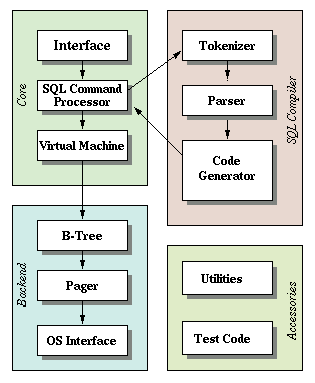
SQLite is an open source, multiplatform, free and small C library that implements a self-contained, embeddable, transactional, serverless and zero-configuration SQL database engine. It is the world’s most used SQL database engine.
Key features include support for isolated, atomic,durable and consistent transactions, SQL92 implementation, database files can be freely shared between computers, supports databases up to 2 terabytes, support for gigabyte-sized blobs and strings, small code footprint, as well as an easy-to-use and very simple API (Application Programming Interface).
SQLite does not require initial configuration or further administration, allows developers to store a complete database in a single, cross-platform disk file, which is perfect for using application file formats, has no external dependencies, comes with built-in TCL (Tool Command Language) bindings, and comprehensive documentation.
Bindings for numerous other programming languages are available separately. Its source code is well-commented and it comes with a standalone CLI (Command-line Interface) client that has been designed from the offset to be used for the administration of SQLite databases.
The SQLite database engine can be used for any purpose, personal or commercial. Suggested uses for SQLite include database for gadgets, website database, stand-in for an enterprise RDBMS (Relational Database Management System), as well as application file format.
The SQLite distribution comes with a standalone command-line access program (sqlite) that can be used to administer an SQLite database and which serves as an example of how to use the SQLite library. It is written entirely in the ANSI-C programming language.
Supported desktop operating systems include GNU/Linux, Mac OS X and Microsoft Windows. Supported mobile operating systems include Android and iOS. It has been successfully tested with both 32-bit and 64-bit hardware platforms, and it’s easily portable to other OSes.
What's new in SQLite 3.30.1:
- This is a bug-fix release that addresses a problem that can occur when an aggregate function in a nested query makes use of the new FILTER clause capability. Some addition patches for various obscure issues are also included, for completeness.
SQLite 3.30.1
 Softpedia Editor's Pick
add to watchlist
add to download basket
send us an update
REPORT
Softpedia Editor's Pick
add to watchlist
add to download basket
send us an update
REPORT
- runs on:
- Linux
- filename:
- sqlite-autoconf-3300100.tar.gz
- main category:
- Database
- developer:
- visit homepage
7-Zip 23.01 / 24.04 Beta

Bitdefender Antivirus Free 27.0.35.146

Microsoft Teams 24060.3102.2733.5911 Home / 1.7.00.7956 Work

Windows Sandbox Launcher 1.0.0

4k Video Downloader 1.5.3.0080 Plus / 4.30.0.5655

ShareX 16.0.1

IrfanView 4.67

calibre 7.9.0

Zoom Client 6.0.3.37634

Context Menu Manager 3.3.3.1

- calibre
- Zoom Client
- Context Menu Manager
- 7-Zip
- Bitdefender Antivirus Free
- Microsoft Teams
- Windows Sandbox Launcher
- 4k Video Downloader
- ShareX
- IrfanView