
A KDE file sharing application using the anonymous file sharing network MUTE. #Sharing network #MUTE network #File sharing #Kommute #Filesharing #Sharing
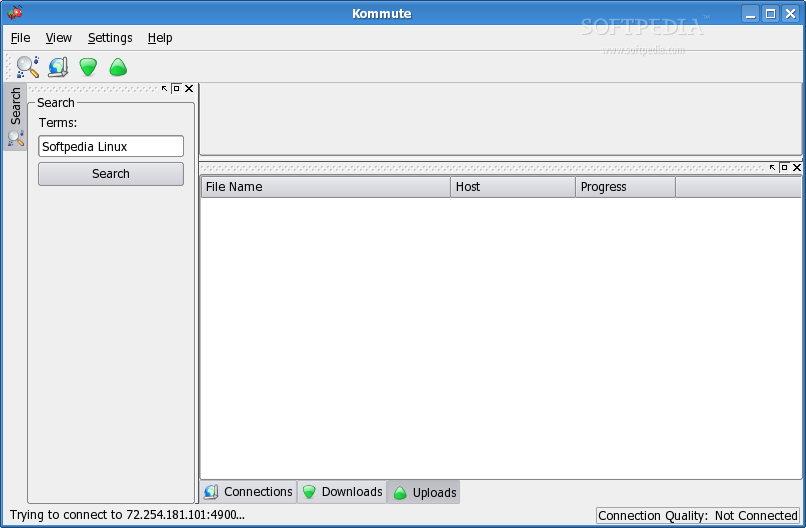
Kommute is a KDE file sharing application using the anonymous file sharing network MUTE.
Kommute provides easy search-and-download functionality while also protecting your privacy.
Download the latest MUTE "Unix Sources". The file is called something like MUTE_fileSharing-xxx_UnixSource.tar.gz, where xxx is the version number. Next unpack the downloaded file like this:
tar -xvzf MUTE_fileSharing-0.4.1_UnixSource.tar.gz
The directory it creates is something like MUTE_fileSharing-xxx_UnixSource. For simplicity we will refer to the MUTE_fileSharing-xxx_UnixSource dir as the MUTE_TMP directory. MUTE_TMP should now contain the MUTE and minorGems directories and the cleanSrc and runToBuild scripts.
Now follow the MUTE instructions to compile the text based interface. This involves using the runToBuild script like this:
cd MUTE_fileSharing-0.4.1_UnixSource ./runToBuild
Downloading the Kommute sources
Now that you have built MUTE and it's libraries, download the Kommute sources into the MUTE_TMP directory. Next unpack the downloaded file like this:
tar -xvzf kommute-0.1.tar.gz
Compile and install Kommute
You should now have a MUTE_TMP/kommute directory. Now it's time to compile and install Kommute:
cd kommute ./configure make su make install
run Kommute
We have now installed Kommute. To start the application just type kommute:
kommute
Kommute 0.24
add to watchlist add to download basket send us an update REPORT- runs on:
- Linux
- main category:
- Communications
- developer:
- visit homepage
4k Video Downloader 1.5.3.0080 Plus / 4.30.0.5655

calibre 7.9.0

IrfanView 4.67

Zoom Client 6.0.3.37634

Microsoft Teams 24060.3102.2733.5911 Home / 1.7.00.7956 Work

7-Zip 23.01 / 24.04 Beta

Context Menu Manager 3.3.3.1

ShareX 16.0.1

Windows Sandbox Launcher 1.0.0

Bitdefender Antivirus Free 27.0.35.146

- ShareX
- Windows Sandbox Launcher
- Bitdefender Antivirus Free
- 4k Video Downloader
- calibre
- IrfanView
- Zoom Client
- Microsoft Teams
- 7-Zip
- Context Menu Manager