
This project provides a capable IRC client for your Linux Terminal (command-line). #IRC client #Terminal client #Irc terminal #F-IRC #Irc #Client
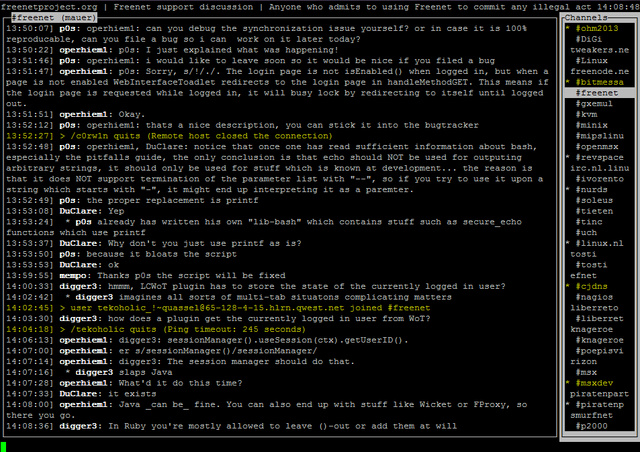
F-IRC is a free and open source command-line application implemented in C and designed to provide users with a console/command-line IRC (Internet Relay Chat) client, supporting multiple servers, scrollback, and all the basic features one can expect from any standard IRC client.
It has been designed from the ground up to be as user-friendly as possible, and includes support for keyboard shortcuts in order to allow users to easily and quickly navigate it. It’s a drop-in replacement for the well known irssi IRC client.
When F-IRC is fired up for the first time, you'll notice a list of channels and servers on the right. The box around these is inverted, which means that if you use the left- and the right cursor, they will work on the channels, etc.
If you press ^n, the box will no longer be inverted and you can use the cursor keys for editing what you're typing. The application allows you to effortlessly navigate channels, it is easy to configure and comes with a pop-up menu for actions.
To install it on your GNU/Linux system, you must first download the latest version from Softpedia or the project’s website, save the archive on your computer, extract its contents and open a terminal emulator.
In the terminal window, use the ‘cd’ command to navigate to the location of the extracted archive files, where you will have to execute the ‘make’ command to compile the software, followed by the ‘make install’ command as root or with sudo to install it system wide.
F-IRC is a simple application, written entirely in the C programming language. It requires the widely used Ncurses library for displaying its command-line interface with menus and pop-ups. It has been successfully tested under various GNU/Linux systems and supports both 64-bit and 32-bit hardware architectures.
What's new in F-IRC 1.36:
- This release brings stability fixes.
F-IRC 1.36
add to watchlist add to download basket send us an update REPORT- runs on:
- Linux
- main category:
- Communications
- developer:
- visit homepage
calibre 7.9.0

Windows Sandbox Launcher 1.0.0

paint.net 5.0.13 (5.13.8830.42291)

ShareX 16.0.1

Microsoft Teams 24060.3102.2733.5911 Home / 1.7.00.7956 Work

Zoom Client 6.0.0.37205

7-Zip 23.01 / 24.04 Beta

4k Video Downloader 1.5.3.0080 Plus / 4.30.0.5655

IrfanView 4.67

Bitdefender Antivirus Free 27.0.35.146

- 4k Video Downloader
- IrfanView
- Bitdefender Antivirus Free
- calibre
- Windows Sandbox Launcher
- paint.net
- ShareX
- Microsoft Teams
- Zoom Client
- 7-Zip